 User Help Manual
  Learn FAQ
  Send us feedback


Video Editor
Download and use the free video software to create and edit videos of any complexity from a family greeting card to a company presentation. Apply vsdc free video editor for light edit hdr-video, any raw-video formats from cams - BRAW, ProRes RAW, any high resolution 4k or more due to video proxies technologies in the editor.
Cut, merge video files, apply visual and audio effects, use filtration and image correction, make slideshows and add an appropriate soundtrack. Use multi-color Chroma Key and advanced parameters settings to give your video a professional look.
All popular video and audio formats are supported.
Video Converter
This program is intended for converting video files from one format to another. Nearly all popular video formats are supported (both reading and saving). In addition, the program drastically simplifies the task of converting videos for playback on specific multimedia devices, such as iPhone, Samsung Galaxy or Huawei P30 Pro. The program is extremely easy to use, has a modern interface and all necessary video processing functions.
Audio Converter
The audio converter will help you convert audio files from one format to another. All key audio formats and codecs are supported. The program also allows you to manage playlists and meta tags, extract audio from video files and save these tracks on your computer in any format.
Animated Intro & Title Templates
Explore the VSDC Template Store with ready-made video templates for intros, animated titles, lower thirds, logo reveals, slideshows, glitch transitions, LUTs, and color grading presets. Drop a template into the VSDC Video Editor timeline, edit text, timing, and colors, and finish professional video projects in minutes.
Choose from 300+ exclusive packs of video transitions, LUT packs, text effects, GPS telemetry widgets, animated elements, and animated backgrounds for VSDC. All templates are fully customizable, support up to 4K resolution in 16:9, and help you build intros, wedding slideshows, travel videos, and tutorials much faster.
VSDC Cloud - Online video management
Keep your work safe, organized and always accessible! Back up your video projects, store media files online and access them from any device. Enjoy collaboration, share project updates and exchange files easily.
 Video Editor
 Video Converter
 Audio Tools
 Templates store
 Cloud
Cloud

Multifunctionality
A wide array of multimedia processing tools in one free video software suite.

High speed
Our programs use fast
and high-quality algorithms optimized for single and multi-core CPU’s.

Affordability
VSDC video software is freely available for download to Windows OS-based PCs and laptops.
News:
Removing Watermarks and Hiding Logos from a Video in VSDC
In today's digital landscape, watermarks and logos serve as both protective measures against unauthorized use and symbols of brand identity. Yet, there are legitimate circumstances for removing watermarks and hiding logos from a video, whether for aesthetic reasons, content reusability or to avoid native advertising. So, as you see, knowing how to efficiently eliminate or conceal watermarks becomes essential, and VSDC Free Video Editor emerges as a powerful tool in this domain. This article provides solutions on how to effectively tackle these marks using VSDC. Dive in to master this art and elevate your video editing skills!
 Download the latest VSDC update
DeLogo Filter
Offered in the free version of VSDC, the DeLogo filter presents a straightforward approach to remove watermarks, obscure unwanted logos or other overlay graphics from videos. It can be applied the following way:
- Start by launching VSDC Free Video Editor. Click on the Blank project button to create your own project.
- Then choose a file in the file explorer, drag it to the scene and drop the mouse button. If you are new to VSDC and want to learn more about how to get started with VSDC, we advise you to watch our comprehensive video guide.
- To access the DeLogo filter, make sure your video file is selected on the timeline. Then head to the Video Effects tab located on the Ribbon, opt for Filters from the dropdown menu and choose the DeLogo option.
- After selecting an object, a pop-up window will emerge, allowing you to define the exact timing for when the effect should be visible and when it should disappear. As soon as you're satisfied with the configurations, click “Ok” to confirm changes. Then you'll observe a pixelated rectangle in the video's center. Simultaneously, DeLogo filter will appear on the timeline.
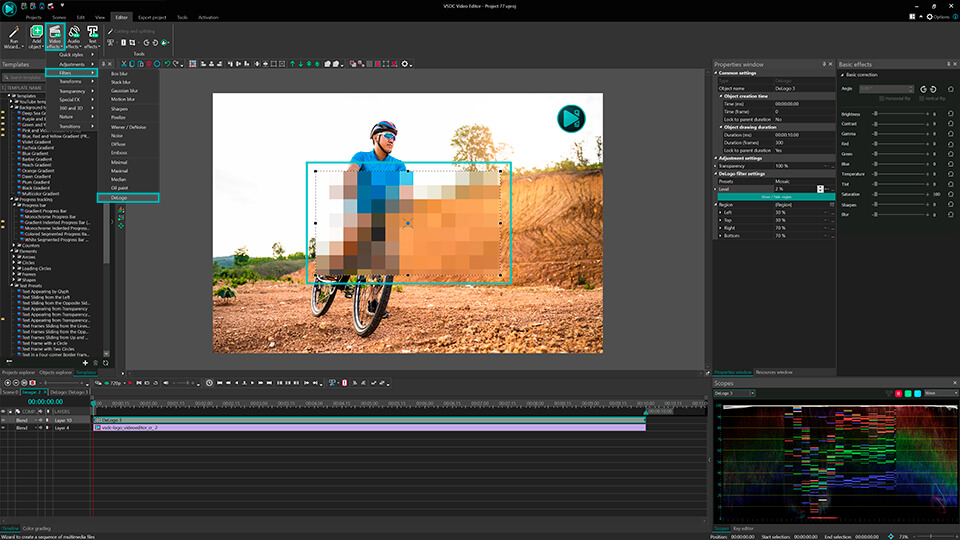
If the default settings aren't ideal:
- Click on the DeLogo filter on the timeline and navigate to the Properties window on the right side of the scene. If it isn't immediately visible, right-click on the DeLogo filter and select Properties. In the Properties window you can adjust the size and position of the pixelated rectangle, ensuring it effectively covers the watermark or logo.
- Within the settings, you have a choice of five presets: Pixelate, Box blur, Lens blur, Mosaic, and Gaussian blur. Choose one that best fits your needs.
- Below, there's an option to adjust the intensity level to fine-tune the appearance.
Now the logo is covered by a blurred rectangle and successfully hidden from your video. If you are satisfied with the result, export your project. This way you can easily remove watermarks, logos, GPS details, vehicle registration numbers and more. So, you see that the DeLogo filter is quite handy, allowing for performing different tasks. But if you are looking for an even more refined appearance, Telea mode is your go-to.
Telea Mode
For those desiring a highly discreet and sophisticated watermark hiding technique, Telea mode is the answer. Unlike basic blurring or pixelation methods that might leave visible traces, the Telea method is based on an algorithm that fills in the unwanted region by analyzing and replicating the surrounding pixels, allowing for a more seamless and discreet removal. However, this feature requires an upgrade to VSDC Pro, which unlocks a world of advanced video editing capabilities. So, this is how to use the Telea mode:
- Again, start by uploading your video into VSDC Free Video Editor. To do this, follow the steps described above.
- Navigate to the vertical tab on the left of the scene and choose the Rectangle tool.
- Use this tool to craft a rectangle that matches the size of the object you wish to conceal, positioning it accordingly.
- Select the Rectangle on the timeline and navigate to the Blend menu on the left of the timeline.
- In the Blend menu find Advanced modes >> Telea inpaint in the drop-down menu and click on it. That’s it!
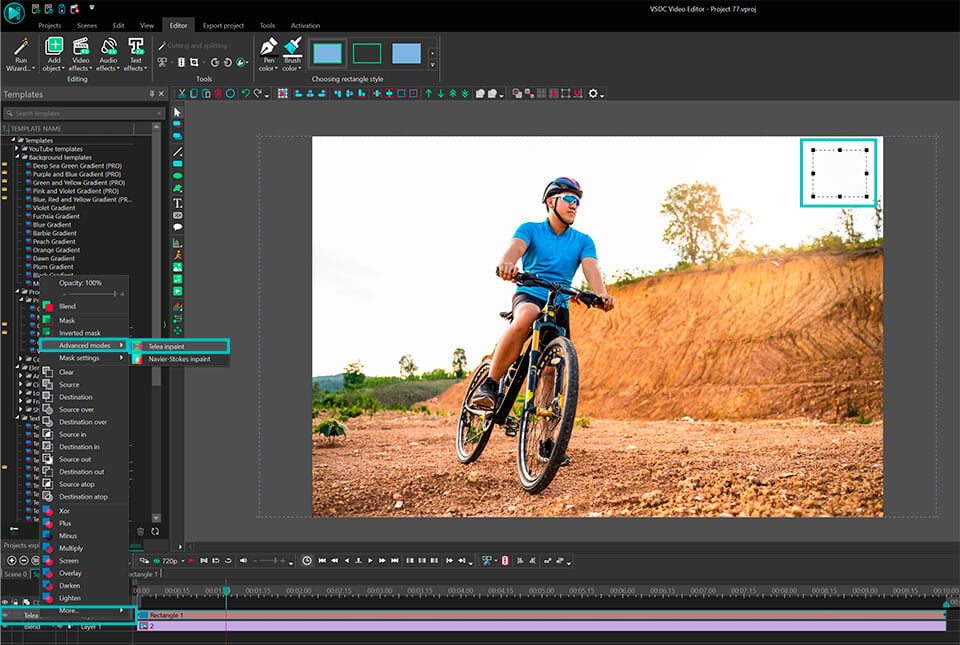
As a result, Telea mode has removed the watermark by replacing it with the existing parts of your video. So, the area's edges are almost invisible and a bit more subdued than with the DeLogo filter.
Please, note, that when you apply Telea mode in a video editor and launch the preview, you might notice a slowdown. It occurs because both the video and the mask are being processed simultaneously. To optimize the editing process and prevent such delays, we recommend you to convert the original video into a proxy format.
Wrapping up
Removing or hiding watermarks and logos can be a challenging task. VSDC Free Video Editor has proved to be an effective tool for this purpose. Whether you opt for the straightforward DeLogo filter or the more refined Telea Mode, it's crucial to use these instruments responsibly and ethically, always respecting the original content creators' rights and intellectual property.
As you continue your video editing journey, subscribe to VSDC YouTube channel to receive instant notifications about new tutorials published. And if you have any questions or need assistance, you can reach our support team via email at This email address is being protected from spambots. You need JavaScript enabled to view it. or through Facebook and Twitter.
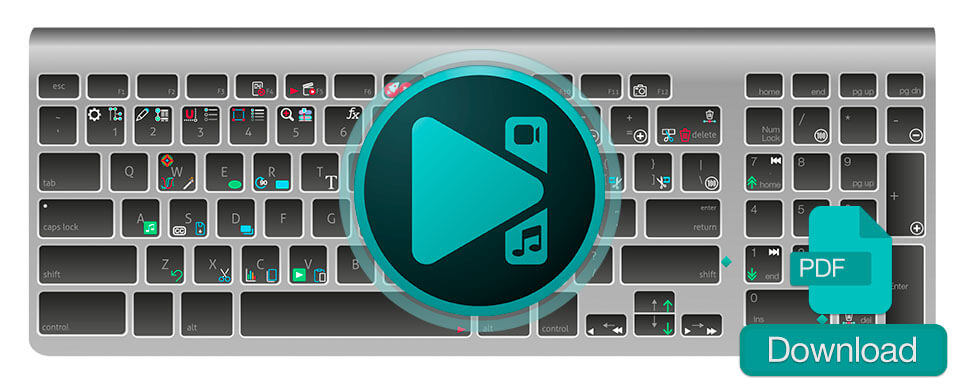
 Download hotkeys map for VSDC video editor



 DOWNLOAD VSDC FREE VIDEO EDITOR


This program allows you to capture the video of your desktop and save it on your PC in various formats. Coupled with a video editor, the program is a great tool for creating presentations, tutorials and demo videos.

The program captures video from external devices and records it to computer in a free format. You can save video from video tuners, webcams, capture cards and other gadgets.
VSDC Video Editor Reviews & Ratings (Trustpilot, Capterra & Media)
VSDC Free Video Editor is rated 4.5/5 by real users on Trustpilot and Capterra. Here are a few reviews and quotes from creators and tech media.
Overall rating: 4.5/5 based on 200+ reviews on Trustpilot and 89 reviews on Capterra.
★★★★⯪
VSDC Free Video Editor is the best free video editor for Windows I’ve used, from color grading to picture-in-picture and cinematic results.
— Ejikeme Eloka Augustine
Source:Trustpilot
★★★★☆
Easy-to-use interface and quick export to social media make VSDC a versatile video editing tool for everyday projects.
— Karen C., E-Learning
Source:Capterra
★★★★☆
A feature-packed non-linear video editor for Windows that can compete with many paid video editing solutions.
— TechRadar
Source:TechRadar review
★★★★★
The free VSDC editor saved my YouTube channel – a powerful video editing software for chroma key, text effects and picture-in-picture.
— Paul Roberts
Source:Trustpilot
★★★★★
Fast and simple for YouTube videos with green screen, zoom, color tools and creative effects in one app.
— Marie R., Media Production
Source:Capterra
★★★★★
One of the best free video editor options for Windows users, ideal for GoPro, YouTube and family videos.
— VidProMom, YouTube creator
Source:Media reviews
★★★★★
I’ve been using VSDC for years; editing is easy and the final videos look great for my personal and professional projects.
— Long-time VSDC user
Source:Trustpilot
★★★★★
Great value and faster than many other free tools; I quickly create videos for YouTube, Instagram and Facebook with features my audience loves.
— Rabika B., Marketing & Advertising
Source:Capterra
★★★★★
VSDC offers many features you don’t usually find in free editors, including picture-in-picture, stabilization and modern codec support with no watermarks.
— Tech media review
Source:Media reviews
 Like us on Facebook
 Follow us on Twitter
Watch us on YouTube
 / @VSDCFreeVideoEditor
© 2011-2026, www.videosoftdev.com, FLASH-INTEGRO LLC. Privacy policy | Terms of use | About us
All trademarks referenced herein are the sole property of their respective owners.
Copying any materials from this site allowed only with written consent of Site Administration.