 User Help Manual
  Learn FAQ
  Send us feedback


VSDC 11.2: Smart search for lost files, GPS data and video sync, H.266 (VVC), accelerated proxy generation even for 4K/8K, keyframe support for shapes and brand-new designer templates
Published by Amy Shao on
Meet the new major update to VSDC Free Video Editor: version 11.2!
Remember how much time you used to spend hunting for lost files in your projects? With VSDC 11.2, that headache is officially a thing of the past! Moved your videos or images to a different folder, renamed them and now have no idea how to get them back into your project? Keep reading to see exactly how this version solves it for good!
Action cam users, this one's for you too. If you work with video in the editor and add telemetry data, you'll love this: now, whenever your telemetry and video are recorded separately, VSDC gives you a fast and easy way to sync them up in no time!
We're also thrilled to say that VSDC 11.2 is among the very first editors to support the H.266 (VVC) codec which shrinks video files to record-breaking sizes with zero quality loss. And for those of you handling 4K footage and beyond, we've added hardware transcoding through the Vulkan graphics API, so proxy generation is now noticeably faster than ever!
And yes, we haven't forgotten about our VSDC Store fans! If you've been waiting for fresh premium template collections, here's the moment you've been waiting for: three new GPS data template packs in a variety of styles, plus two collections for creating vintage-looking videos, are now available in our catalog!
Check out the full rundown of everything else including shape-handling upgrades, hotkeys for LGG (Lift/Gamma/Gain), new options and more right below!
In this article
- Smart Lost File Search
- Fast GPS Data and Video Synchronization, Expanded GPX File Support
- Brand-New designer-made premium templates
- H.266 (VVC) Codec and Hardware-Accelerated Proxy Generation
- Shape Animation, Three-Color Gradients and New Settings for Lines
- Color Workflow Improvements: LGG Hotkeys and a New Enhanced Color Profile for HDR
- New Options for a More Comfortable Video Editing Experience
- Other Fixes and Improvements
- VSDC 11.2 Frequently Asked Questions
 Download the free VSDC video editor 11.2
Smart Lost File Search
Moving project folders or renaming source files used to mean dealing with endless error messages and manually relinking each lost file. With version 11.2, we've put an end to that hassle by introducing a smart system for handling lost media.
Now, when you open a project with missing files, VSDC instantly alerts you and brings up a file search window. You can still point to a single file manually if you prefer, but here's the real breakthrough because you can also select a new directory for just one file and let our algorithm scan the full directory automatically. In one operation it will locate every missing file stored in that folder.
If you'd prefer to locate some files later, you can simply close the window and return to the search the next time you open the project.
Fast GPS Data and Video Synchronization, Expanded GPX File Support
If you're using a GoPro or Insta360, video and telemetry are usually already linked out of the box. But if you're working with any other device, there's no built-in connection between the footage and the data and creating one manually can be tricky.
VSDC 11.2 changes that with a new feature: telemetry markers. They allow you to manually establish the link between video and GPS data with pinpoint accuracy, without compromising data integrity.
Here's how it works: you add your video and GPX file to the scene, then place a telemetry marker on the video to mark a precise moment — say, a turn, a jump, or any other noticeable action. Next, you do the same on the telemetry data, placing a matching marker at the corresponding point. Finally, simply select the target video in the telemetry object's properties and sync them.
Video filtering for sync has also been upgraded. In the properties window you can now choose how to display your video list: show all videos with a marker, only those that overlap with the telemetry timeline or those that meet both conditions. When dealing with lots of footage, it makes finding the right video for syncing faster and easier than ever.
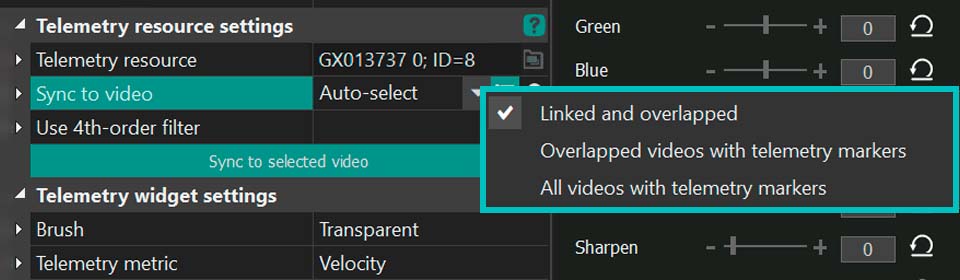
What's more, GPX file support has been significantly expanded in this release. The editor now reads data from a wider range of devices with greater accuracy, ensuring more precise and stable telemetry processing across the board.
Brand-New Designer Templates
We've prepared a major update to the VSDC Store catalog! Version 11.2 introduces several new collections of premium templates that help you create professional-looking videos without spending ages tweaking effects manually.
You'll find three premium packs for GPS telemetry data visualization:
- SegMentor Dash: a clean, minimalist style with crisp digital indicators for a sleek, informative look;
- Dynamic Hues: a vibrant, color-dynamic set perfect for high-energy footage;
- AeroSense Dash: an aviation-inspired design with instrument-panel elements for a cockpit feel.
Plus, two stylized premium packs for creating vintage cinema looks: Grain Texture and Vintage Reel. For professional version users, there's also the Vintage Grain collection in the same style available at no extra cost. These templates let you add grain, scratches, film noise, color shifts and a classic old-film palette with a single click. Now you can give your videos that retro, old-school atmosphere in just seconds without complex color grading or manual noise overlays required!
All templates are now available in the VSDC Store catalog!
Learn more about working with the templates window: premium-templates
H.266 (VVC) Codec and Hardware-Accelerated Proxy Generation
The H.266 (VVC) codec is now available in the export profile settings. This next-generation compression standard delivers the same quality as H.265 while taking up 30–50% less storage space and up to 70% less than H.264 while keeping the same visual quality.
To streamline your workflow we've also added Vulkan acceleration so your GPU can now generate lightweight proxy copies much faster, even for 4K footage and beyond. To activate it, simply head to the program Options, find the proxy section and select this decoder type for proxy creation.
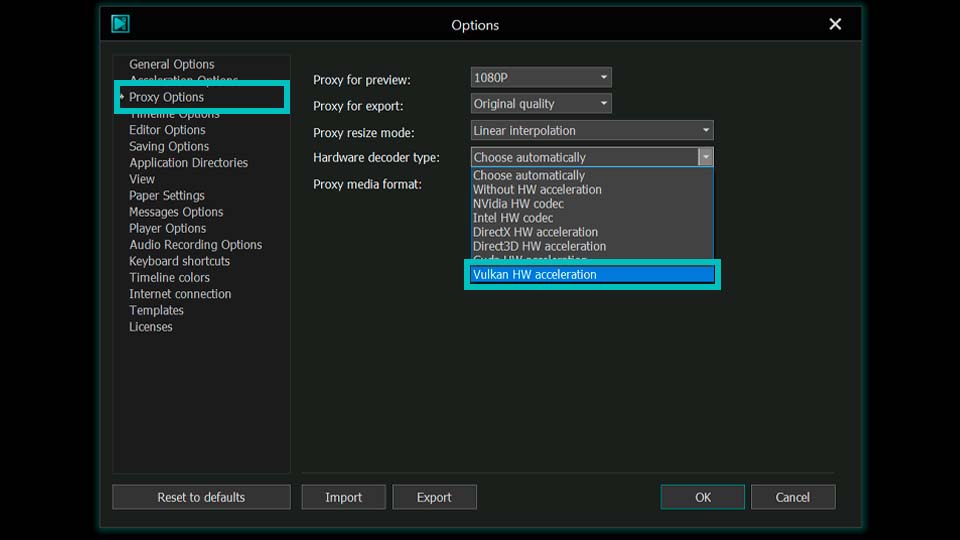
Shape Animation, Three-Color Gradients and New Settings for Lines
VSDC 11.2 expands the creative toolkit for those working with graphic elements and color. The Rectangle, Line and Ellipse tools now feature keyframe support via the Key Editor just like the Free Shape tool. That means you can now use them to create animations too!
On top of that, all shape types now support animation for a third color in gradients, allowing for more complex and dynamic fills. This option becomes available when the Brush mode in the properties window is set to Gradient. Three-color transitions open up far more design possibilities than standard two-color gradients.
The Line tool has also received a major functionality boost. In the properties window you'll now find opacity settings and the ability to customize the start and end caps of a line. You can choose from round, square, arrow, and other shapes: a feature that's sure to be a hit with anyone working on infographics, diagrams or technical illustrations.
Color Workflow Improvements: LGG Hotkeys and a New Color Profile for HDR
Working with color is one of the core tasks in video editing, and with VSDC 11.2, it's now more convenient and faster than ever!
We've added hotkeys for controlling LGG (Lift/Gamma/Gain) so you can now adjust shadows, midtones and highlights without ever taking your hands off the keyboard. This is especially valuable for those who prefer working with external controllers, since you can map these hotkeys to your controller and adjust everything right from it.
What's more, the key assignments are compatible with all VSDC keyboard layouts. Whether you stick with the default scheme or opt for familiar presets from Adobe Premiere, Filmora or HitFilm, you'll feel right at home. It will make the transition to VSDC from other video editors smoother and more intuitive.
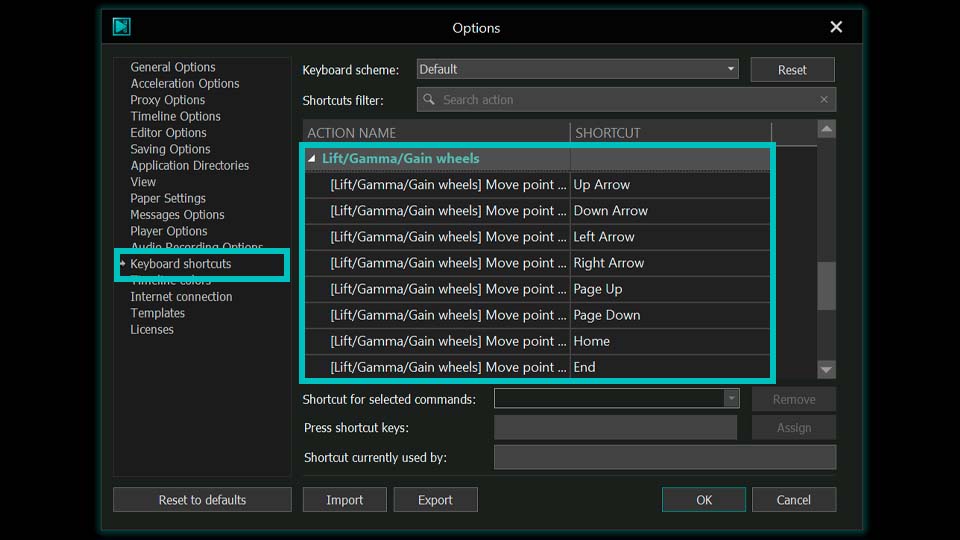
And for everyone working with HDR footage, there's an important addition: we've introduced a new hardware-accelerated color profile, which you can find in the properties window. With this new profile, you'll be able to process high dynamic range video significantly faster than before!
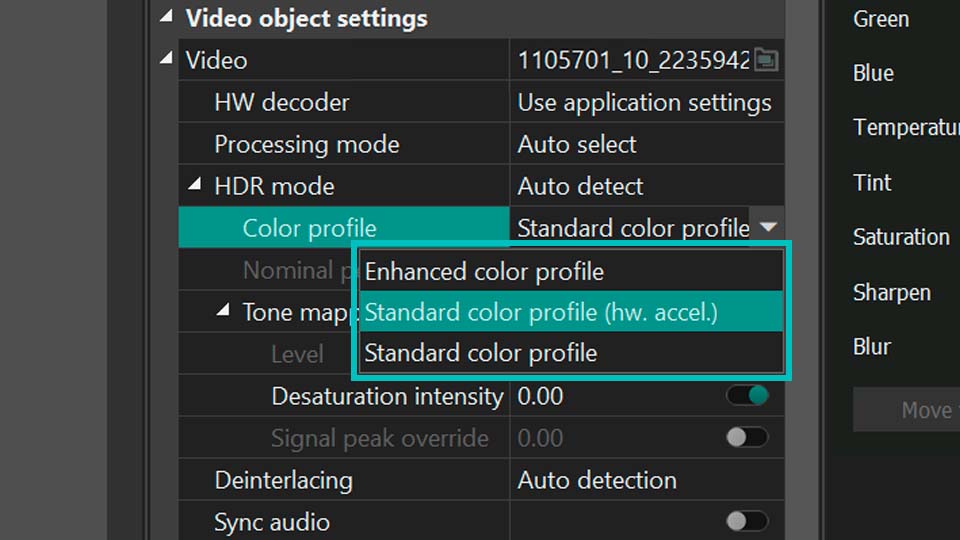
New Options for a More Comfortable Video Editing Experience
VSDC 11.2 introduces new settings that make working in the video editor even more comfortable!
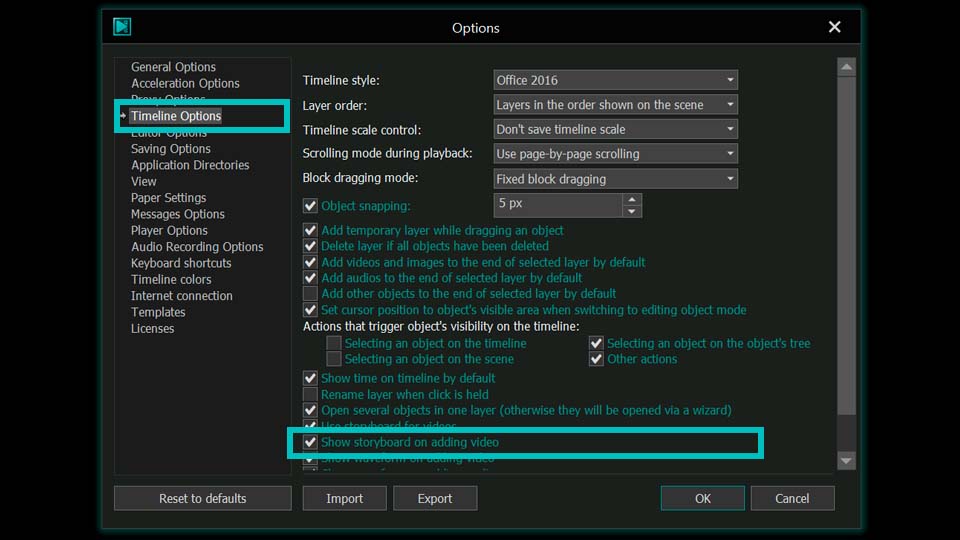
In the Timeline Options section, you'll now find an option that controls storyboard display when adding video to the timeline. If needed, you can disable it to save system resources and keep your workflow smooth.
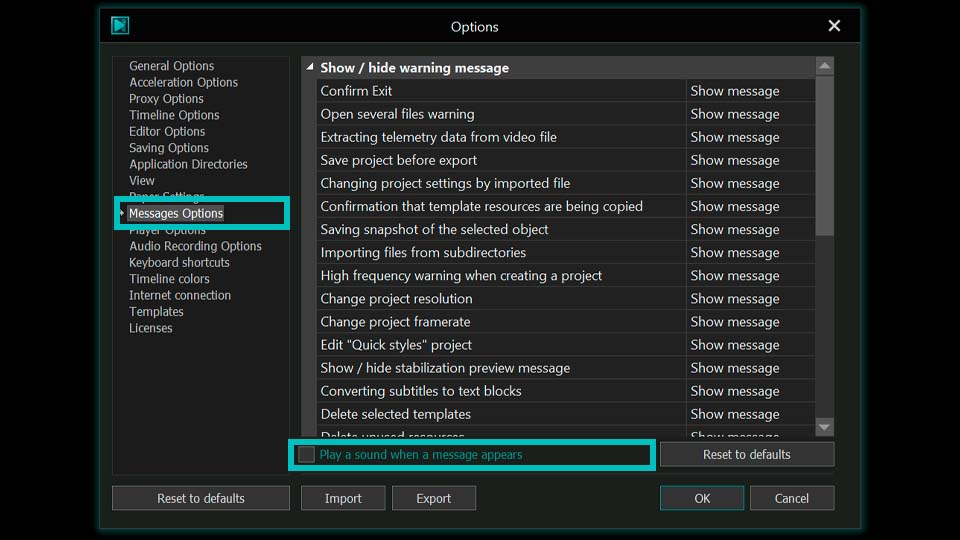
Another handy addition — in the Messages Options section you can now disable the sound of program notifications if their alerts are distracting you from focusing on your video editing.
Other Fixes and Improvements
VSDC 11.2 also addresses a number of issues. For instance, audio handling has been improved, crashes related to Intel hardware decoding have been fixed and problems with marker timestamps and docked window locking have been resolved.
Project workflow has also become more convenient: layer heights on the timeline no longer reset when undoing or redoing actions, since this change is no longer recorded in the history keeping your timeline layout intact. Additionally, cloned objects now receive more meaningful names, making timeline navigation easier and reducing confusion.
A huge thank you to all users who reported issues — your feedback helps us make VSDC better and more stable with every release!
We always love to see you in our social media communities: follow us to stay updated on news and helpful editing tips, ask questions and share your experiences!
And if you need prompt assistance or run into any issues, don't hesitate to reach out to our support team at This email address is being protected from spambots. You need JavaScript enabled to view it..
VSDC 11.2 Frequently Asked Questions
1. How does the smart search for lost files work?
If a file is no longer available at its previously specified path, the editor turns it into an offline object while keeping it in the Resources window. When you reopen the project, VSDC automatically checks for all media files and, instead of bombarding you with individual error messages for each missing file, offers to locate all of them at once. Simply point to the new location of a single file and the editor will automatically restore the links for all the others found nearby.
2. How do I sync video and GPS data recorded separately?
Use the new telemetry markers. Place a marker on your video at a key moment (e.g., a jump), add a matching marker on the GPS telemetry data and sync via the properties window.
3. What is H.266 (VVC) and why does it matter?
It's the latest compression standard that creates files 30–50% smaller than H.265 and up to 70% smaller than H.264 while delivering the same quality.
4. How can I speed up working with 4K and 8K video in VSDC?
VSDC has long supported proxy file creation to help you edit high-resolution footage more smoothly. With version 11.2 we've taken it a step further by adding hardware-accelerated transcoding through the Vulkan graphics API. Your GPU can now generate lightweight proxy copies even for 4K and 8K footage significantly faster than before, so you can jump into editing even sooner.
5. Any new templates?
Yes, three GPS telemetry packs (SegMentor Dash, Dynamic Hues, AeroSense Dash), two vintage cinema packs (Grain Texture, Vintage Reel), plus Vintage Grain for users of VSDC professional version. All are already available in the VSDC Store.
6. What new settings are available?
Timeline Options now let you disable showing storyboard thumbnails when adding videos to the timeline to save resources, and Messages Options let you mute notification sounds.
 Like us on Facebook
 Follow us on Twitter
Watch us on YouTube
 / @VSDCFreeVideoEditor
© 2011-2026, www.videosoftdev.com, FLASH-INTEGRO LLC. Privacy policy | Terms of use | About us
All trademarks referenced herein are the sole property of their respective owners.
Copying any materials from this site allowed only with written consent of Site Administration.