 User Help Manual
 Learn FAQ
 Send us feedback


Video Editor
Download and use the free video software to create and edit videos of any complexity from a family greeting card to a company presentation. Apply vsdc free video editor for light edit hdr-video, any raw-video formats from cams - BRAW, ProRes RAW, any high resolution 4k or more due to video proxies technologies in the editor.
Cut, merge video files, apply visual and audio effects, use filtration and image correction, make slideshows and add an appropriate soundtrack. Use multi-color Chroma Key and advanced parameters settings to give your video a professional look.
All popular video and audio formats are supported.
Video Converter
This program is intended for converting video files from one format to another. Nearly all popular video formats are supported (both reading and saving). In addition, the program drastically simplifies the task of converting videos for playback on specific multimedia devices, such as iPhone, Samsung Galaxy or Huawei P30 Pro. The program is extremely easy to use, has a modern interface and all necessary video processing functions.
Audio Converter
The audio converter will help you convert audio files from one format to another. All key audio formats and codecs are supported. The program also allows you to manage playlists and meta tags, extract audio from video files and save these tracks on your computer in any format.
Animated Intro & Title Templates
Explore the VSDC Template Store with ready-made video templates for intros, animated titles, lower thirds, logo reveals, slideshows, glitch transitions, LUTs, and color grading presets. Drop a template into the VSDC Video Editor timeline, edit text, timing, and colors, and finish professional video projects in minutes.
Choose from 300+ exclusive packs of video transitions, LUT packs, text effects, GPS telemetry widgets, animated elements, and animated backgrounds for VSDC. All templates are fully customizable, support up to 4K resolution in 16:9, and help you build intros, wedding slideshows, travel videos, and tutorials much faster.
VSDC Cloud - Online video management
Keep your work safe, organized and always accessible! Back up your video projects, store media files online and access them from any device. Enjoy collaboration, share project updates and exchange files easily.
 Video Editor
 Video Converter
 Audio Tools
 Templates store
 Cloud

Multifunctionality
A wide array of multimedia processing tools in one free video software suite.

High speed
Our programs use fast
and high-quality algorithms optimized for single and multi-core CPU’s.

Affordability
VSDC video software is freely available for download to Windows OS-based PCs and laptops.
News:
6 Best Free 3D Animation Software
Working with 3D animation is one of the most demanding skills in contemporary art, requiring not only knowledge about 3D models but also a deep understanding of shot composition, game engines, renderers, and animation software.
In this article we focus on six best free 3D animation software for both beginners and professionals compatible with Windows, ensuring you have the tools to start your animation journey without breaking the bank. These programs offer high-quality features and user-friendly interfaces, making them ideal for those just starting out. And of course, we don’t forget about VSDC Video Editor: we'll share some handy tips for creating 3D objects in a 2D editing tool!
Key Takeaways
- 3D Editing Tricks in VSDC Video Editor
- What Defines Good 3D Animation Software?
- Factors to Consider When Choosing Free 3D Animation Software
- Best Free 3D Animation Software:
- Blender;
- K-3D;
- Tinkercad;
- Daz Studio;
- Wings 3D;
- UE4.
- FAQ
3D Editing Tricks in VSDC Video Editor
VSDC Video Editor is a great video editing tool for both beginners and professionals boasting a range of powerful features. Unlike specialized 3D editing software, which can be complex and time-consuming to learn, VSDC provides a straightforward alternative that meets most editing needs without requiring you to learn new software. And if you are accustomed to working with VSDC, you wouldn’t probably want to start learning new software. However, if you're looking to incorporate 3D elements to your footage, there's no need to worry. VSDC allows you to easily create basic 3D shapes within your projects. Here’s a quick guide:
- Create a new project and add your files (the elements of the upcoming animation) to the timeline by dragging and dropping them from the file explorer or by using the Add object option on the Editor tab. You can also create shapes using the tools on the left-hand menu.
- Organize these objects on different layers.
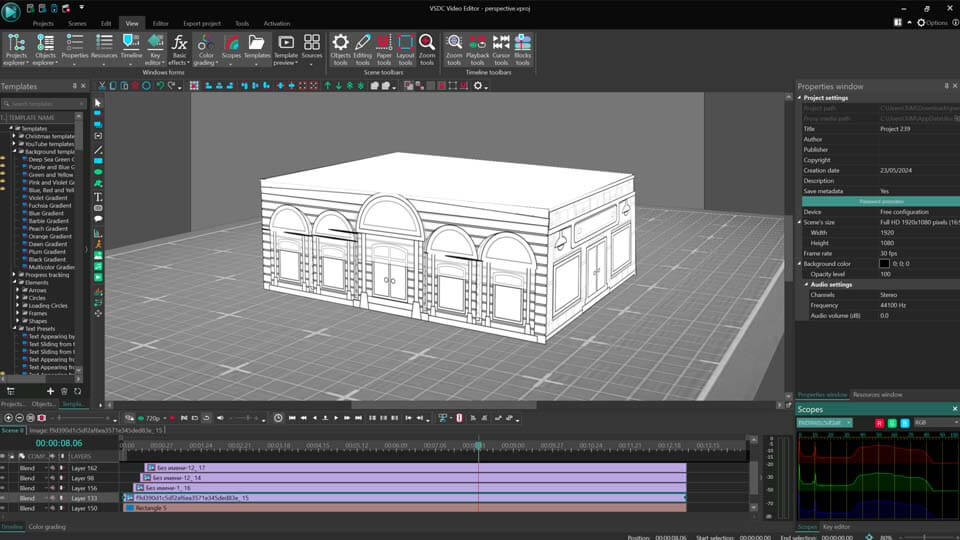
- Go inside the first object by double-clicking on it. Add Perspective: Video effects >> Transforms >> Perspective and click Ok in the pop-up window.
- Select the Perspective effect on the timeline and navigate to the Properties window. Switch Mode to Bind to service points and click the Add tracking points button. Tracking points appear at the edges of your object right on the scene. You can move them by holding the mouse button and dragging them, adjusting the perspective to achieve the desired result.
- Apply the same steps to other objects. Then you can add animation to add some dynamics to our 3D object. In our example we use Fade in: Add this effect inside each file by navigating to Video effects >> Transparency >> Fade in and adjust its duration. Repeat for the rest of the files, go back to Scene 0 and position objects on the timeline the way you want them to appear on the scene.
 Download the editor and free try!
A quick lifehack: You can also manually make a 3D text in VSDC! Just check the illustration below:
If you find these capabilities insufficient for more advanced 3D editing needs, such as building and thoroughly editing realistic 3D objects, stay tuned: below we are going to consider six video editing programs that offer robust tools for 3D editing, each with unique strengths and features to help bring your 3D animation projects to life.
What Defines Good 3D Animation Software?
A good 3D animation tool allows you to tell compelling stories, evoke emotions, and create engaging worlds and characters. It should provide the capabilities to shape, manipulate, and control scenes, ensuring that your creative vision can be fully realized. Control over the flow of the story and the ability to work from different angles are essential features that enhance the storytelling experience for your audience.
Selecting the right 3D animation software can greatly impact the efficiency, quality, and adaptability of your animation projects, whether it's a hobby or your profession. The right software, equipped with a wide variety of tools that suit your needs and goals, can bring your artistic ideas to life and help you achieve the desired results. An ideal software solution should be lightweight yet functional, easy to use, and preferably affordable. And finally, availability of user tutorials matters a lot: it is the best way to master new soft.
Factors to Consider When Choosing Free 3D Animation Software
Choosing the right 3D animation software is a critical step for beginners and professionals alike, as it sets the foundation for their journey in animation. With a great number of options available, understanding the key features that differentiate good software from bad can simplify this decision. Here are the essentials to consider when selecting free 3D animation software:
- Versatility: For beginners, starting with software that is widely used by major studios can be beneficial. Blender, for instance, is a popular choice known for its robust features and extensive library of tutorials that makes it an excellent learning tool, helping users overcome common challenges and grow skills.
- Interface: An intuitive user interface with clear navigation and customizable tools is crucial for enhancing productivity and minimizing the learning curve, especially for beginners. A well-designed interface can significantly impact the ease with which new users can adapt to the software. Tinkercad, for example, is truly appreciated for its user-friendly interface, making it a great starting point for novices.
- Features: The range of features and capabilities offered by the software directly influences its suitability for various animation projects. Look for advanced tools for modeling, rigging, animation, simulation, and rendering.
- Compatibility: Compatibility and integration with other software applications and file formats is essential for seamless workflow integration. Ensure that the chosen software can easily exchange data with popular tools and platforms used in the animation pipeline. E.g., UE4 is known for its robust integration capabilities, making it a valuable asset for complex animation projects.
- Price: Consider the cost of acquiring the software, including upfront fees, subscription plans, and licensing options. Evaluate the return on investment (ROI) based on your budget, project requirements, and long-term career goals. Free software like Blender and K-3D can provide a cost-effective way to start without sacrificing quality.
Best Free 3D Animation Software
1. Blender
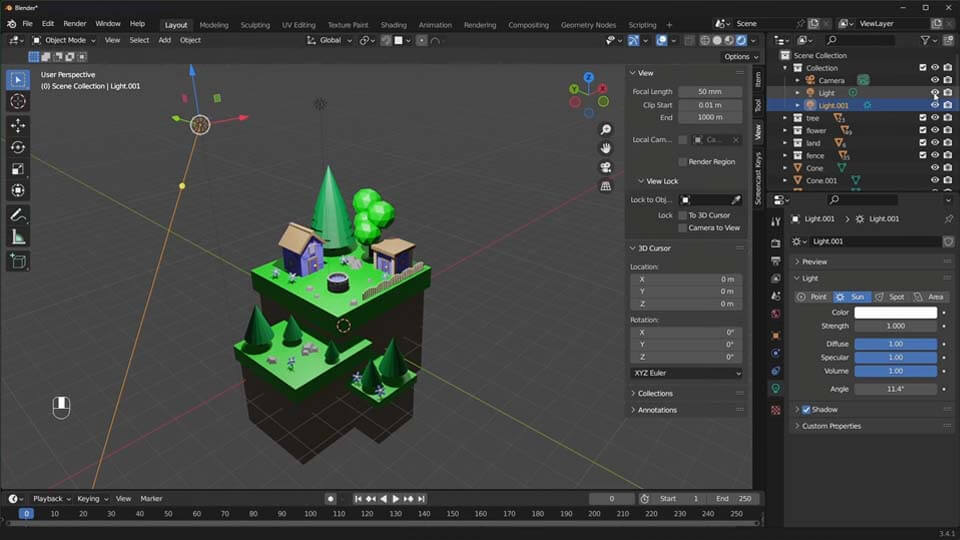
When it comes to free 3D animation software, the first thing that comes to your mind is Blender, an indispensable tool for both beginners and professionals. This is an open-source animation program that offers a comprehensive array of features and functions, some of which are only available in the paid versions of advanced animation software. Blender supports the entire three-dimensional pipeline, including video editing, motion tracking, rendering, simulating, compositing, animating, rigging, and modeling. It is used to create video games, animated feature films, visual effects, and much more. With a plethora of tools that surpass even some full versions of best-selling graphics software, Blender is an all-in-one 3D animation tool suitable for a wide range of applications, from hobbyist projects to professional 3D architectural designs. For those aiming to create professional-level 3D animations, Blender is the perfect software to master.
2. K-3D
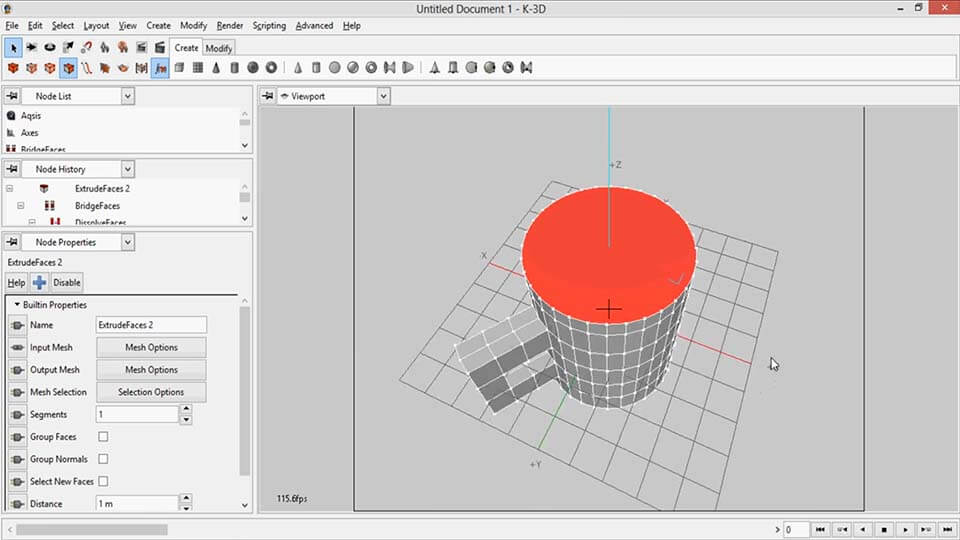
K-3D is a free 3D modeling, animation, and rendering software that stands out for its flexibility and powerful features. It combines a user-friendly interface familiar to those already proficient in other platforms with a robust, node-based visualization pipeline that simplifies complex animations. K-3D supports procedural and parametric workflows, allowing real-time adjustments and immediate feedback. Its versatility is enhanced by the ability to modify one side of a model while viewing the mirrored other side in real time, demonstrating changes instantaneously across the workflow.
3. Tinkercad
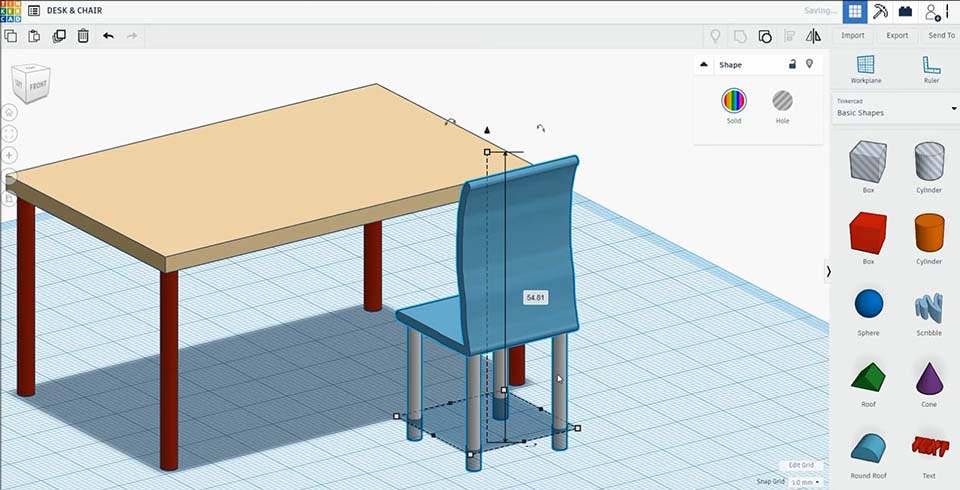
TinkerCAD is a user-friendly computer-aided design (CAD) software, tailored for animation creators without prior modeling experience. It offers an intuitive, mouse-driven interface that simplifies the process of designing and recreating both 2D and 3D models. Users can effortlessly modify or combine different shapes and objects, incorporate movements, and design circuits with customizable shapes. The drag-and-drop functionality facilitates the creation of complex designs, making TinkerCAD an ideal choice for beginners, especially those on a limited budget.
4. Daz Studio
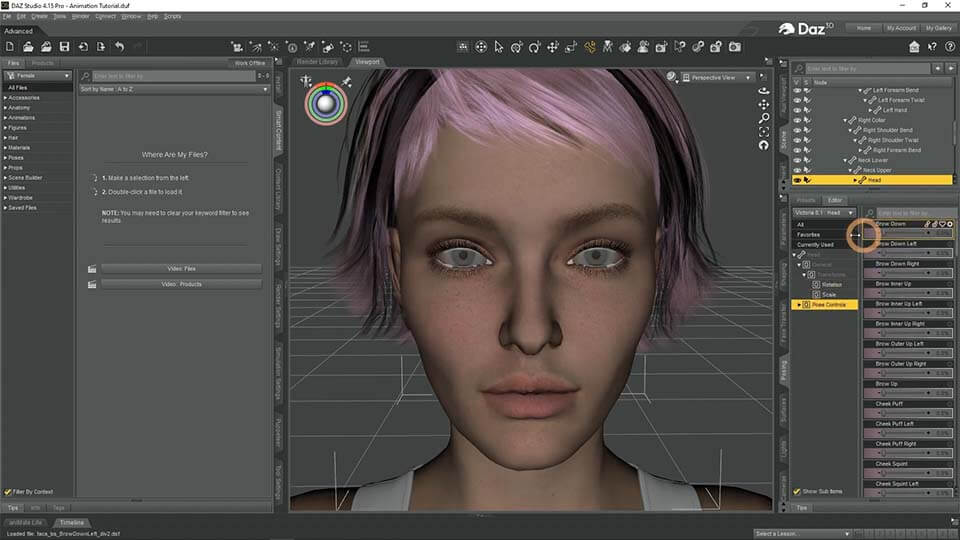
Daz Studio is a favorite among hobbyists and beginners in 3D animation, offering a user-friendly platform that enhances workflow through smart shortcuts and a rich array of customizable options. This free software not only allows users to acquire pre-made models from its marketplace but also to start with presets that can be tailored to one's preferences. Daz Studio stands out with its comprehensive 3D Content Marketplace and its ability to produce photo-realistic animations and images thanks to its studio-class processing. The software’s extensive content library and advanced character system enable users to create detailed, lifelike scenes and characters from scratch, making it possible to design an entire universe with unique, visually-stunning details.
5. Wings 3D
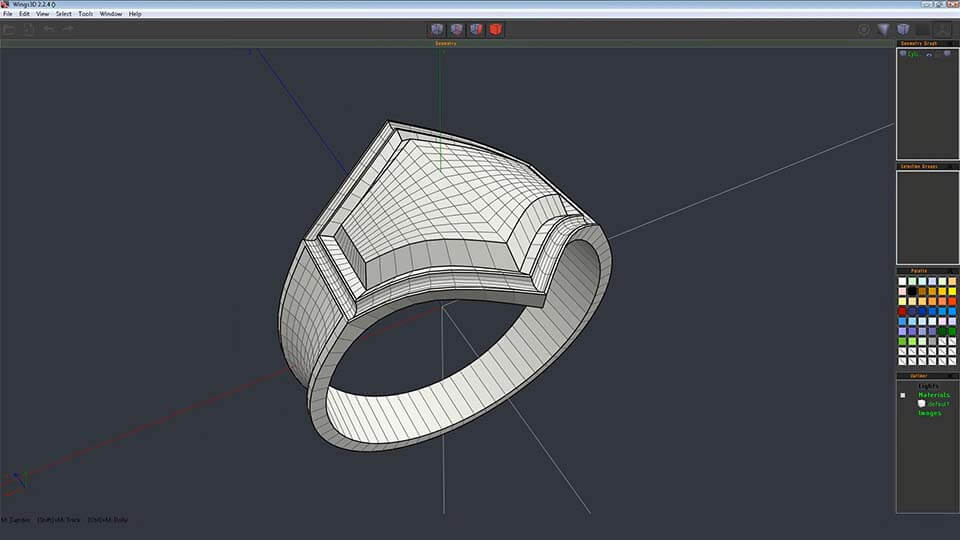
Wings 3D is an advanced open-source 3D modeling tool, specifically designed for creating low to mid-range models suitable for gaming animation. Utilizing a unique winged data structure to manage coordinate and adjacency data, Wings 3D offers basic OpenGL rendering, a virtual mirror for symmetrical modeling, and comprehensive surface modeling and texture mapping capabilities. These features make it particularly effective for users focused on 3D asset creation, providing both basic and advanced tools that cater to the needs of both beginners and professionals alike.
6. UE4
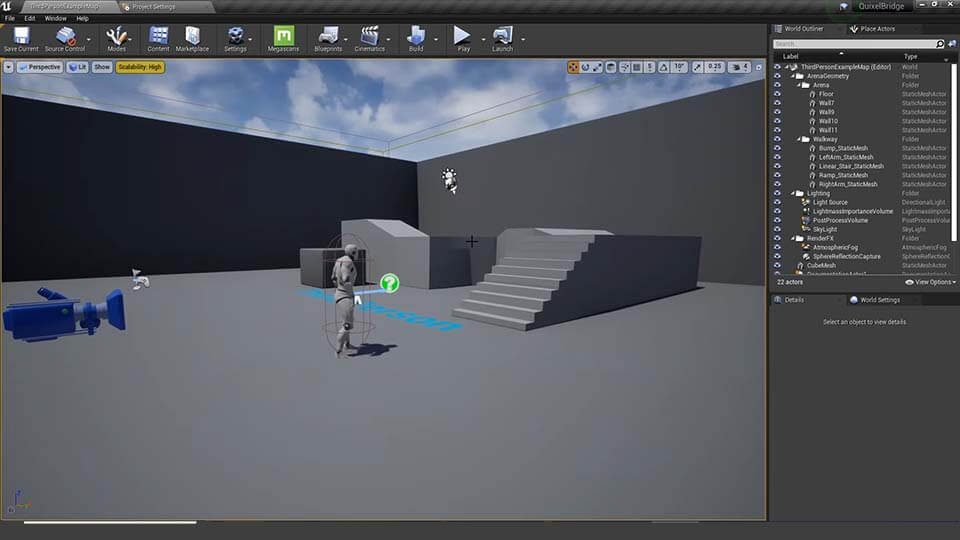
Unreal Engine stands as a formidable platform for 3D modeling, providing a comprehensive suite of tools that streamline the creation of complex models and animations. This step-by-step guide demonstrates how Unreal Engine simplifies the 3D modeling process, catering to both simple and intricate project requirements. With tips on optimizing your workflow, Unreal Engine offers various plugins to enhance efficiency at different development stages. The software's large array of tools and options, though initially daunting, becomes manageable with guidance on effective model creation, including using duplicate versions for safety and minor adjustments via the transform tab. Furthermore, the guide emphasizes the use of ready-made assets from Unreal Engine's marketplace to save time, illustrating the software's versatility in accommodating both bespoke and pre-built solutions.
Conclusion
Are you ready to embark on your first animation project? The range of animation software we've outlined is quite various, but you can definitely find something to fulfill your ideas and create dynamic 3D animation. Mastering any 3D animation software requires practice, much like any skill in life, but persistence pays off. We trust that our guide to the best free 3D animation software for beginners has provided you with valuable insights.
FAQ
Is free 3D animation software any good?
Absolutely! Above we’re highlighting some of the best free software options that we find best for making a professional-like animation for free.
Which free 3D animation software is the easiest to learn?
Blender is a good option for its extensive range of tutorials, and K-3D is favored by many users for its straightforward layout, making it easier to master.
I want to create character animations, which software is best?
For character animations, the best software depends on your specific needs and skill level. E.g. Blender is versatile for modifying or combining different shapes and objects, incorporating movements, and even designing detailed environments or characters. For beginners, Tinkercad is a user-friendly option to create dynamic 3D character animation.
My computer is older, will it run free 3D animation software?
Yes, 3D animation software can be demanding, requiring high-performance computers with sufficient processing power, memory, and graphics capabilities; some lighter software options may still be suitable for older systems.
Where can I find tutorials and resources for learning these free programs?
A wealth of tutorials and learning resources can be found on YouTube and the official websites of the software programs.


This program allows you to capture the video of your desktop and save it on your PC in various formats. Coupled with a video editor, the program is a great tool for creating presentations, tutorials and demo videos.

The program captures video from external devices and records it to computer in a free format. You can save video from video tuners, webcams, capture cards and other gadgets.
VSDC Video Editor Reviews & Ratings (Trustpilot, Capterra & Media)
VSDC Free Video Editor is rated 4.5/5 by real users on Trustpilot and Capterra. Here are a few reviews and quotes from creators and tech media.
Overall rating: 4.5/5 based on 200+ reviews on Trustpilot and 89 reviews on Capterra.
★★★★⯪
VSDC Free Video Editor is the best free video editor for Windows I’ve used, from color grading to picture-in-picture and cinematic results.
— Ejikeme Eloka Augustine
Source:Trustpilot
★★★★☆
Easy-to-use interface and quick export to social media make VSDC a versatile video editing tool for everyday projects.
— Karen C., E-Learning
Source:Capterra
★★★★☆
A feature-packed non-linear video editor for Windows that can compete with many paid video editing solutions.
— TechRadar
Source:TechRadar review
★★★★★
The free VSDC editor saved my YouTube channel – a powerful video editing software for chroma key, text effects and picture-in-picture.
— Paul Roberts
Source:Trustpilot
★★★★★
Fast and simple for YouTube videos with green screen, zoom, color tools and creative effects in one app.
— Marie R., Media Production
Source:Capterra
★★★★★
One of the best free video editor options for Windows users, ideal for GoPro, YouTube and family videos.
— VidProMom, YouTube creator
Source:Media reviews
★★★★★
I’ve been using VSDC for years; editing is easy and the final videos look great for my personal and professional projects.
— Long-time VSDC user
Source:Trustpilot
★★★★★
Great value and faster than many other free tools; I quickly create videos for YouTube, Instagram and Facebook with features my audience loves.
— Rabika B., Marketing & Advertising
Source:Capterra
★★★★★
VSDC offers many features you don’t usually find in free editors, including picture-in-picture, stabilization and modern codec support with no watermarks.
— Tech media review
Source:Media reviews
 Like us on Facebook
 Follow us on Twitter
Watch us on YouTube
 / @VSDCFreeVideoEditor
© 2011-2026, www.videosoftdev.com, FLASH-INTEGRO LLC. Privacy policy | Terms of use | About us
All trademarks referenced herein are the sole property of their respective owners.
Copying any materials from this site allowed only with written consent of Site Administration.