 User Help Manual


Editor Video
L'editor video consente di modificare file e creare video di qualsiasi complessità. Potete applicare effetti video e audio effects ad oggetti modificati, trasformarli, applicare filtri e correzioni d'immagini. Tutti i popolari formati video e audio sono supportati (sia lettura che salvataggio).
Convertitore Video
Questo programma serve a convertire video file da un formato ad un altro. Quasi tutti i popolari formati video sono supportati. Inoltre, il programma semplifica drasticamente il compito di convertire video da riprodurre su determinati dispositivi multimedia quali iPhone, Microsoft Zune oppure Archos. Il programma è semplicissimo da usare, dispone di una moderna interfaccia e di tutte le necessarie funzioni per processare i video.
Convertitore Audio
Il convertitore audio vi aiuterà a convertire file audio da un formato ad un altro. Tutti i formati audio e codec chiavi sono supportati. Il programma vi consente inoltre di gestire playlist e meta tags, di estrarre audio dai file video e di salvare queste tracce sul vostro computer in qualsiasi formato.
Animated Intro & Title Templates
Explore the VSDC Template Store with ready-made video templates for intros, animated titles, lower thirds, logo reveals, slideshows, glitch transitions, LUTs, and color grading presets. Drop a template into the VSDC Video Editor timeline, edit text, timing, and colors, and finish professional video projects in minutes.
Choose from 300+ exclusive packs of video transitions, LUT packs, text effects, GPS telemetry widgets, animated elements, and animated backgrounds for VSDC. All templates are fully customizable, support up to 4K resolution in 16:9, and help you build intros, wedding slideshows, travel videos, and tutorials much faster.
VSDC Cloud - Online video management
Keep your work safe, organized and always accessible! Back up your video projects, store media files online and access them from any device. Enjoy collaboration, share project updates and exchange files easily.
 Editor Video
 Convertitore Video
 Convertitore Audio
 Templates store
 Cloud
Cloud

Versatilità
Più strumenti contemporaneamente per elaborare file video e audio in una singola applicazione.

Alta velocità
I nostri programmi
impiegano rapidi algoritmi di alta qualità per processori singoli a multipli.

Accessibilità
I nostri prodotti sono disponibili per essere scaricati gratuitamente su tutti i computer e dispositivi che supportano i sistemi operativi Windows.
Notizie:
- Pubblicato da Amy Shao il 30 giugno 2026 Scopri il nuovo grande a...
- Pubblicato da Amy Shao l’11 marzo 2026 Qual è il regalo migliore pe...
- pubblicato da Amy Shao 19/11/25 Ecco l'attesissimo aggiornamento VSDC 10.2: ...
- Ciao, sono Mattea Wharton, una videomaker di viaggi di Seattle. Per tre anni ho ...
L’ultima guida come lavorare con effetto Glitch in VSDC
Oggi effetto Glitch è una delle tendenze più calde video grafiche. È usato molto in video musicali, video giochi, film - lo chiamate. Non è una sorpresa come bene guardare i video distorti!
La distorsione digitale fa un video più dinamico e crea un’illusione dell’effimero. Però non tutti gli effetti glitch sono creati ugualmente. A volte non potete raggiungere il risultato desiderato solo con l’applicazione del filtro di standard. Prima ci sono tanti varianti della distorsione - e ogni crea il suo effetto unico. Secondo a volte potete volere personalizzare l’effetto con il cambio di tipo di glitch e con la regolazione della sua intensità.
Se siete seri di imparare l’arte della distorsione digitale VDC è il video editor migliore per questo obiettivo. Sarete capaci di non solo rapidamente aggiungere un effetto glitch a un video ma anche di regolare la distorsione manualmente. Nel manuale sotto mostreremo esattamente come farlo.
Scaricare VSDC video editor gratuito
Allora l’effetto Glitch tipicamente imita gli errori di software o un segnale male e causa lo strappo dell’immagine, il rumore statico, ecc. Di solito sembra:
- La distorsione dell’immagine ondulata.
- Cornici congelati.
- Colori invertiti.
Esaminiamo più attenti come l’effetto Glich funziona in VSDC.
Come applicare un effetto glitch a un video in VSDC
Quando avete scaricato e avete lanciato il video editor, importate il video che volete distorcere. Per applicare l’effetto Glitch seguite tre passi facili:
- Aprite il menù «Video effetti».
- Passate alla sezione «Speciale FX» e scegliete «Glitch».
- Nella finestra spuntata «Impostazioni della posizione dell’oggetto» fate un clic su OK.
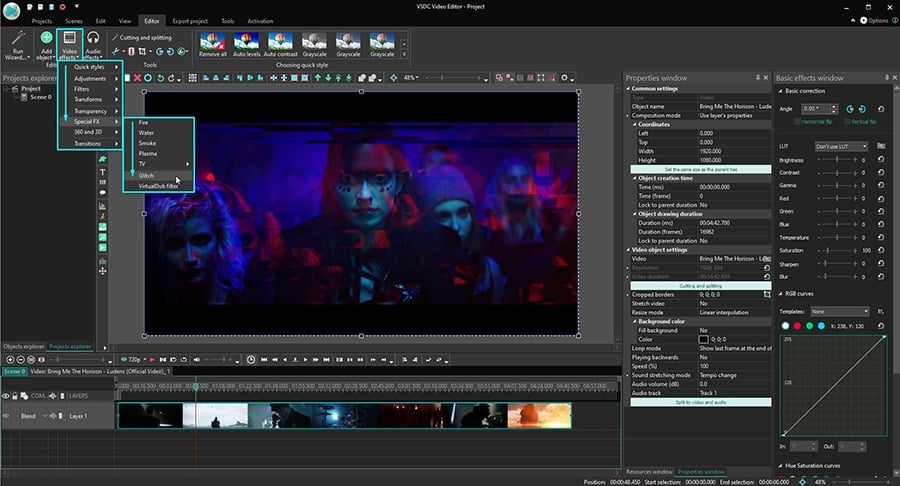
In questo modo avete già applicato una delle pre impostazioni glitch automatiche a un video. VSDC ha 8 pre impostazioni diverse - ogni crea un effetto unico. Per scegliere altro passate alla finestra Proprietà al lato destro e trovate la finestra «Impostazioni dell’effetto glitch». Scegliete qualche pre imposizione e guardate la finestra dell’anteprima per il risultato in tempo reale. Potete sempre modificare i parametri e creare la sua pre impostazione personalizzata.
Ad esempio, questo è come lo stesso video può apparire quando applicate le pre impostazioni diverse automatiche:
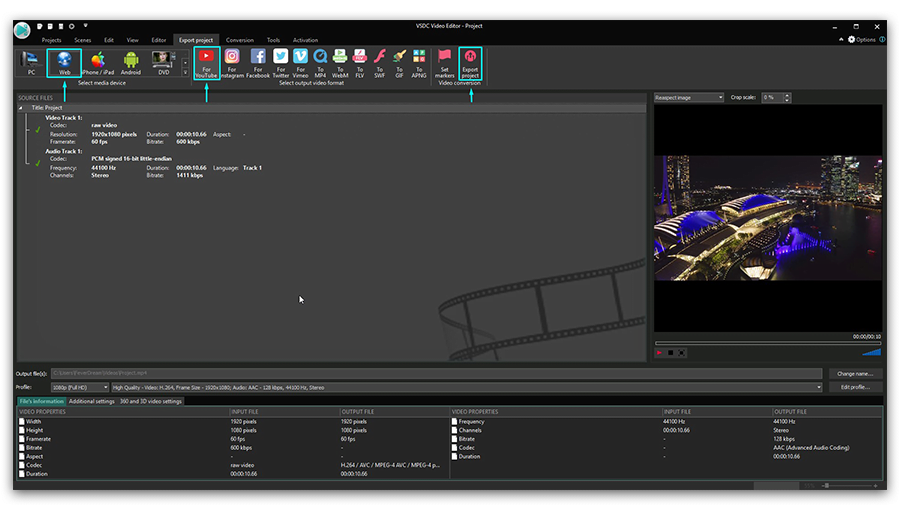
Se siete felici del risultato solo andate avanti e salvate il video usando la tabella «Esportare progetto».
Però se volete regolare precisamente l’effetto mostreremo come farlo sotto. Imparerete per che cosa ogni effetto Glitch è responsabile e come regolare la distorsione con il cambio del suo tipo e l’intensità.
Impostazioni dell’effetto Glitch: primi passi
All’inizio fate un clic con il pulsante destro del mouse allo strato dell’effetto Glitch sulla cronologia e scegliete «Proprietà» nel menù.
Andate alla «Finestra di Proprietà» al lato destro e trovate il menù «Impostazioni dell’effetto glitch». Oltre le pre impostazioni menzionate sopra vedrete 6 parametri:
- Potere di trasferimento glitch (%)
- Potere di effetto glitch (%)
- Intensità glitch (%)
- Usare stadio 1
- Usare stadio 2
- Usare stadio 3
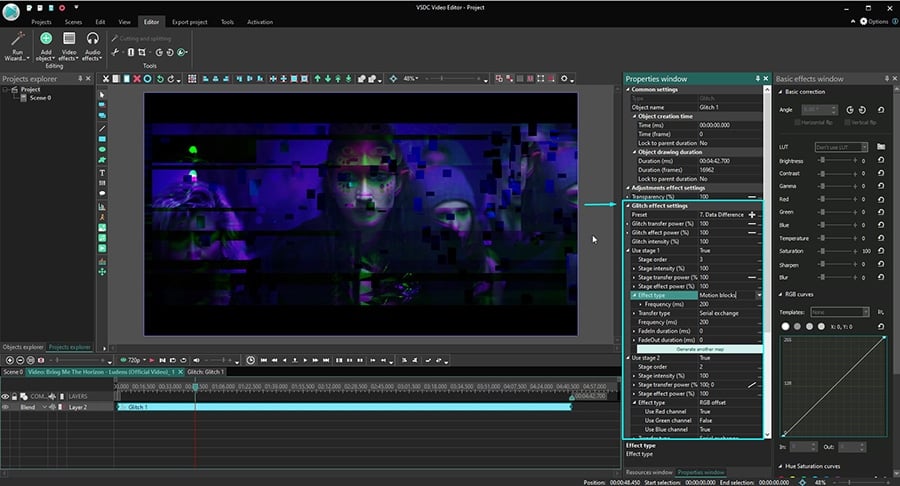
In questo contesto uno stadio significa uno stadio del lavorazione e ogni stadio del lavorazione include un tipo dell’effetto della distorsione. I tipi della distorsione includono un pacco di RGB, i blocchi di movimento, gli spostamenti di pixel e altri. Troverete tutte le opzioni nel menù a tendina titolato «Tipo d’effetto». E se uno stadio può solo includere un effetto della distorsione - Glitch è infatti una combinazione degli stadi.
In altre parole l’effetto Glitch in VSDC è una composizione unica dei tipi della distorsione diversi.
Effetto glitch può includere da uno a tre stadi del lavorazione - ogni contiene una distorsione unica. Questi effetti della distorsione possono essere applicati a un video contemporaneamente o uno dopo l’altro. Notate se cambiate qualsiasi parametro Glitch (potere di trasferimento Glitch, potere dell’effetto Glith, intensità Glitch), applicate pertanto il regolamento a tutti gli stadi.
Impostazioni comune dell’effetto
Se siete i creatori aspirante VSDC è una scelta buonissima per tanti motivi. Uno è abilità di affinare quasi ogni parametro manualmente. Ad esempio VSDC vi permette di fissare il momento quando l’effetto apparisce nel video ed anche la durata dell’effetto.
Per farlo usate «Impostazioni comune dell’effetto» nella finestra delle Proprietà. Il parametro «Tempo per creare oggetto» vi permette di determinare l’aspetto dell’effetto precisamente con le cornici o millisecondi. E il parametro «Durata per disegnare oggetto» aiuta di scegliere la durata dell’effetto.
Parametri dell’effetto Glitch rivisti nei dettagli
É ora per tornare all’effetto Glitch. Come abbiamo detto prima ci sono otto pre impostazioni pronte da usare e l’abilità di creare la sua. Quando cambiate il parametro automatico create una pre impostazione nuova che è chiamata con il numero d’ordine - Glitch 9, Glitch 10, ecc. Poi sarete capaci di salvare e rinominarla.
Prima di cominciare rivedere i parametro abbattiamo il processo della distorsione in VSDC e guardiamo come esattamente funziona.
Quando applicate l’effetto Glitch a un video in VSDC il software rompe ogni video cornice a segmenti o blocchi. Pensate di loro come una riflessione dei blocchi perché ogni blocco riflette qualche elemento nella cornice del video. Cambiando la distanza tra i blocchi e il loro numero e il livello dell’opacità potete controllare come la distorsione apparisce.
Tornando ai parametri dell’effetto Glitch ci sono tre di loro nel menù principale:
- Potere di trasferimento Glitch (%) sposta i blocchi più vicino agli elementi che riflettono o li muove più lontano l’uno dall’altro. Quando il valore più alto i blocchi sono più lontani. Se il valore per questo parametro è 100% la distanza tra i blocchi e gli elementi è massima e uguale a 1/4 della larghezza della cornice.
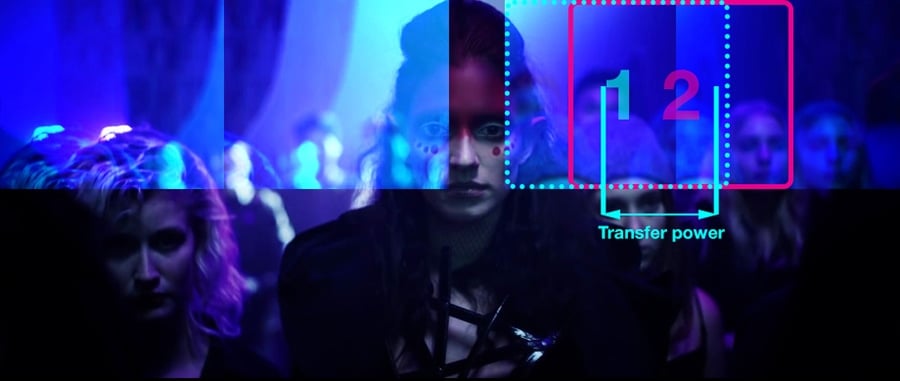
- Potere di effetto glitch (%) determina il livello dell’opacità applicata ai blocchi della riflessione. Se il suo valore è 0% i blocchi sono assolutamente trasparenti. Se il valore è 100% i blocchi sono completamente non trasparenti.
- Intensità Glitch (%) regola il numero dei blocchi che appariscono nella cornice. Quando intensità è 100% il numero dei blocchi massimo possibile è mostrato. Se il valore dell’intensità è 0% nessuno dei blocchi saranno mostrati.
Giocando con questi parametri potete controllare totalmente il numero dei blocchi della riflessione, il loro livello dell’opacità e come lontano sono postati dagli elemento riflessi.
Inoltre potete applicare un cambio dinamico a ogni parametro. Questo significa che il valore cambierà gradualmente quando il video è riprodotto. Ad esempio, i blocchi possono essere un po’ più trasparenti all’inizio del video e non trasparenti alla fine. Per ottenere il cambio dinamico i parametri di «Valore iniziale» e «Valore finale» nel menù devono essere diversi.
Come lavorare con l’effetto Glitch negli stadi di lavorazione
Il livello prossimo delle impostazioni è “stadi”. Troverete tre stadi di lavorazione nel menù e ogni contiene l’effetto di una distorsione: pacco di RGB, riempiemento casuale del colore, cambio di pixel e altri. Potete usare fino a tre stadi diversi in un effetto Glitch e creare una composizione unica che sarà disponibile come una pre impostazione personalizata.
Automaticamente i parametri «Usare stadio 2» e «Usare stadio 3» sono esaminati come «Falso». Questo significa che l’effetto attualmente usa solo uno stadio di lavorazione. Se volete aggiungere gli stadi solo cambiate «Falso» a «Vero».
Al livello di stadio lavorate con i parametri seguenti:
- Ordine degli stadi
- Intensità dello stadio (%)
- Potere di trasferimento dello stadio (%)
- Potere dell’effetto dello stadio (%)
- Tipo d’effetto
- Tipo di trasferimento
- Frequenza
- Durata di fade in
- Durata di fade out
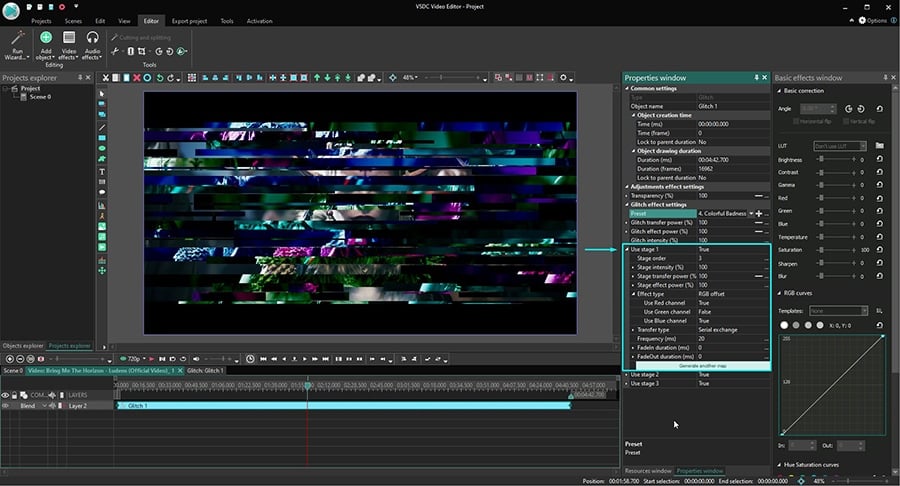
Guardiamo più da vicino ogni parametro.
Ordine degli stadi vi permette di cambiare l’ordine degli stadi di lavorazione applicando i numeri d’ordine a loro. Questa impostazione è rilevante solo se usate più di uno stadio. Se il valore dell’ordine degli stadi è «0» gli stadi vanno uno dopo l’altro nell’ordine automatico: stadio 1, stadio 2, stadio 3.
Intensità dello stadio (%) determina il numero dei blocchi della riflessione in una cornice. L’intendità dello stadio è calcolata come percento dell’intensità Glitch. In altre parole se l’intensità Glitch è 50% e l’intensità dello stadio è 50% così il numero dei blocchi sarà 25% al massimo- perché 50% x 0,5 = 25%
Delta valueIl valore delta qui è un intervallo tra il numero minimo e massimo possibile dei blocchi. Questo parametro determina l’intensità dello stadio che sarà scelta casualmente nei momenti diversi durante la riproduzione. Quando il valore delta è zero i valori dell’intensità degli stadi minimo e massimo sono uguali.
Il calco minimo e massimo va in modo seguente:
Valore massimo = valore dell’intensità dello stadio
Valore minimo = Intensità dello stadio - (intensità dello stadio x valore delta)
Ad esempio, se intensità glitch è 50%, intensità dello stadio è 50% e valore delta è 20% durante la riproduzione vedrete tre 20% e 25% dei blocchi della riflessione dal numero massimo possibile.
Ecco i calcoli per questo esempio:
Intensità dello stadio massima = 50%
Intensità dello stadio minima = 50%-(50%x0.2)=40%
Intensità Glitch massima = 50%x0.5=25%
Intensità Glitch minima =50%xo.4=20%
Potere di trasferimento dello stadio (%) determina come lontani i blocchi sono spostati dagli elementi che riflettono.
Il potere di trasferimento dello stadio è calcolato come il percentuale del potere di trasferimento di Glitch. Per esempio, se Il potere di trasferimento Glitch è 50% e il potere di trasferimento dello stadio è 50% la distanza tra i blocchi della riflessione e l’elemento che riflettono sarà 25% al massimo - dove il minimo è 1/4 della larghezza della cornice.
Il potere di trasferimento dello stadio ha tre parametri supplementari:
- Valore iniziale
- Valore finale
- Valore delta
Il valore iniziale determina la distanza tra i blocchi della riflessione e gli elementi rifletti per l’inizio della riproduzione. Il valore finale - come il nome suggerisce - determina la distanza per la fine dell riproduzione. Il valore delta imposta l’intervallo tra lo spostamento del blocco massimo e minimo possibile che succederò casualmente durante la riproduzione.
Il valore massimo qui è uguale al valore che impostate per il parametro «potere di trasferimento dello stadio». Il valore minimo piò essere calcolato con la formula seguente:
Valore di trasferimento dello stadio - (Valore di trasferimento dello stadio x Valore delta)
Il potere dell’effetto dello stadio vi permette ipostare il livello desiderato dell’opacità per i blocchi della riflessione.
Il potere dell’effetto dello stadio è calcolato come il percentuale del potere dell’effetto Glitch. Ad esempio, se il potere dell’effetto Glitch è 50%, e il potere dell’effetto dello stadio è 50% così il livello dell’opacità sarà 25% (perchè 50% di 50% è 25%). 0% significherà che i blocchi sono assolutamente trasparenti e 100% significherà che sono completamente non trasparenti.
Solo come con le impostazioni del potere di trasferimento dello stadio VSDC vi permette di impostare l’opacità per i blocchi della riflessione all’inizio e alla fine della riproduzione.
Tipo d’effetto è il menù a tendina con 12 tipi degli effetti della distorsione che potete scegliere.
Tipo di trasferimento determina il modo in qualle i blocchi sono postati nella cornice. Include quattro opzioni:
- Scambio seriale - i blocchi appariscono nella sequenza semplice uno dopo l’altro a base della loro dimensione e la distanza tra loro.
- Scambio simmetrico - i blocchi sono mostrati simmetricamente a base dei loro parametri.
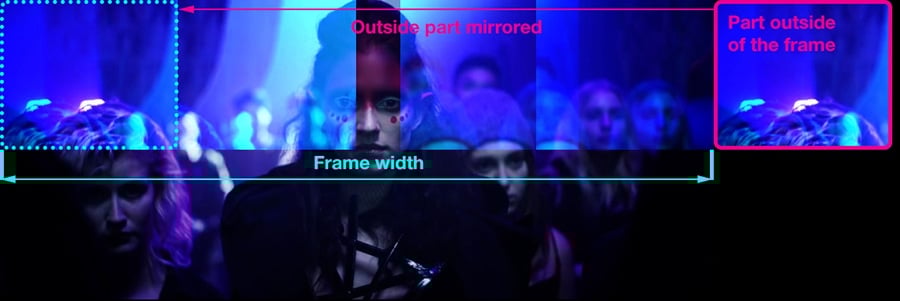
- Copiare con i bordi dello specchio - i blocchi sono specchiati. Se una parte di qualsiasi blocco cade fuori la cornice questa parte è copiata e mostrata al lato opposto della fornice:
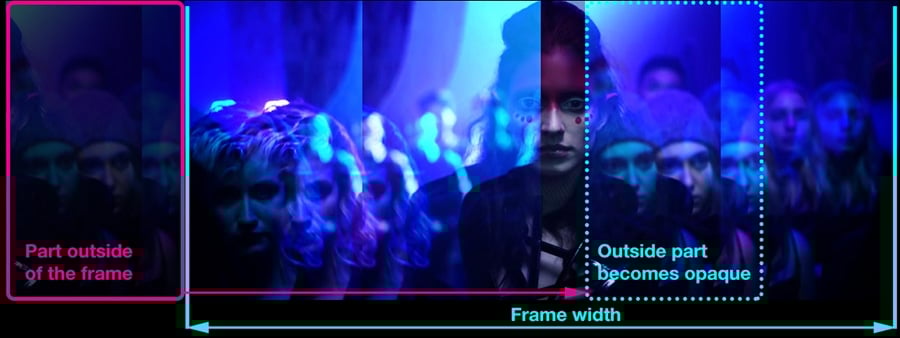
- Copiare con i bordi trasparenti - la parte di un blocco che cade fuori la cornice non è specchiata al lato opposto ma diventa completamente opaca.
Per regolare il tipo di trasferimento anche più precisamente potete usare i parametri seguenti disponibili nel menù:
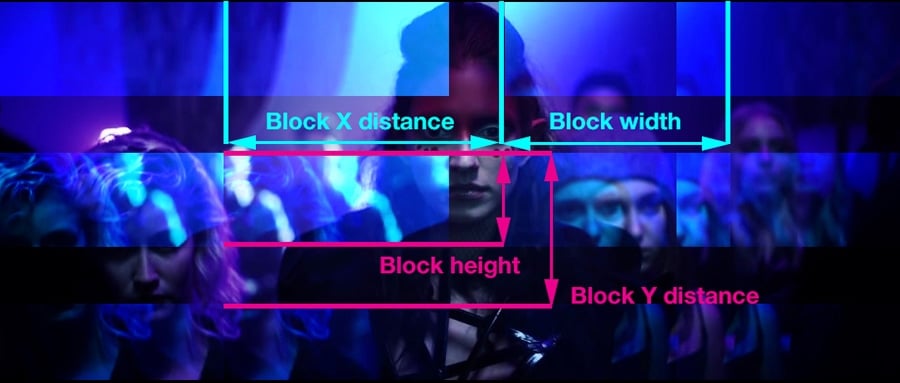
- Larghezza del blocco (%) - la larghezza del blocco, calcolata come percentuale della larghezza della cornice.
- Altezza del blocco (%) - l’altezza del blocco calcolata come percentuale dell’altezza della cornice.
- Distanza X del blocco (%) - la distanza orizzontale tra l’inizio del primo blocco e l’inizio del blocco seguente, dove 100% è la larghezza della cornice.
- Distanza Y del blocco (%) - la distanza verticale tra l’inizio del primo blocco e l’inizio del blocco seguente, dove 100% è l’altezza della cornice.
- Scostamento dell’inizio (%) - la distanza orizzontale tra il primo blocco e l’angolo superiore sinistro della cornice.
Frequenza (ms) - questo parametro determina come spesso i blocchi cambiano in un millisecondo. In altre parole se il valore della frequenza è 0 i blocchi saranno immobili durante tutta la riproduzione. Se il valore della frequenza è uguale a 10, vedrete 10 combinazioni dei blocchi cambiare in un millisecondo.
Durata di fade in (ms) - l’apparizione graduale dell’effetto nel video. Se il valore è 0, la posizione e l’intensità dei blocchi saranno determinati dal potere dell’effetto Glitch e del potere dell’effetto dello stadio.
Se è qualcosa diverso da zero, l’apparizione graduale dei blocchi sarà allungata al periodo determinato in millisecondi. Ad esempio, se il valore di fade in è 100 vedrete il video originale nella prima cornice, e l’effetto della distorsione apparisce gradualmente in 100 millisecondi prossimi.
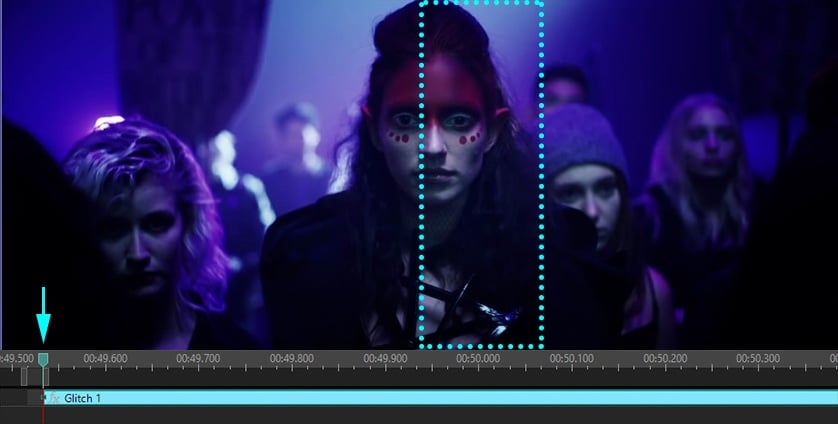
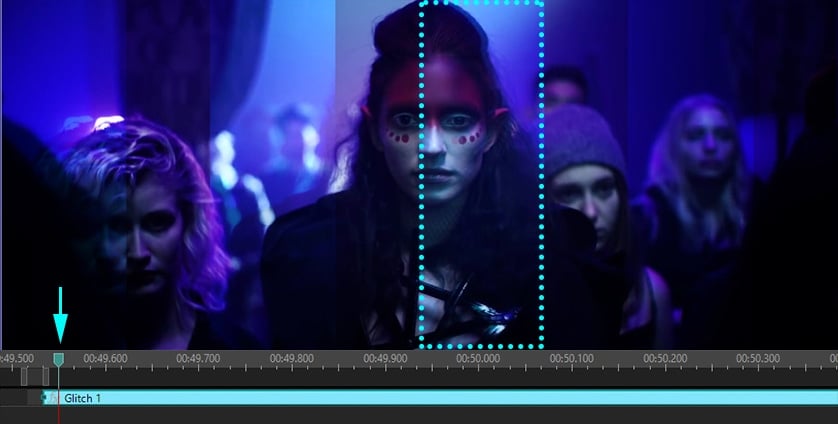
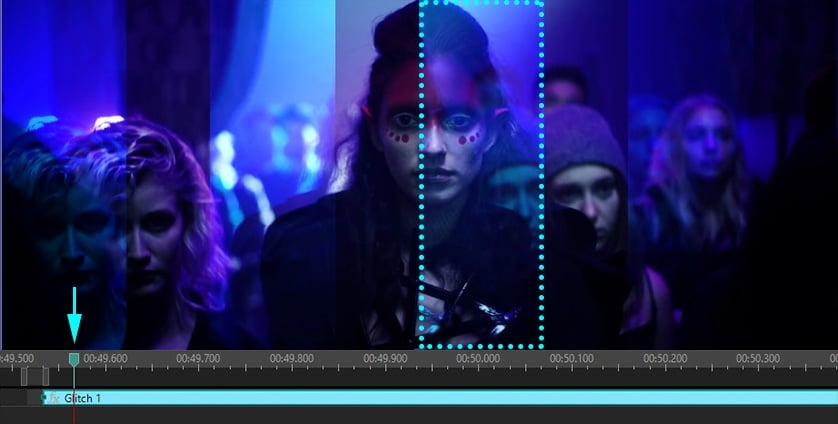
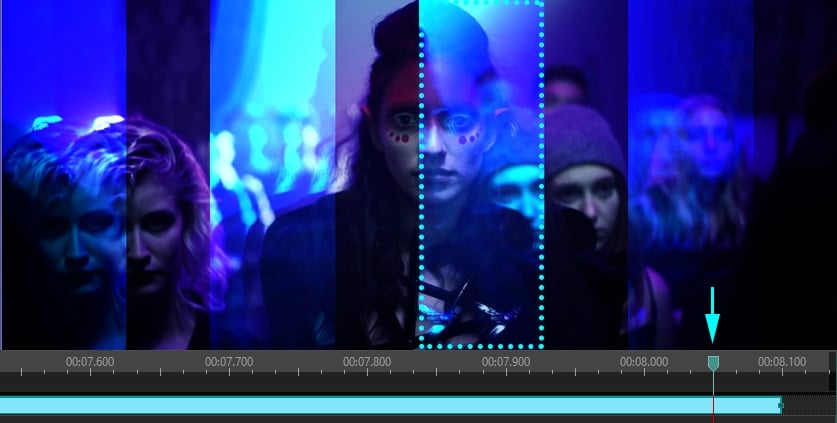
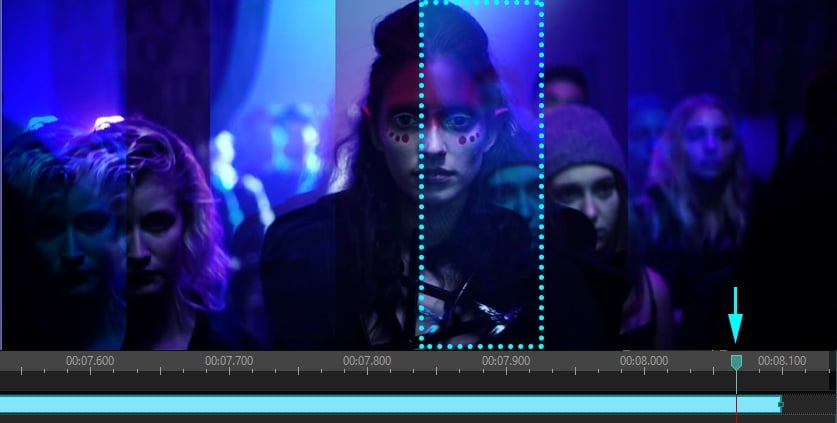
Durata di fade out (ms) - nella stessa maniera questo è un parametro che imposta la sparizione graduale dell’effetto alla fine della sua riproduzione.
Se la durata del valore di fade out è zero alla fine della riproduzione dell’effetto la posizione e l’intensità dei blocchi saranno determinate dal potere dell’effetto Glitch e dal potere dell’effetto dello stadio. Se il valore della durata di fade out è 100, ad esempio, questo significa che l’effetto scomparirà gradualmente durante gli ultimi 100 millisecondi della sua riproduzione.
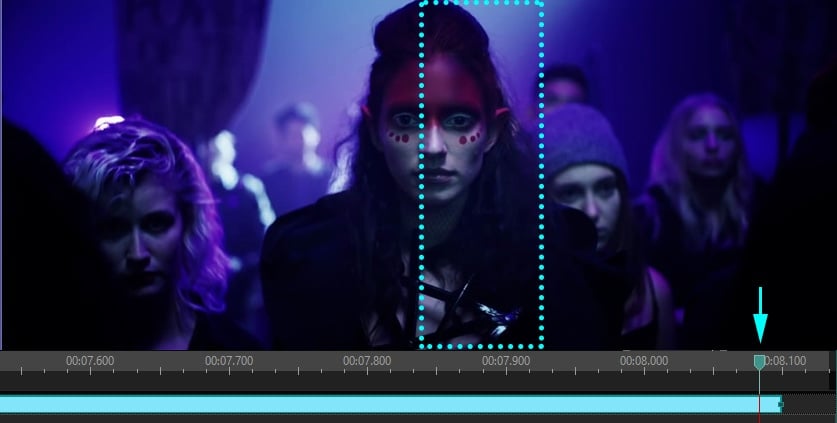
È la fine del nostro manuale. Siete pronti di cominciare a usare l’effetto Glitch in vostri video?
Allora scaricate VSDC al vostro computer e cominciate i trucchi descritti in questa guida.
Se siete passionali del video montaggio vi iscrivete al nostro canale su YouTube - pubblichiamo i video manuali facili da seguire settimanalmente!
 Download VSDC Video Editor 8.2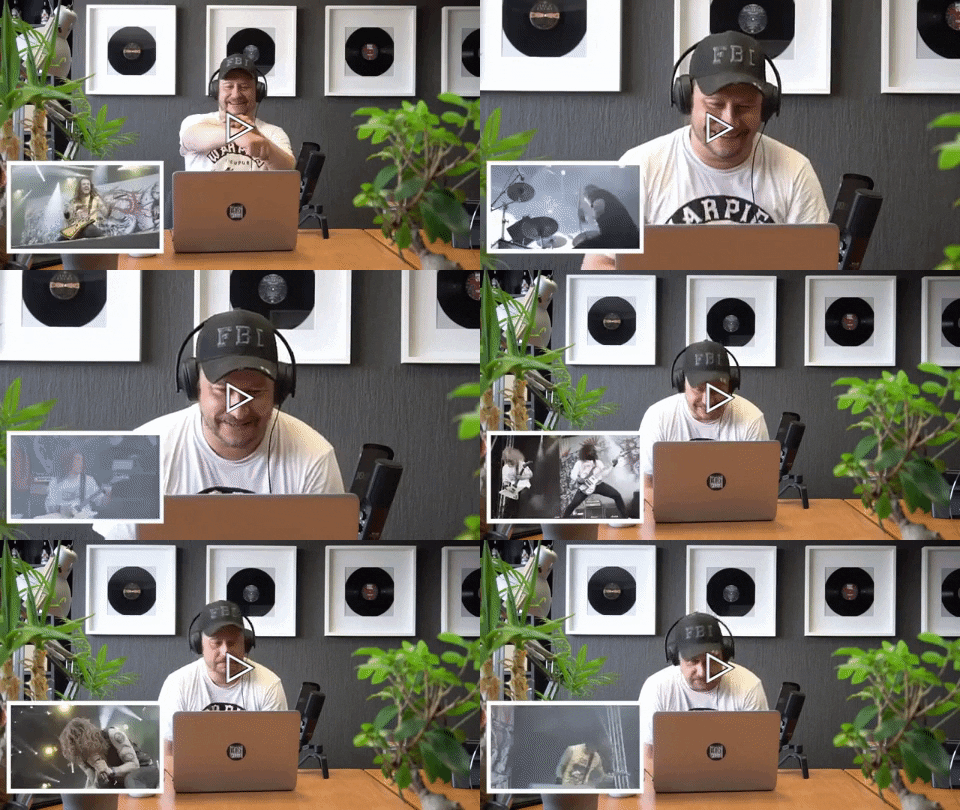
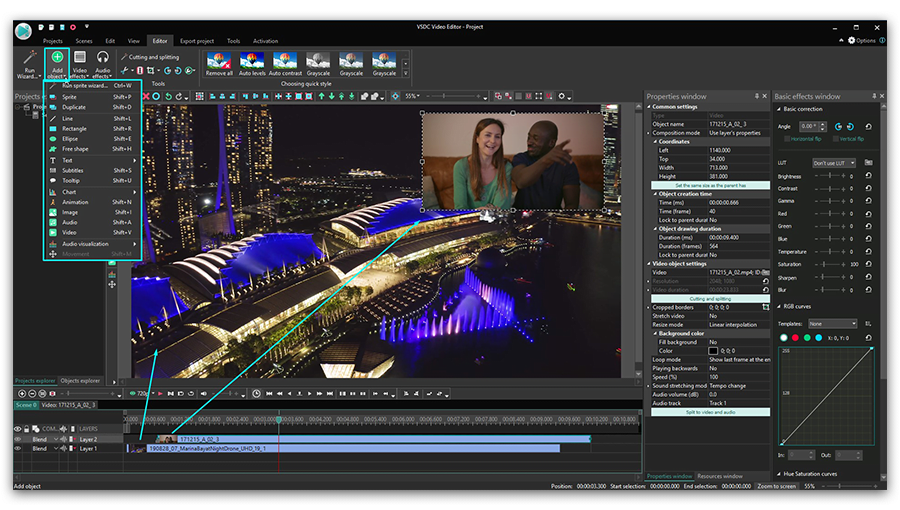
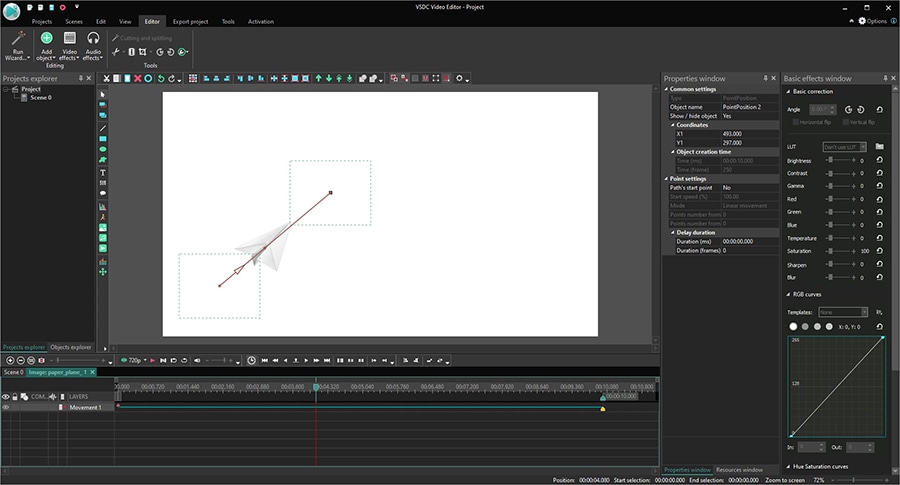
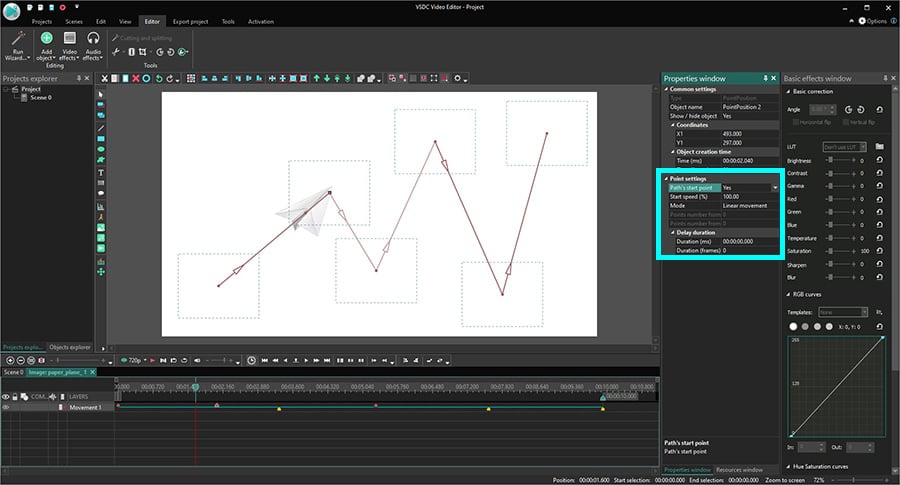
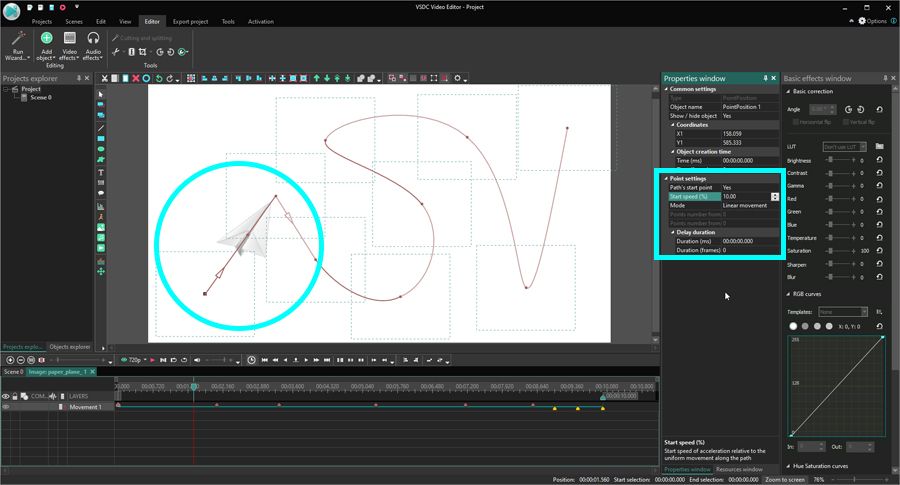
 o usate la combinazione del tasto di scelta rapida Shift + M. Nella finestra spuntata «Parametri della posizione degli oggetti», fate un clic su «Ok». Il punto di controllo apparirà nel centro dell’aereo di carta. Si chiama il punto dell’inizio del percorso e questo comincerà la traiettoria del movimento.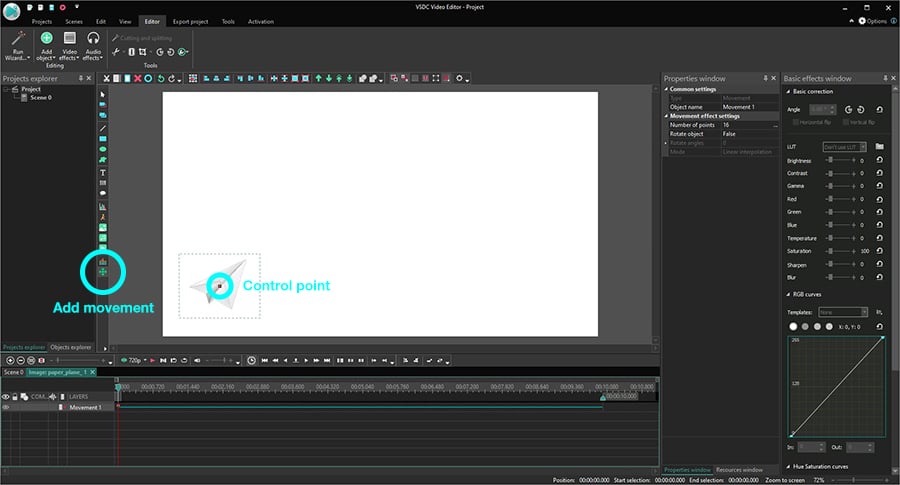


Con questo programma è possibile registrare i video dal desktop e salvarli sul computer in diversi formati. Insieme al video editor è ideale per creare presentazioni e demo.

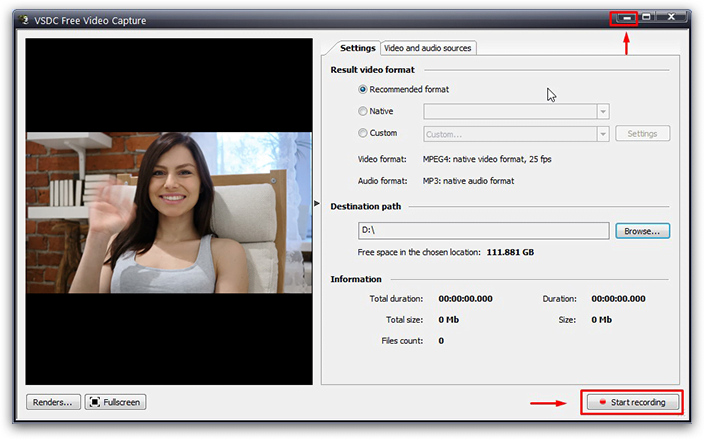
Il programma serve per catturare video da dispositivi esterni e e per registrarli sul computer in qualsiasi formato video. Potete salvare il video da sintonizzatori video, webcam, schede di acquisizione e vari dispositivi.
VSDC Video Editor Reviews & Ratings (Trustpilot, Capterra & Media)
VSDC Free Video Editor is rated 4.5/5 by real users on Trustpilot and Capterra. Here are a few reviews and quotes from creators and tech media.
Overall rating: 4.5/5 based on 200+ reviews on Trustpilot and 89 reviews on Capterra.
★★★★⯪
VSDC Free Video Editor is the best free video editor for Windows I’ve used, from color grading to picture-in-picture and cinematic results.
— Ejikeme Eloka Augustine
Source:Trustpilot
★★★★☆
Easy-to-use interface and quick export to social media make VSDC a versatile video editing tool for everyday projects.
— Karen C., E-Learning
Source:Capterra
★★★★☆
A feature-packed non-linear video editor for Windows that can compete with many paid video editing solutions.
— TechRadar
Source:TechRadar review
★★★★★
The free VSDC editor saved my YouTube channel – a powerful video editing software for chroma key, text effects and picture-in-picture.
— Paul Roberts
Source:Trustpilot
★★★★★
Fast and simple for YouTube videos with green screen, zoom, color tools and creative effects in one app.
— Marie R., Media Production
Source:Capterra
★★★★★
One of the best free video editor options for Windows users, ideal for GoPro, YouTube and family videos.
— VidProMom, YouTube creator
Source:Media reviews
★★★★★
I’ve been using VSDC for years; editing is easy and the final videos look great for my personal and professional projects.
— Long-time VSDC user
Source:Trustpilot
★★★★★
Great value and faster than many other free tools; I quickly create videos for YouTube, Instagram and Facebook with features my audience loves.
— Rabika B., Marketing & Advertising
Source:Capterra
★★★★★
VSDC offers many features you don’t usually find in free editors, including picture-in-picture, stabilization and modern codec support with no watermarks.
— Tech media review
Source:Media reviews
 Unisciti a noi
  Seguici
 Guardaci
 / @VSDCFreeVideoEditor
© 2011-2026, www.videosoftdev.com, FLASH-INTEGRO LLC. Tutela della privacy | Condizioni di utilizzo | Chi siamo
Tutti i marchi citati nel presente documento sono di proprieta esclusiva dei rispettivi proprietari.
La copia di qualsiasi materiale da questo sito e consentita solo con il consenso scritto dell'amministrazione sito.