 User Help Manual
  Learn FAQ
  Send us feedback


Video Editor
Download and use the free video software to create and edit videos of any complexity from a family greeting card to a company presentation. Apply vsdc free video editor for light edit hdr-video, any raw-video formats from cams - BRAW, ProRes RAW, any high resolution 4k or more due to video proxies technologies in the editor.
Cut, merge video files, apply visual and audio effects, use filtration and image correction, make slideshows and add an appropriate soundtrack. Use multi-color Chroma Key and advanced parameters settings to give your video a professional look.
All popular video and audio formats are supported.
Video Converter
This program is intended for converting video files from one format to another. Nearly all popular video formats are supported (both reading and saving). In addition, the program drastically simplifies the task of converting videos for playback on specific multimedia devices, such as iPhone, Samsung Galaxy or Huawei P30 Pro. The program is extremely easy to use, has a modern interface and all necessary video processing functions.
Audio Converter
The audio converter will help you convert audio files from one format to another. All key audio formats and codecs are supported. The program also allows you to manage playlists and meta tags, extract audio from video files and save these tracks on your computer in any format.
Animated Intro & Title Templates
Explore the VSDC Template Store with ready-made video templates for intros, animated titles, lower thirds, logo reveals, slideshows, glitch transitions, LUTs, and color grading presets. Drop a template into the VSDC Video Editor timeline, edit text, timing, and colors, and finish professional video projects in minutes.
Choose from 300+ exclusive packs of video transitions, LUT packs, text effects, GPS telemetry widgets, animated elements, and animated backgrounds for VSDC. All templates are fully customizable, support up to 4K resolution in 16:9, and help you build intros, wedding slideshows, travel videos, and tutorials much faster.
VSDC Cloud - Online video management
Keep your work safe, organized and always accessible! Back up your video projects, store media files online and access them from any device. Enjoy collaboration, share project updates and exchange files easily.
 Video Editor
 Video Converter
 Audio Tools
 Templates store
 Cloud
Cloud

Multifunctionality
A wide array of multimedia processing tools in one free video software suite.

High speed
Our programs use fast
and high-quality algorithms optimized for single and multi-core CPU’s.

Affordability
VSDC video software is freely available for download to Windows OS-based PCs and laptops.
News:
- Published by Amy Shao on June 30, 2026 Meet the new major update ...
- Published by Amy Shao on March 11, 2026 What is the best gift for...
- published Amy Shao 11/19/25 Meet the long-awaited VSDC 10.2 update: a new ve...
- Hi, I'm Mattea Wharton, a travel videographer from Seattle. For three years I ba...
How to use VSDC as a video background remover (Chroma Key effect)
People often need to remove a background from a video and replace it with a nice picture or another video. Technically, there are 2 ways to do it. The first and the most popular “background remover” is Chroma Key. It’s a tool that automatically detects a solidly colored background and instantly removes it from the video. The second way is masking, and it is often applied when the background you want to remove is not a one-tone smooth solid green wall.
Masking involves a lot of manual editing, and therefore, requires more skills and PC resources. Chroma Key, on the other hand, is very user-friendly and efficient. So, we definitely recommend using it whenever you need to change your video background. Now, let’s see how to do it in VSDC Free Video Editor.
How to remove a background from a video using VSDC
Once you download VSDC Video Editor to your PC, launch the program and import the video with a solid color background.
Once the video is placed on the timeline, you need to apply the Chroma Key effect to it. Go to “Video effects” in the top menu, choose “Transparent” and proceed to “Background remover”. Note, you won’t immediately see the green color erased from the scene, but you’ll notice a new layer on the timeline, called Background Remover1. Right-click on it to open the Properties window (if it hasn’t opened automatically). See the illustration below.
In the Background removal settings, you’ll notice “Chromakey color”. Use the eyedropper tool to get the color directly from the scene. To do that, just click on the eyedropper icon and then click anywhere on the video background – the software will automatically detect the color that needs to be removed.
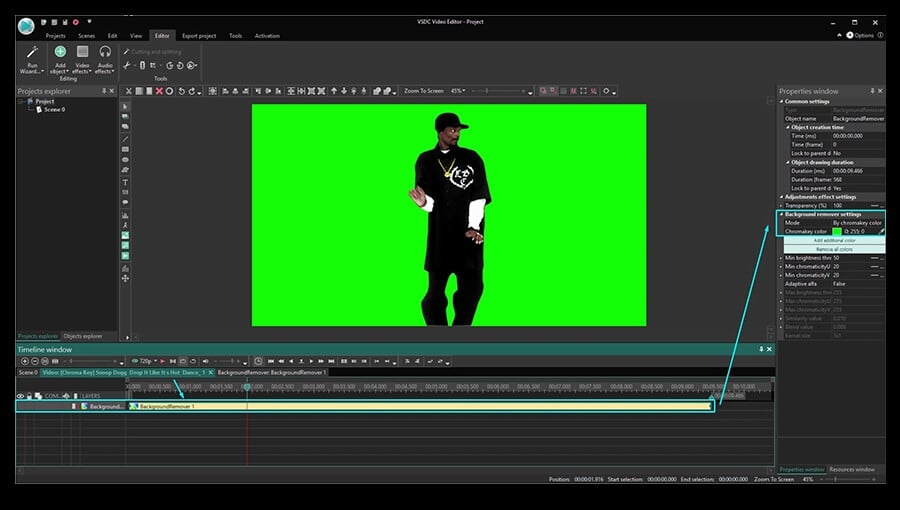
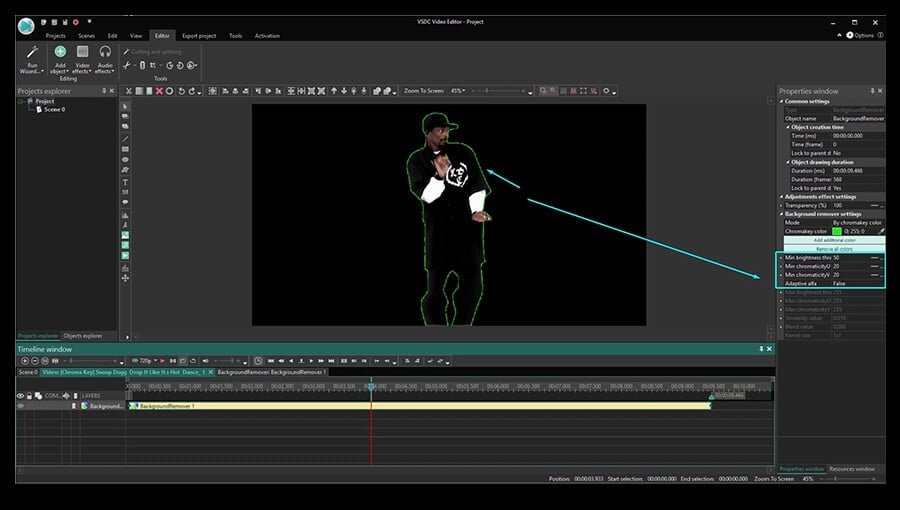
Sometimes even after you remove the background from the video, there is a thin green colored border left around the object. That usually happens when the background color is not even, or the lighting is poor which creates noticeable shades and highlights.
If there is a whole large area that hasn’t been removed, you can use the option called Add additional color. If it’s a thin line around the object, go ahead and adjust the following parameters in the Properties window:
- Min brightness threshold (usually this parameter needs to be increased).
- Min chromaticityU threshold.
- Min chromaticityV threshold (usually this parameter needs to be increased).
There is no universal combination of a perfect setup for this because each video is different. So, we suggest you manually play around with these parameters checking the result in real-time on the working area.
If you’re using VSDC Pro, you can switch to the HSL mode for higher precision. To learn more about HSL, read this tutorial.
How to remove background from a video and replace it with an image
Now we’ve got to the most interesting part – changing the video background. Here is what you need to do:
Step 1: Click back on the Scene 0 tab on the timeline.
Step 2: Click the green round “Add object” button in the top menu.
Step 3: On your PC, choose a video or an image you want to replace the background with.
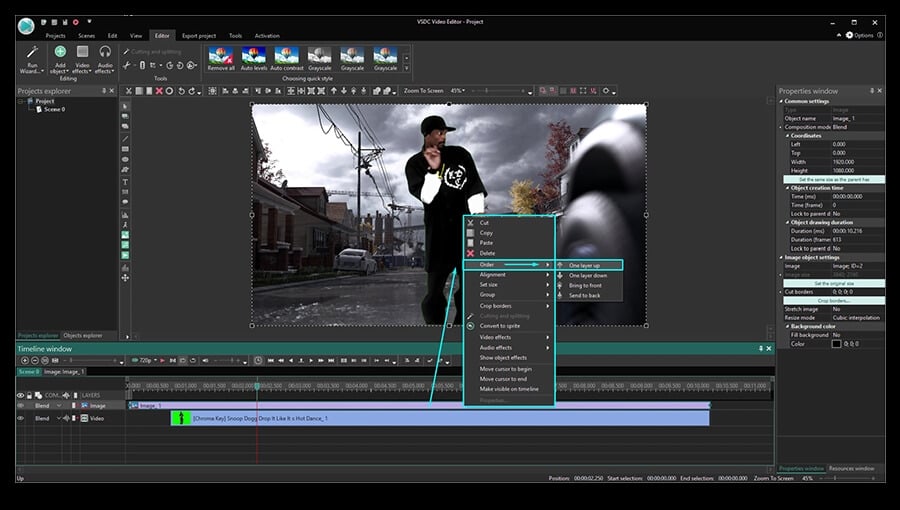
Step 4: When you do that, the new background will be placed in the front of the scene – so right-click on it and choose Order – One layer down.
Step 5: Adjust the result if needed by moving or resizing the objects.
How to remove background from a video with minimum hiccups
The magic of Chroma Key is impressive, especially when you use it for the first time. And to help you make the whole process as smooth as possible, here are three tips:
- Avoid changing the size or the resolution of your original video. If you do that, the neighboring colors may get mixed, and once you remove the background, some objects will get the color tone of the removed background.
- Try to use an evenly coated background and arrange a decent light when shooting. The smoother your video background color is, the easier it will be for the software to detect and remove it entirely.
- The object you’re shooting should have a maximum contrast with the background. In other words, if the background is of green color, avoid wearing green because your clothes are likely to be erased from the video just like the background. Dark colors typically work best, while any color containing green in it might eventually get blended.
If you’d like to learn more about shooting a perfect green screen video on a budget, we talked about it in this green screen software tutorial. You may also find some inspirational ideas for your project there.
Hopefully, this was detailed enough for you to be able to remove the background from the video yourself now. Feel free to message us on Facebook if you have any questions!
And don’t forget to subscribe to our YouTube channel where we share new video editing tricks every week.
Get VSDC Free Video Editor - powerful non-linear editing software with advanced features. Perfect for YouTube creators, social media videos, and professional projects. Learn more about features.
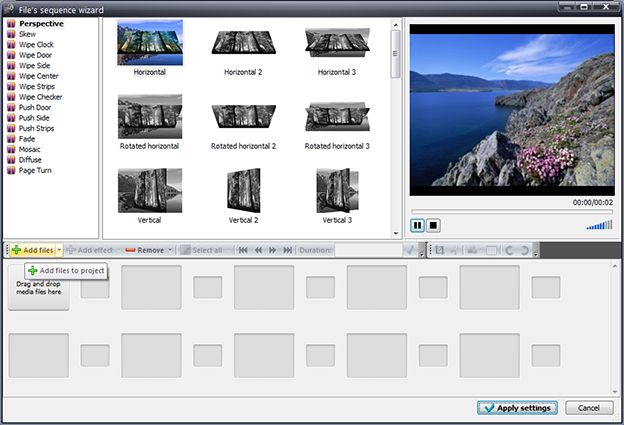
 Download VSDC Free Video Editor for Windows
This program allows you to capture the video of your desktop and save it on your PC in various formats. Coupled with a video editor, the program is a great tool for creating presentations, tutorials and demo videos.

The program captures video from external devices and records it to computer in a free format. You can save video from video tuners, webcams, capture cards and other gadgets.
VSDC Video Editor Reviews & Ratings (Trustpilot, Capterra & Media)
VSDC Free Video Editor is rated 4.5/5 by real users on Trustpilot and Capterra. Here are a few reviews and quotes from creators and tech media.
Overall rating: 4.5/5 based on 200+ reviews on Trustpilot and 89 reviews on Capterra.
★★★★⯪
VSDC Free Video Editor is the best free video editor for Windows I’ve used, from color grading to picture-in-picture and cinematic results.
— Ejikeme Eloka Augustine
Source:Trustpilot
★★★★☆
Easy-to-use interface and quick export to social media make VSDC a versatile video editing tool for everyday projects.
— Karen C., E-Learning
Source:Capterra
★★★★☆
A feature-packed non-linear video editor for Windows that can compete with many paid video editing solutions.
— TechRadar
Source:TechRadar review
★★★★★
The free VSDC editor saved my YouTube channel – a powerful video editing software for chroma key, text effects and picture-in-picture.
— Paul Roberts
Source:Trustpilot
★★★★★
Fast and simple for YouTube videos with green screen, zoom, color tools and creative effects in one app.
— Marie R., Media Production
Source:Capterra
★★★★★
One of the best free video editor options for Windows users, ideal for GoPro, YouTube and family videos.
— VidProMom, YouTube creator
Source:Media reviews
★★★★★
I’ve been using VSDC for years; editing is easy and the final videos look great for my personal and professional projects.
— Long-time VSDC user
Source:Trustpilot
★★★★★
Great value and faster than many other free tools; I quickly create videos for YouTube, Instagram and Facebook with features my audience loves.
— Rabika B., Marketing & Advertising
Source:Capterra
★★★★★
VSDC offers many features you don’t usually find in free editors, including picture-in-picture, stabilization and modern codec support with no watermarks.
— Tech media review
Source:Media reviews
 Like us on Facebook
 Follow us on Twitter
Watch us on YouTube
 / @VSDCFreeVideoEditor
© 2011-2026, www.videosoftdev.com, FLASH-INTEGRO LLC. Privacy policy | Terms of use | About us
All trademarks referenced herein are the sole property of their respective owners.
Copying any materials from this site allowed only with written consent of Site Administration.