 User Help Manual
  Learn FAQ
  Send us feedback


Video Editor
Download and use the free video software to create and edit videos of any complexity from a family greeting card to a company presentation. Apply vsdc free video editor for light edit hdr-video, any raw-video formats from cams - BRAW, ProRes RAW, any high resolution 4k or more due to video proxies technologies in the editor.
Cut, merge video files, apply visual and audio effects, use filtration and image correction, make slideshows and add an appropriate soundtrack. Use multi-color Chroma Key and advanced parameters settings to give your video a professional look.
All popular video and audio formats are supported.
Video Converter
This program is intended for converting video files from one format to another. Nearly all popular video formats are supported (both reading and saving). In addition, the program drastically simplifies the task of converting videos for playback on specific multimedia devices, such as iPhone, Samsung Galaxy or Huawei P30 Pro. The program is extremely easy to use, has a modern interface and all necessary video processing functions.
Audio Converter
The audio converter will help you convert audio files from one format to another. All key audio formats and codecs are supported. The program also allows you to manage playlists and meta tags, extract audio from video files and save these tracks on your computer in any format.
Animated Intro & Title Templates
Explore the VSDC Template Store with ready-made video templates for intros, animated titles, lower thirds, logo reveals, slideshows, glitch transitions, LUTs, and color grading presets. Drop a template into the VSDC Video Editor timeline, edit text, timing, and colors, and finish professional video projects in minutes.
Choose from 300+ exclusive packs of video transitions, LUT packs, text effects, GPS telemetry widgets, animated elements, and animated backgrounds for VSDC. All templates are fully customizable, support up to 4K resolution in 16:9, and help you build intros, wedding slideshows, travel videos, and tutorials much faster.
VSDC Cloud - Online video management
Keep your work safe, organized and always accessible! Back up your video projects, store media files online and access them from any device. Enjoy collaboration, share project updates and exchange files easily.
 Video Editor
 Video Converter
 Audio Tools
 Templates store
 Cloud
Cloud

Multifunctionality
A wide array of multimedia processing tools in one free video software suite.

High speed
Our programs use fast
and high-quality algorithms optimized for single and multi-core CPU’s.

Affordability
VSDC video software is freely available for download to Windows OS-based PCs and laptops.
News:
- Published by Amy Shao on June 30, 2026 Meet the new major update ...
- Published by Amy Shao on March 11, 2026 What is the best gift for...
- published Amy Shao 11/19/25 Meet the long-awaited VSDC 10.2 update: a new ve...
- Hi, I'm Mattea Wharton, a travel videographer from Seattle. For three years I ba...
VSDC 7.1 Upgrades GUI and LUT Editor, Adds New Effects and Custom Shortcuts
The new version of VSDC includes two new video effects, expands the functionality of the LUT editor, and makes video editing more convenient by bringing an improved interface, optimized timeline, and custom shortcuts.
Let’s have a look at each update in more detail.
 DOWNLOAD VSDC 7.1
Matrix effect (PRO)
The Matrix video effect has become available in the list of Special FX so that now you can replicate the raining code from the famous movie trilogy. As you would expect, the effect is fully customizable: you’ll be able to decide whether you want it to consist of alphabet letters or runes; how frequently the symbols should be changing, and how fast they should be falling. On top of that, you can work with the background and foreground ‘layers’ which adds depth to the effect.
Color twist effect
The Color twist effect from the Adjustments menu has been updated and included in the Basic effects window for easier access. As the name suggests, it allows you to adjust colors in the footage by working directly with the GRB color channels and changing tone values for each component. In many scenarios, the purpose of the Color Twist effect is similar to the LUT editor – however, the former option will be much easier to use for basic tasks. For example, you can quickly change cool color tones to warm color tones, create color inversion, and so on.
LUT editor upgrade
The LUT editor has become more versatile, as it now allows for performing color correction of the same object in stages. At each stage, you’ll be able to define a scope of color tones you’re working with and set the desired Hue, Saturation, and Lightness values for them. In other words, if you need to perform correction of several different color tones, there’s no need to use the same histogram – you can create a separate stage for each tone, which is way more convenient.
On top of that, it’s now possible to view color scopes and histograms for each separate scene or object. Finally, you’ll be able to apply fade-in transitions to LUTs and use adjustments for brightness, contrast, gamma, temperature, and saturation values.
Optimized GUI and timeline
In addition to the user interface enhancements, there’s been a series of minor functional improvements as well. For example, you can now quickly trim videos by grabbing side handlers and dragging them inwards.
To streamline the editing process, we’ve also added a storyboard and a simplified version of an audio waveform to the pop-up Cutting and splitting window. If you were looking for a more precise tool to edit videos to the beat in the free version, this might be the best solution for your needs.
Finally, the timeline has received 3 new scrolling modes to help you better control the playhead position when previewing a scene at an increased timeline scale.
Here are the names of the new timeline scrolling modes:
- Fixed smooth scrolling
- Adaptive smooth scrolling
- Scrolling from the timeline center
To switch between them, open the Options menu in the top right corner of the editor’s interface and proceed to Timeline options.
Custom shortcuts
The ability to create custom shortcuts is a long-awaited feature, and we’re excited to finally announce its release. Although VSDC has been supporting a list of commonly used shortcuts for a few years now, the freedom to create your own hotkey combinations will make the editing process more convenient for creators.
To get started, open the general settings, type the desired hotkey combination, and select the action you want to associate it with. If you change your mind, you can always restore the default shortcut scheme.
Subtitle markdown
Those using subtitles in videos can now take advantage of a markdown. Markdown is a feature that automatically creates markers for each subsequent line of subtitles that appears in the scene. To activate the markdown, upload the file with subtitles to the editor, select it on the timeline, and click Add markers in the Properties window. This way, you’ll be able to see each moment on the timeline when subtitles appear and align other objects if needed.
It’s time to download VSDC 7.1
Without further ado, we suggest that you download the latest version of VSDC and see all the updates with your own eyes. Got any questions? Email us at This email address is being protected from spambots. You need JavaScript enabled to view it. or leave a comment under the release video on our channel.
DOWNLOAD VSDC 7.1


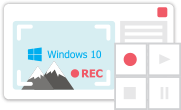
This program allows you to capture the video of your desktop and save it on your PC in various formats. Coupled with a video editor, the program is a great tool for creating presentations, tutorials and demo videos.

The program captures video from external devices and records it to computer in a free format. You can save video from video tuners, webcams, capture cards and other gadgets.
VSDC Video Editor Reviews & Ratings (Trustpilot, Capterra & Media)
VSDC Free Video Editor is rated 4.5/5 by real users on Trustpilot and Capterra. Here are a few reviews and quotes from creators and tech media.
Overall rating: 4.5/5 based on 200+ reviews on Trustpilot and 89 reviews on Capterra.
★★★★⯪
VSDC Free Video Editor is the best free video editor for Windows I’ve used, from color grading to picture-in-picture and cinematic results.
— Ejikeme Eloka Augustine
Source:Trustpilot
★★★★☆
Easy-to-use interface and quick export to social media make VSDC a versatile video editing tool for everyday projects.
— Karen C., E-Learning
Source:Capterra
★★★★☆
A feature-packed non-linear video editor for Windows that can compete with many paid video editing solutions.
— TechRadar
Source:TechRadar review
★★★★★
The free VSDC editor saved my YouTube channel – a powerful video editing software for chroma key, text effects and picture-in-picture.
— Paul Roberts
Source:Trustpilot
★★★★★
Fast and simple for YouTube videos with green screen, zoom, color tools and creative effects in one app.
— Marie R., Media Production
Source:Capterra
★★★★★
One of the best free video editor options for Windows users, ideal for GoPro, YouTube and family videos.
— VidProMom, YouTube creator
Source:Media reviews
★★★★★
I’ve been using VSDC for years; editing is easy and the final videos look great for my personal and professional projects.
— Long-time VSDC user
Source:Trustpilot
★★★★★
Great value and faster than many other free tools; I quickly create videos for YouTube, Instagram and Facebook with features my audience loves.
— Rabika B., Marketing & Advertising
Source:Capterra
★★★★★
VSDC offers many features you don’t usually find in free editors, including picture-in-picture, stabilization and modern codec support with no watermarks.
— Tech media review
Source:Media reviews
 Like us on Facebook
 Follow us on Twitter
Watch us on YouTube
 / @VSDCFreeVideoEditor
© 2011-2026, www.videosoftdev.com, FLASH-INTEGRO LLC. Privacy policy | Terms of use | About us
All trademarks referenced herein are the sole property of their respective owners.
Copying any materials from this site allowed only with written consent of Site Administration.