


Editor de vídeo
Use o editor de vídeo gratuito para criação e edição de vídeos de qualquer complexidade. Corte vídeos, aplique efeitos visuais e de áudio, use filtros e correção de imagem, faça apresentações de slides, adicione uma trilha sonora. Use Chroma Key e outras funções avançadas. Todos os formatos populares são suportados.
Conversor de vídeo
Converta vídeo de um formato para outro. Todos os formatos de vídeo mais populares são suportados - AVI, MOV, QT, MP4, M4V, MPEG, WMV, FLV, MKV, RealVideo (RM e RMVB), 3GP e 3G2. Prepare seus arquivos multimídia para reprodução instantânea em qualquer formato e em qualquer dispositivo.
Conversor de áudio
Converta arquivos de áudio de um formato para outro. Todos os principais formatos e codecs de áudio suportados. Você também pode gerenciar listas de reprodução e meta tags, extrair o áudio de arquivos de vídeo e salvar faixas em seu dispositivo em qualquer formato.
Animated Intro & Title Templates
Explore the VSDC Template Store with ready-made video templates for intros, animated titles, lower thirds, logo reveals, slideshows, glitch transitions, LUTs, and color grading presets. Drop a template into the VSDC Video Editor timeline, edit text, timing, and colors, and finish professional video projects in minutes.
Choose from 300+ exclusive packs of video transitions, LUT packs, text effects, GPS telemetry widgets, animated elements, and animated backgrounds for VSDC. All templates are fully customizable, support up to 4K resolution in 16:9, and help you build intros, wedding slideshows, travel videos, and tutorials much faster.
VSDC Cloud - Online video management
Keep your work safe, organized and always accessible! Back up your video projects, store media files online and access them from any device. Enjoy collaboration, share project updates and exchange files easily.
 Editor de vídeo
 Conversor de vídeo
 Conversor de áudio
 Templates store
 Cloud
Cloud

Multifuncionalidade
Uma ampla gama de ferramentas de processamento multimídia em um pacote de software de vídeo gratuito.

Alta velocidade
Algoritmos de nossos programas são rápidos e otimizados para CPU de núcleo único e múltiplos núcleos.

Disponibilidade
VSDC está disponível gratuitamente para PCs e laptops com sistema operacional Windows.
News:
- Publicado por Amy Shao em 30 de junho de 2026 Conheça a nova atua...
- Publicado por Amy Shao em 11 de março de 2026 Qual é o melhor pre...
- publicado por Amy Shao 19/11/25 Conheça a tão aguardada atualização VSDC 10....
- Olá, eu sou Mattea Wharton, videomaker de viagens de Seattle. Durante três anos ...
Como usar as configurações avançadas do VSDC Video Editor?
As configurações avançadas disponíveis na versão Pro do programa estão listadas neste artigo, juntamente com instruções sobre como utilizá-las.
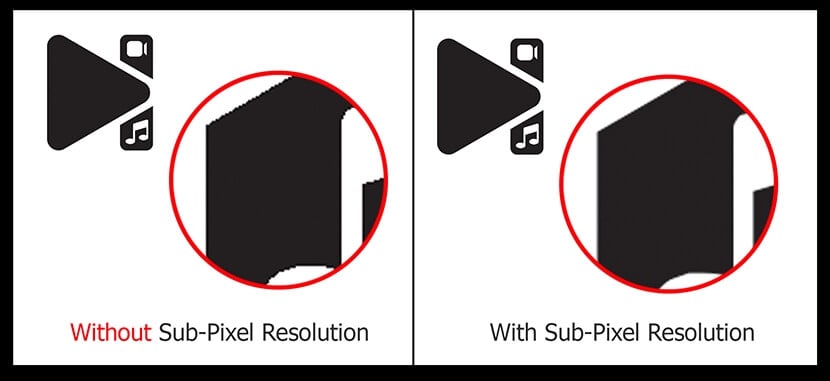
1. Resolução avançada de subpixels
O programa utiliza esse algoritmo ao aplicar vários efeitos de rotação e movimento nos quais pode ocorrer alguma perda de informação conhecida como aliasing. Ele remove o aliasing e aprimora a resolução de imagens digitais.
2. Redimensionamento
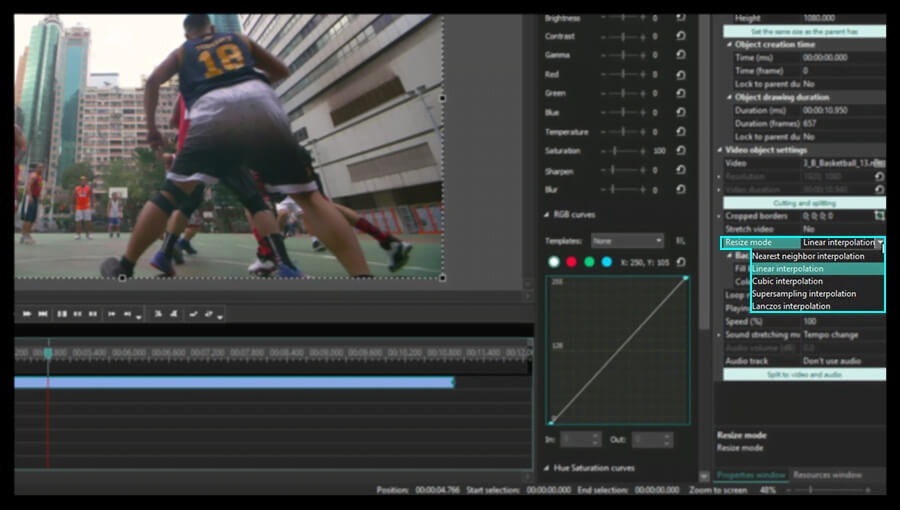
Ao colocar um vídeo ou um arquivo de imagem na cena, mantendo a resolução original, você evita a perda de qualidade da imagem. Toda vez que redimensiona a imagem para que ocupe apenas parte da tela, perde sua qualidade. Métodos avançados de redimensionamento, como interpolação de vizinho mais próximo, interpolação cúbica, interpolação de supersampling e interpolação de Lanczos, estão integrados na versão Pro do programa. Para aplicá-los à sua imagem, siga estas etapas:
- Abra seu arquivo no programa Como abrir arquivo de vídeo ou imagem para edição
- Selecione a posição e o tamanho do objeto na cena. Clique no botão esquerdo do mouse e, mantendo-o pressionado, ajuste o tamanho do objeto e, em seguida, solte o botão do mouse.
- Clique no arquivo adicionado na linha do tempo para abrir a aba de Propriedades.
- Encontre a linha de modo de redimensionamento entre os parâmetros disponíveis e selecione o método apropriado no menu suspenso.
3. Forma de onda de áudio
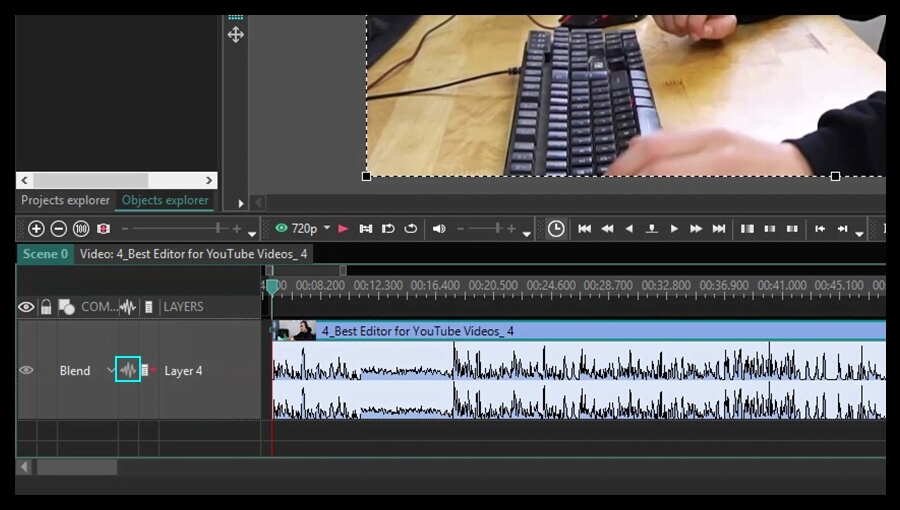
Se o seu vídeo contém uma faixa de áudio, apenas a versão Pro do programa permite que você mostre a forma de onda de áudio clicando no ícone correspondente na linha do tempo. Isso pode ser muito útil ao cortar alguns fragmentos de áudio ou ao aplicar efeitos de áudio disponíveis. Essa funcionalidade ajuda a processar o áudio facilmente com assistência visual. Para ver a forma de onda de áudio do vídeo carregado, clique no ícone apropriado na linha do tempo e selecione "Mostrar forma de onda" no menu suspenso.
4. Chroma key avançado
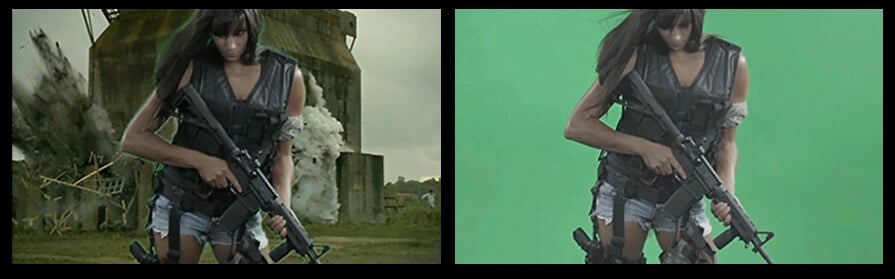
A opção Chroma key permite que você remova o fundo do seu vídeo ou foto e o substitua por um novo. Essa técnica consiste em tornar transparentes as cores selecionadas. A versão gratuita do programa oferece a opção Chroma key baseada em apenas uma cor, mas a versão Pro permite remover um número ilimitado de cores do fundo da imagem. Vamos ver como funciona.
- Abra seu arquivo no programa (Como abrir arquivo de vídeo ou imagem para edição) e coloque-o na cena.
- Clique no arquivo na linha do tempo e vá para a aba Editor.
- Clique no botão Efeitos de vídeo e selecione Transparência > Removedor de fundo.
- Ajuste a posição e a duração do efeito selecionado.
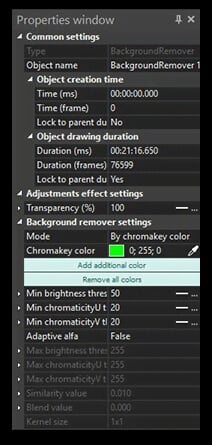
- Abra a aba de Propriedades para ajustar os parâmetros do efeito.
- Clique no ícone Picker próximo ao campo de cor do Chromakey para selecionar uma cor a ser removida.
- Use Adicionar cor adicional para selecionar mais cores.
- Configure outros parâmetros disponíveis para obter o melhor resultado: defina o valor True do Adaptive alfa, defina os limiares de brilho mínimo/máximo, limiares de cromaticidade mínimo/máximo, Similaridade e valores de Mistura. Aumente o parâmetro Tamanho do kernel para aumentar a eficiência da sua edição.
- Adicione um arquivo de imagem para um novo fundo. Clique nele na linha do tempo, vá para a aba Editar e clique no botão Para frente.
5. Aceleração de hardware
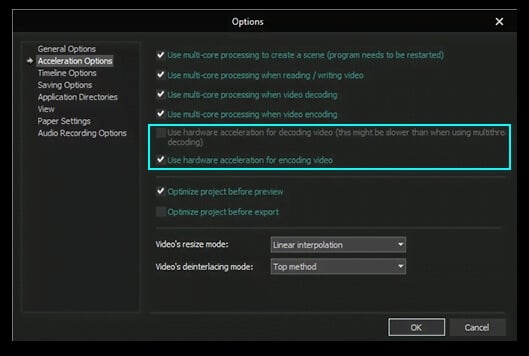
Esta funcionalidade será muito útil para quem trabalha com vídeo em HD. Não há dúvida de que vídeos em HD têm um tamanho grande e seu processamento pode ser demorado. A versão Pro do programa pode tratar arquivos HD utilizando a capacidade da placa de vídeo, apenas se a sua placa de vídeo oferecer suporte, para que a decodificação e codificação dos dados de vídeo ocorram mais rapidamente.
Para ativar essa opção, vá para as opções do programa e marque as caixas correspondentes na categoria Opções de Aceleração.
6. Movimento do objeto
Às vezes, é necessário criar um vídeo com objetos em movimento. A versão Pro do programa pode criar não apenas movimento de um ponto para outro, mas um movimento ao longo de uma spline e através de um conjunto de pontos selecionados.
- Abra seu arquivo no programa (Como abrir arquivo de vídeo ou imagem para edição) e coloque-o na cena.
- Adicione um objeto Sprite usando o botão correspondente na barra de ferramentas, que conterá o efeito de Movimento e um objeto móvel em si.
 O cursor assumirá a forma de mira, permitindo que você especifique a posição de um novo objeto na cena. Você verá um quadrado preto representando uma posição inicial, que pode ser substituído por uma imagem mais tarde.
 - Dê um duplo clique na linha Sprite na linha do tempo.
- Adicione o efeito de Movimento usando o botão
 correspondente na barra de ferramentas ou clicando no botão Adicionar objeto na aba Editor e selecionando a opção Movimento no menu.
 - Indique a posição final do objeto na tela, arrastando o ponto inicial para uma nova posição com o mouse. Esse efeito será exibido na cena como um vetor, que intercruza os centros do objeto em suas posições inicial e final.
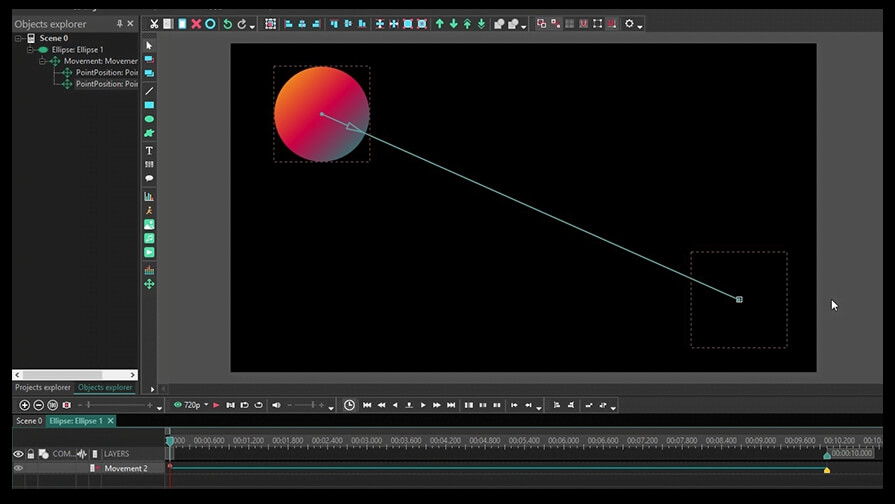
- Clique no ícone Ponto de início ou Ponto final que apareceu na linha do tempo para configurar seus parâmetros na aba de Propriedades.
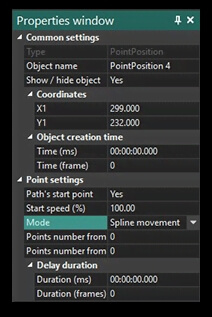
Primeiro, selecione o valor True no campo Ponto de início do Caminho. Em seguida, altere o tipo de Modo, se necessário.
- Para criar uma trajetória mais complexa, clique novamente no botão Movimento e continue a trajetória colocando o próximo ponto na cena.
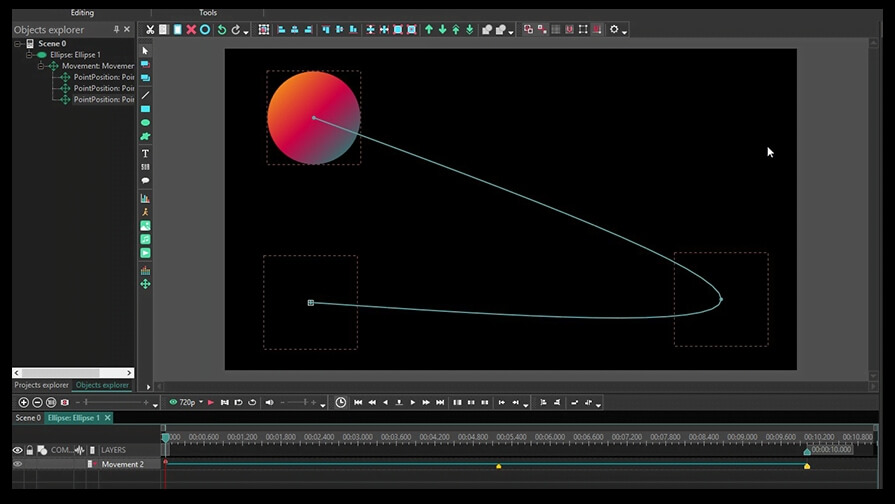
- Adicione uma imagem ou um vídeo usando os botões correspondentes na barra de ferramentas e coloque-o no lugar do quadrado preto na cena.
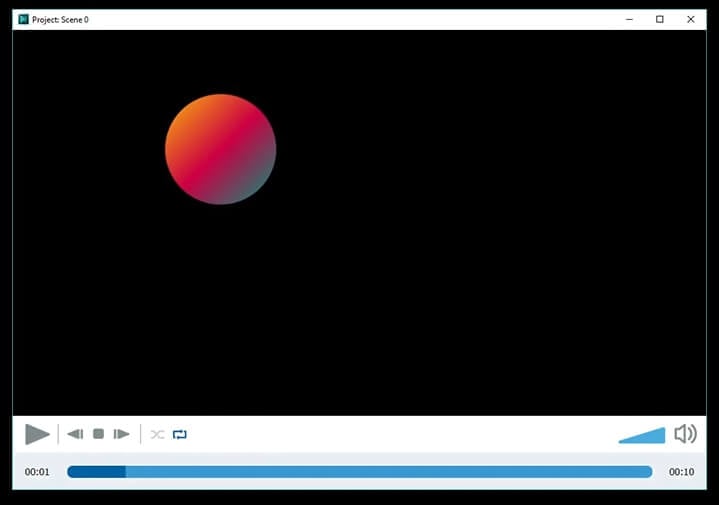
- Use a visualização para ver o resultado da sua edição.
Obtenha o VSDC Free Video Editor - software de edição de vídeo poderoso com recursos avançados. Perfeito para criadores do YouTube, vídeos para redes sociais e projetos profissionais. Saiba mais sobre os recursos.




Ferramenta de captura de sua Área de Trabalho, que lhe permite salvar essa captura em um arquivo de vídeo e processar no editor.

Um programa para capturar vídeo de dispositivos externos. Você pode salvar o vídeo de sintonizadores de vídeo, câmeras web, placas de captura e outros dispositivos.
VSDC Video Editor Reviews & Ratings (Trustpilot, Capterra & Media)
VSDC Free Video Editor is rated 4.5/5 by real users on Trustpilot and Capterra. Here are a few reviews and quotes from creators and tech media.
Overall rating: 4.5/5 based on 200+ reviews on Trustpilot and 89 reviews on Capterra.
★★★★⯪
VSDC Free Video Editor is the best free video editor for Windows I’ve used, from color grading to picture-in-picture and cinematic results.
— Ejikeme Eloka Augustine
Source:Trustpilot
★★★★☆
Easy-to-use interface and quick export to social media make VSDC a versatile video editing tool for everyday projects.
— Karen C., E-Learning
Source:Capterra
★★★★☆
A feature-packed non-linear video editor for Windows that can compete with many paid video editing solutions.
— TechRadar
Source:TechRadar review
★★★★★
The free VSDC editor saved my YouTube channel – a powerful video editing software for chroma key, text effects and picture-in-picture.
— Paul Roberts
Source:Trustpilot
★★★★★
Fast and simple for YouTube videos with green screen, zoom, color tools and creative effects in one app.
— Marie R., Media Production
Source:Capterra
★★★★★
One of the best free video editor options for Windows users, ideal for GoPro, YouTube and family videos.
— VidProMom, YouTube creator
Source:Media reviews
★★★★★
I’ve been using VSDC for years; editing is easy and the final videos look great for my personal and professional projects.
— Long-time VSDC user
Source:Trustpilot
★★★★★
Great value and faster than many other free tools; I quickly create videos for YouTube, Instagram and Facebook with features my audience loves.
— Rabika B., Marketing & Advertising
Source:Capterra
★★★★★
VSDC offers many features you don’t usually find in free editors, including picture-in-picture, stabilization and modern codec support with no watermarks.
— Tech media review
Source:Media reviews
 Like us on Facebook
 Follow us on Twitter
Watch us on YouTube
 / @VSDCFreeVideoEditor
© 2011-2026, www.videosoftdev.com, FLASH-INTEGRO LLC. Política de privacidade | Termos de uso | Sobre nós
Todas as marcas comerciais mencionadas neste documento são de propriedade exclusiva de seus respectivos proprietários.
A cópia de qualquer material deste site é permitida apenas com o consentimento por escrito da Administração do Site.