


Editor de vídeo
Use o editor de vídeo gratuito para criação e edição de vídeos de qualquer complexidade. Corte vídeos, aplique efeitos visuais e de áudio, use filtros e correção de imagem, faça apresentações de slides, adicione uma trilha sonora. Use Chroma Key e outras funções avançadas. Todos os formatos populares são suportados.
Conversor de vídeo
Converta vídeo de um formato para outro. Todos os formatos de vídeo mais populares são suportados - AVI, MOV, QT, MP4, M4V, MPEG, WMV, FLV, MKV, RealVideo (RM e RMVB), 3GP e 3G2. Prepare seus arquivos multimídia para reprodução instantânea em qualquer formato e em qualquer dispositivo.
Conversor de áudio
Converta arquivos de áudio de um formato para outro. Todos os principais formatos e codecs de áudio suportados. Você também pode gerenciar listas de reprodução e meta tags, extrair o áudio de arquivos de vídeo e salvar faixas em seu dispositivo em qualquer formato.
Animated Intro & Title Templates
Explore the VSDC Template Store with ready-made video templates for intros, animated titles, lower thirds, logo reveals, slideshows, glitch transitions, LUTs, and color grading presets. Drop a template into the VSDC Video Editor timeline, edit text, timing, and colors, and finish professional video projects in minutes.
Choose from 300+ exclusive packs of video transitions, LUT packs, text effects, GPS telemetry widgets, animated elements, and animated backgrounds for VSDC. All templates are fully customizable, support up to 4K resolution in 16:9, and help you build intros, wedding slideshows, travel videos, and tutorials much faster.
VSDC Cloud - Online video management
Keep your work safe, organized and always accessible! Back up your video projects, store media files online and access them from any device. Enjoy collaboration, share project updates and exchange files easily.
 Editor de vídeo
 Conversor de vídeo
 Conversor de áudio
 Templates store
 Cloud
Cloud

Multifuncionalidade
Uma ampla gama de ferramentas de processamento multimídia em um pacote de software de vídeo gratuito.

Alta velocidade
Algoritmos de nossos programas são rápidos e otimizados para CPU de núcleo único e múltiplos núcleos.

Disponibilidade
VSDC está disponível gratuitamente para PCs e laptops com sistema operacional Windows.
News:
- Publicado por Amy Shao em 30 de junho de 2026 Conheça a nova atua...
- Publicado por Amy Shao em 11 de março de 2026 Qual é o melhor pre...
- publicado por Amy Shao 19/11/25 Conheça a tão aguardada atualização VSDC 10....
- Olá, eu sou Mattea Wharton, videomaker de viagens de Seattle. Durante três anos ...
Como clonar você mesmo em um vídeo com VSDC
Quer se clonar em um vídeo? Neste tutorial, mostraremos como fazer isso usando VSDC Pro - um editor de vídeo leve para PC com Windows.
O efeito clone é bastante popular entre os cineastas de Hollywood e YouTubers criativos. O principal recurso necessário para realizar esse truque é o mascaramento de vídeo. O problema é que a maioria dos editores de vídeo com um recurso de mascaramento decente vai custar um braço e uma perna, enquanto o VSDC Pro é a opção mais acessível que existe. Todo o conjunto de recursos está disponível por apenas $19,99 por ano e funciona mesmo se você tiver 2 GB de RAM no PC.
Confira o tutorial abaixo para ver como é fácil clonar alguém em um vídeo, mesmo se você não for um profissional.
Pronto para replicar o efeito? Baixe VSDC agora.
Dicas para gravar seu primeiro vídeo com um clone
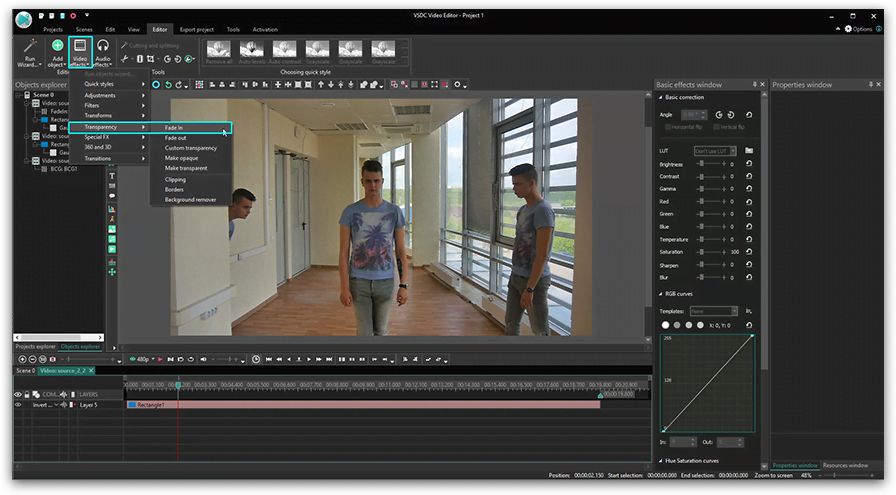
A ideia é muito simples. Você tira várias fotos da mesma pessoa em posições diferentes usando o mesmo ângulo de tiro. Em seguida, sobrepõe essas fotos usando máscara de vídeo. Como resultado, a pessoa aparece em várias posições simultaneamente.
Para que essa ilusão funcione bem, é crucial gravar sua filmagem usando o mesmo ângulo. Isso significa que a câmera deve permanecer no mesmo local até que você termine. Na verdade, pode seguir nosso exemplo do vídeo acima e gravar um vídeo em uma tomada para que você não precise nem tocar na câmera.
Também é necessário manter alguma distância entre os “clones” quando eles aparecem simultaneamente no vídeo. Idealmente, você deseja encontrar algum tipo de separador de espaço e mantê-lo em mente ao planejar onde cada “clone” será localizado. Para nosso exemplo, usamos a porta como separador. Observe que quando os dois clones aparecem no vídeo, eles não cruzam a fronteira imaginária — eles ficam à direita ou à esquerda.
Se você seguir essas dicas de filmagem, a montagem será rápida, mesmo se você for um novato em edição de vídeo.
Como se clonar em um vídeo: tutorial passo a passo
Inicie o VSDC e faça upload da sua filmagem usando o botão Importar conteúdo na tela inicial. No nosso caso, é um vídeo de uma única cena, então precisamos cortar as partes indesejadas primeiro.
Passo 1. Localize a filmagem na linha do tempo
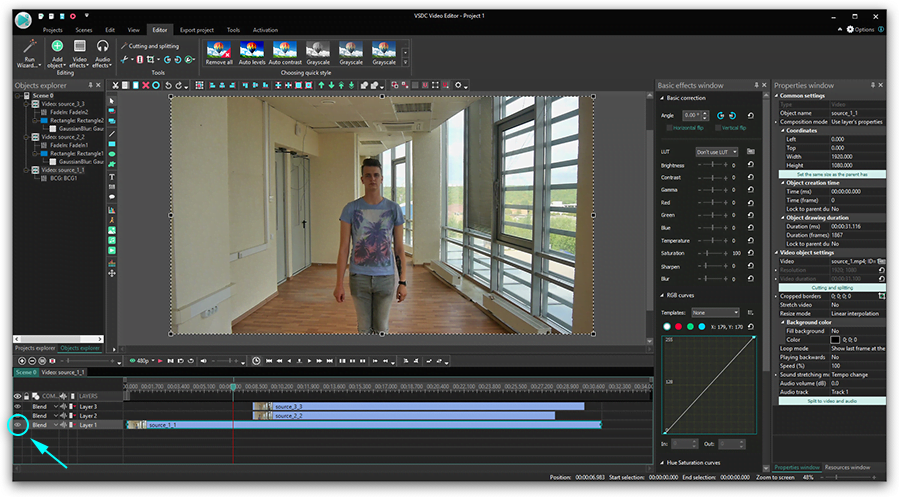
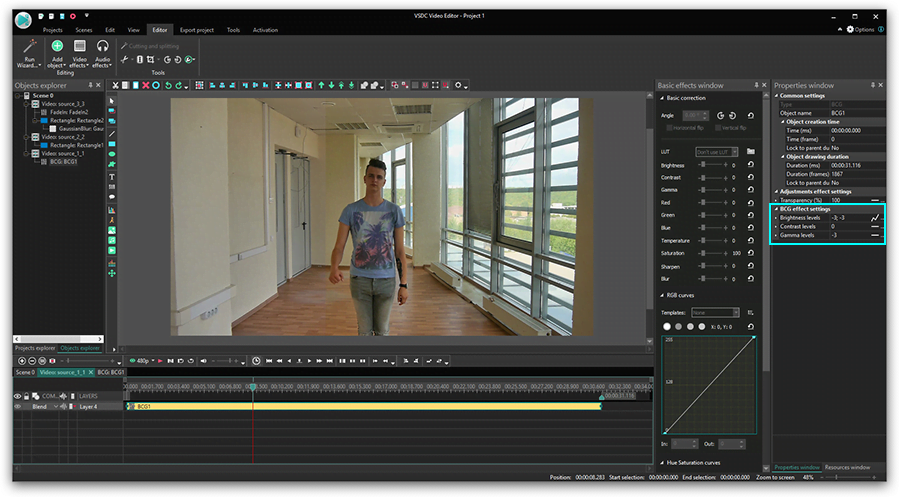
A primeira etapa é colocar a filmagem na linha do tempo corretamente. Estaremos trabalhando com três peças, mas você pode ter quantas quiser. A ideia é simples: você precisa sobrepor vídeos com clones na linha do tempo.
Observe que cada vídeo subsequente contendo outra aparência de clone deve ser colocado uma camada abaixo e começar antes que a anterior termine. Para obter uma visualização rápida de como será o resultado quando os dois clones aparecerem no vídeo, use o controle Opacidade na parte superior.
Passo 2. Separe a área com um clone
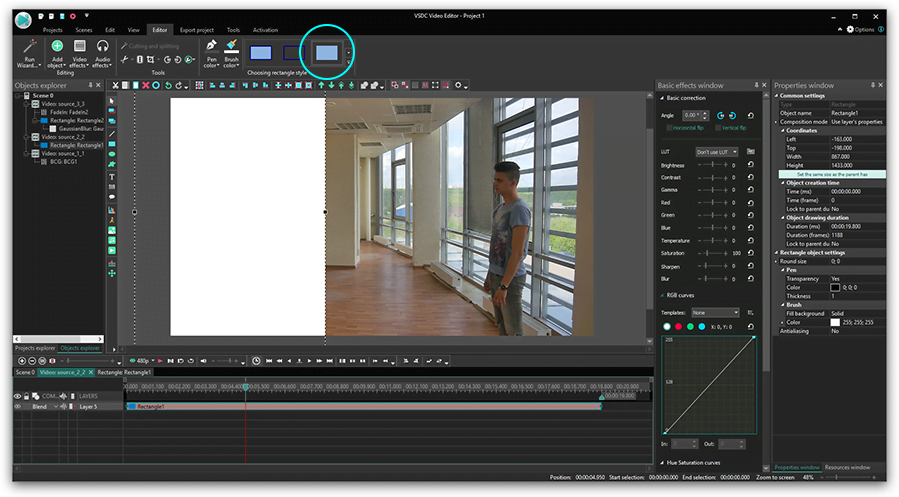
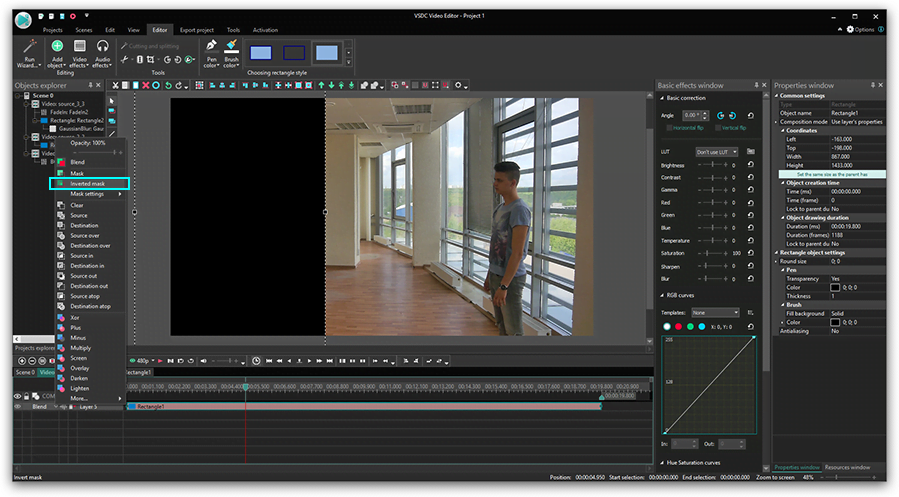
Para fazer com que os dois clones apareçam no vídeo, você precisará aplicar uma máscara invertida a um deles. A maneira mais fácil de fazer isso é mascarar toda a área com um clone e torná-la visível por meio de outro vídeo. No nosso caso, essa é a área à esquerda da porta. Lembra que dissemos que é conveniente ter um separador visual no vídeo? É exatamente aí que se torna útil.
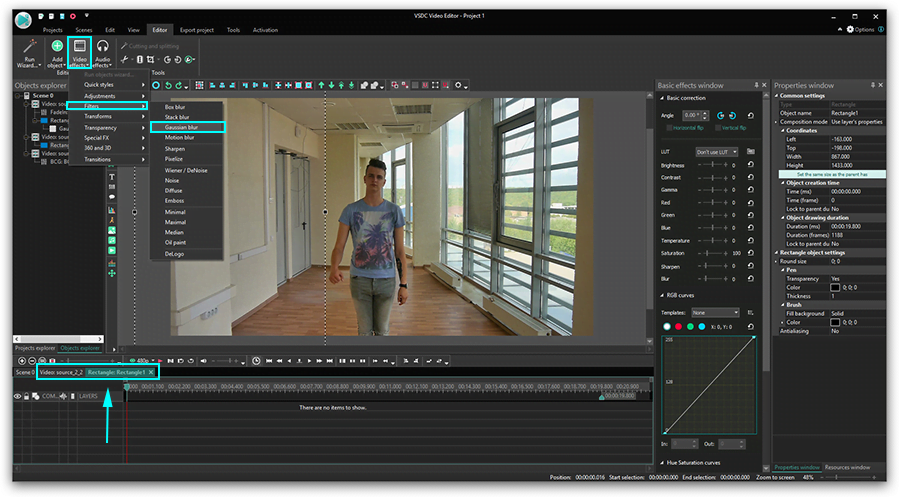
Antes de começar a aplicar a máscara, faça um corte exatamente onde os vídeos se sobrepõem, porque você só deseja criar uma máscara para a peça sobreposta.

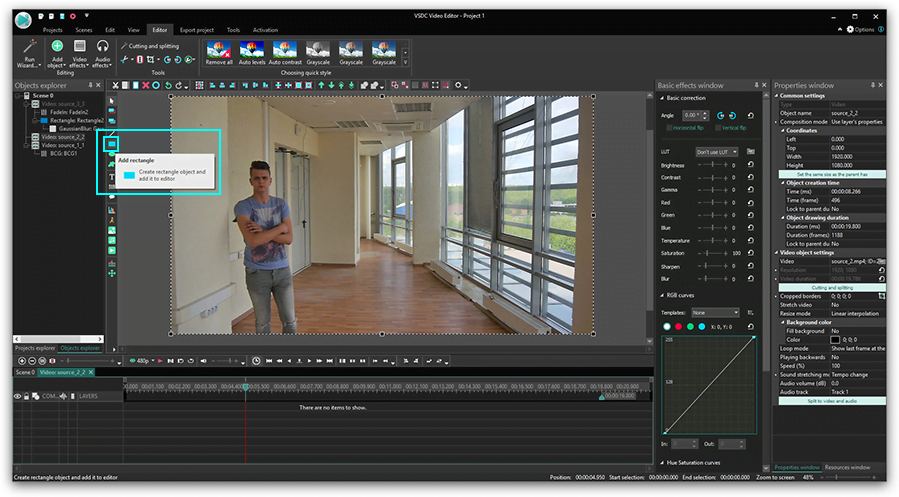
Depois de cortar a peça desejada, clique duas vezes nela. Selecione a ferramenta Forma livre no menu do lado esquerdo e contorne a área à esquerda da porta.
Passo 3. Aplique máscara
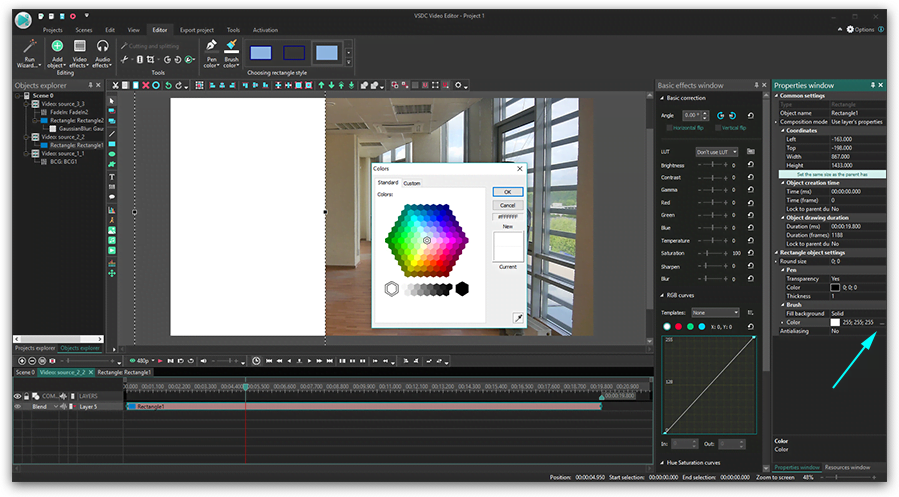
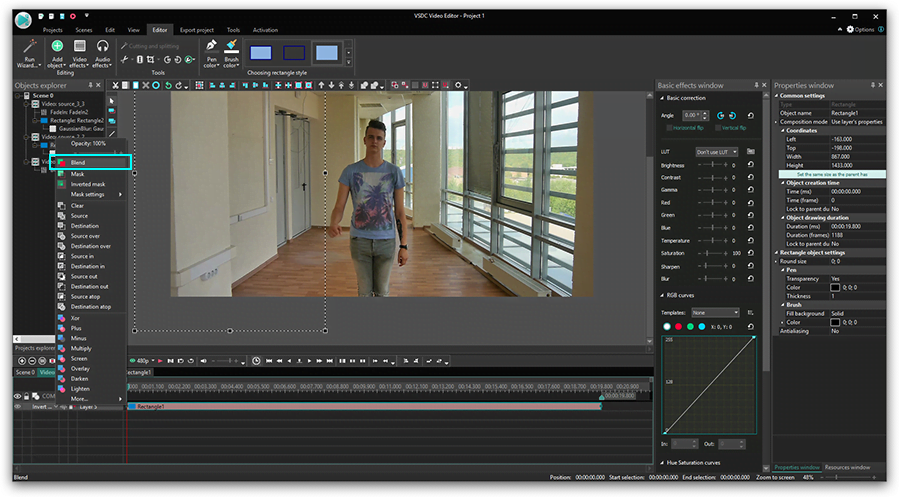
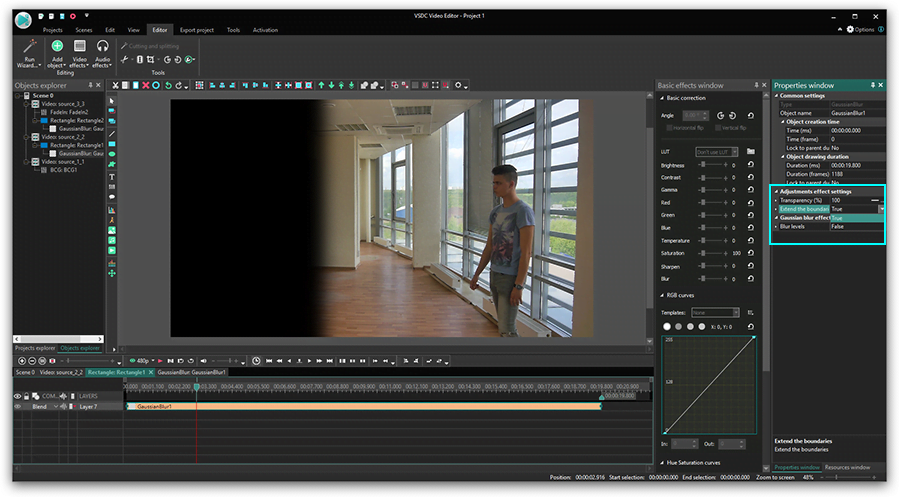
Pinte a área contornada de preto e abra o menu do Modo de mesclagem. Selecione Máscara invertida na lista. Em seguida, volte para a guia principal da linha do tempo e, para o fragmento de vídeo em que está trabalhando, selecione a opção chamada Usar propriedades da camada - na janela Propriedades do lado direito.

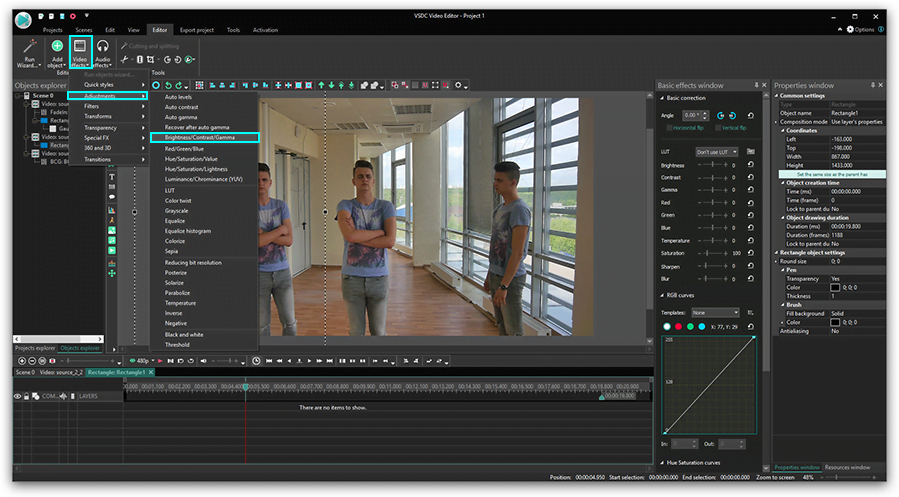
Use o Modo de visualização para ver o resultado. Em seguida, vá para a segunda parte da filmagem, localizada na mesma camada. A área não mudou, duplique a máscara que você criou um minuto atrás usando Ctrl + C e Ctrl + V. Lembre-se de pintar a forma livre de preto, aplique a Máscara invertida a ela. Selecione a opção Usar propriedades da camada.
Repita suas ações quantas vezes forem necessárias.
Clonar-se em um vídeo é mais fácil do que parece
Recomendamos começar com apenas dois clones em um vídeo para você ter uma noção da técnica de mascaramento. Depois de entender o conceito, você poderá clonar a si mesmo em um vídeo quantas vezes quiser.
Dica bônus. Se você não está absolutamente pronto para desembolsar $19,99 pela versão Pro do VSDC, você pode clonar-se em um vídeo usando o removedor de plano de fundo gratuito disponível no VSDC. Grave-se na frente de um fundo verde e, em seguida, remova o fundo usando Chroma Key, corte a filmagem em partes onde você estiver em diferentes locais da cena e sobreponha-as. Essa abordagem vai exigir um pouco mais de seu tempo e esforço, mas é uma ótima opção de orçamento zero.
Pronto para continuar aprendendo? Confira este tutorial de efeito clone de quadro gratuito:
 Descarregar VSDC agora



Ferramenta de captura de sua Área de Trabalho, que lhe permite salvar essa captura em um arquivo de vídeo e processar no editor.

Um programa para capturar vídeo de dispositivos externos. Você pode salvar o vídeo de sintonizadores de vídeo, câmeras web, placas de captura e outros dispositivos.
VSDC Video Editor Reviews & Ratings (Trustpilot, Capterra & Media)
VSDC Free Video Editor is rated 4.5/5 by real users on Trustpilot and Capterra. Here are a few reviews and quotes from creators and tech media.
Overall rating: 4.5/5 based on 200+ reviews on Trustpilot and 89 reviews on Capterra.
★★★★⯪
VSDC Free Video Editor is the best free video editor for Windows I’ve used, from color grading to picture-in-picture and cinematic results.
— Ejikeme Eloka Augustine
Source:Trustpilot
★★★★☆
Easy-to-use interface and quick export to social media make VSDC a versatile video editing tool for everyday projects.
— Karen C., E-Learning
Source:Capterra
★★★★☆
A feature-packed non-linear video editor for Windows that can compete with many paid video editing solutions.
— TechRadar
Source:TechRadar review
★★★★★
The free VSDC editor saved my YouTube channel – a powerful video editing software for chroma key, text effects and picture-in-picture.
— Paul Roberts
Source:Trustpilot
★★★★★
Fast and simple for YouTube videos with green screen, zoom, color tools and creative effects in one app.
— Marie R., Media Production
Source:Capterra
★★★★★
One of the best free video editor options for Windows users, ideal for GoPro, YouTube and family videos.
— VidProMom, YouTube creator
Source:Media reviews
★★★★★
I’ve been using VSDC for years; editing is easy and the final videos look great for my personal and professional projects.
— Long-time VSDC user
Source:Trustpilot
★★★★★
Great value and faster than many other free tools; I quickly create videos for YouTube, Instagram and Facebook with features my audience loves.
— Rabika B., Marketing & Advertising
Source:Capterra
★★★★★
VSDC offers many features you don’t usually find in free editors, including picture-in-picture, stabilization and modern codec support with no watermarks.
— Tech media review
Source:Media reviews
 Like us on Facebook
 Follow us on Twitter
Watch us on YouTube
 / @VSDCFreeVideoEditor
© 2011-2026, www.videosoftdev.com, FLASH-INTEGRO LLC. Política de privacidade | Termos de uso | Sobre nós
Todas as marcas comerciais mencionadas neste documento são de propriedade exclusiva de seus respectivos proprietários.
A cópia de qualquer material deste site é permitida apenas com o consentimento por escrito da Administração do Site.