Video Editor

Download and use the free video software to create and edit videos of any complexity from a family greeting card to a company presentation. Apply vsdc free video editor for light edit hdr-video, any raw-video formats from cams - BRAW, ProRes RAW, any high resolution 4k or more due to video proxies technologies in the editor.
Cut, merge video files, apply visual and audio effects, use filtration and image correction, make slideshows and add an appropriate soundtrack. Use multi-color Chroma Key and advanced parameters settings to give your video a professional look.
All popular video and audio formats are supported.

Read more about Video Editor...

Video Converter

This program is intended for converting video files from one format to another. Nearly all popular video formats are supported (both reading and saving). In addition, the program drastically simplifies the task of converting videos for playback on specific multimedia devices, such as iPhone, Samsung Galaxy or Huawei P30 Pro. The program is extremely easy to use, has a modern interface and all necessary video processing functions.

Read more about Video Converter...

Audio Converter

The audio converter will help you convert audio files from one format to another. All key audio formats and codecs are supported. The program also allows you to manage playlists and meta tags, extract audio from video files and save these tracks on your computer in any format.

Read more about Audio Converter...

Animated Intro & Title Templates

Explore the VSDC Template Store with ready-made video templates for intros, animated titles, lower thirds, logo reveals, slideshows, glitch transitions, LUTs, and color grading presets. Drop a template into the VSDC Video Editor timeline, edit text, timing, and colors, and finish professional video projects in minutes.

Choose from 300+ exclusive packs of video transitions, LUT packs, text effects, GPS telemetry widgets, animated elements, and animated backgrounds for VSDC. All templates are fully customizable, support up to 4K resolution in 16:9, and help you build intros, wedding slideshows, travel videos, and tutorials much faster.

Store catalog

VSDC Cloud - Online video management

Keep your work safe, organized and always accessible! Back up your video projects, store media files online and access them from any device. Enjoy collaboration, share project updates and exchange files easily.

Online video editing management capabilities

Multifunctionality

Multifunctionality

A wide array of multimedia processing tools in one free video software suite.

High speed

High speed

Our programs use fast
and high-quality algorithms optimized for single and multi-core CPU’s.

Affordability

Affordability

VSDC video software is freely available for download to Windows OS-based PCs and laptops.

VSDC 6.4: Storyboard mode and the Glitch effect are video makers’ best friends
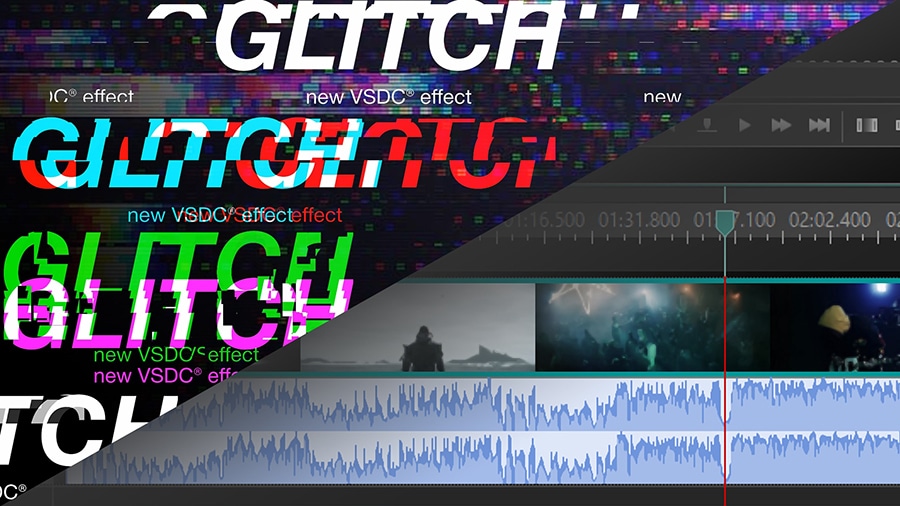
Video storyboard for video editor implemented

The new VSDC release brings interface enhancements along with expanded feature-set. By popular demand, the editor now includes a storyboard mode and the Glitch effect at users’ disposal.

Storyboard mode brings ultra-precise cutting and splitting

As the next step in the series of timeline updates, a storyboard mode has been implemented to provide more precision during cutting and splitting.

From now on, any video file will be processed in the storyboard mode by default. As the name suggests, the new feature creates a convenient way of viewing files as a story with every frame being easily seen and reachable for selection. The new mode allows for zooming the story in and out based on user needs. If you prefer the conventional timeline, you can always switch back to it in the Options section.

Glitch effect helps create trendy videos in a click

The Video Effects menu has received the highly-demanded customizable Glitch effect.

For the past few months, the VSDC team has been working hard to show that cinematic video effects can be recreated for free with a bit of time and effort. And as most users already know, the most popular effects and transitions traditionally end up being added to the menu as ready-to-use presets. This time, the trendy Glitch effect has received the biggest number of requests and it’s now available under the Video Effects selection.

The new effect is highly customizable. You can set individual parameters for the transparency, intensity, and power of the effect. Moreover, there’s a handy option to find a suitable preset with the required distortion and noise levels.

And more enhancements

  • The long-awaited waveform update makes working with soundtracks easier by showing your work progress on the timeline.
  • The choice of supported formats has been expanded with the MXF format - a video container format for professional video and audio content that serves an alternative of actual videotape in a digital format.
  • The Blending modes menu now optimizes the usage of PC memory and provides more precise results.
  • Video capture and screen recorder have been significantly improved to ensure better software performance.

Got any questions left? Do not hesitate to drop a line to This email address is being protected from spambots. You need JavaScript enabled to view it.

To download the new version of VSDC Free Video Editor, please proceed to www.videosoftdev.com/free-video-editor.
VSDC 6.3.8: User Experience Optimization and Advanced Cropping Tool

The new version of VSDC Free Video Editor addresses the most popular user requests, helps you optimize the process of video editing, and brings a new stylish effect involving cropping and resizing.

Make videos export-ready for your device

This time, enhancements welcome you from the very start. The project settings window popping up while you’re creating a new project now includes a device choice. This new option is designed to save newbies from trouble making up their minds which settings are better for their needs. The dropdown menu envisages the most popular devices and social networks: Android and iOS smartphones, YouTube, Instagram, and Vimeo.

Benefit from the advanced Crop effect

Cropping settings have been significantly expanded and included to the “Transformations” category as a standalone effect. The new set of parameters allow you to fine-tune video width and height according to the aspect ratio of the original file or the necessary points. In addition to that, the ‘Crop and resize’ mode provides you with the capability to create custom transitions and a smooth zooming effect.

Optimize the Preview window performance

VSDC is known to be able to process large high-quality videos and perform well even on low-end computers. Both factors, however, often result in a lagging video preview. Although it doesn’t affect the outcome quality and only indicates the lack of computer resources, lagging may become quite annoying for a video creator, and in this release, we’re addressing this issue. From now on, you’ll be able to speed up the preview or avoid its freezing by skipping frames in the player – every second frame, for example.

Speed up the post-production process

Few features to save your time while processing a video have also been added to the new version of the editor:

  • Properties can now be saved as a file and imported/exported for future use when needed.
  • The new drag&drop options allow for adding elements much faster to any part of the interface: scene, timeline, or resource window.

For any questions or recommendations, do not hesitate to drop a line to This email address is being protected from spambots. You need JavaScript enabled to view it.

To download the new version of VSDC Free Video Editor, please proceed to www.videosoftdev.com/free-video-editor.
VSDC Spring Release: Vaster Opportunities for Professional Color Correction and Advanced Animation

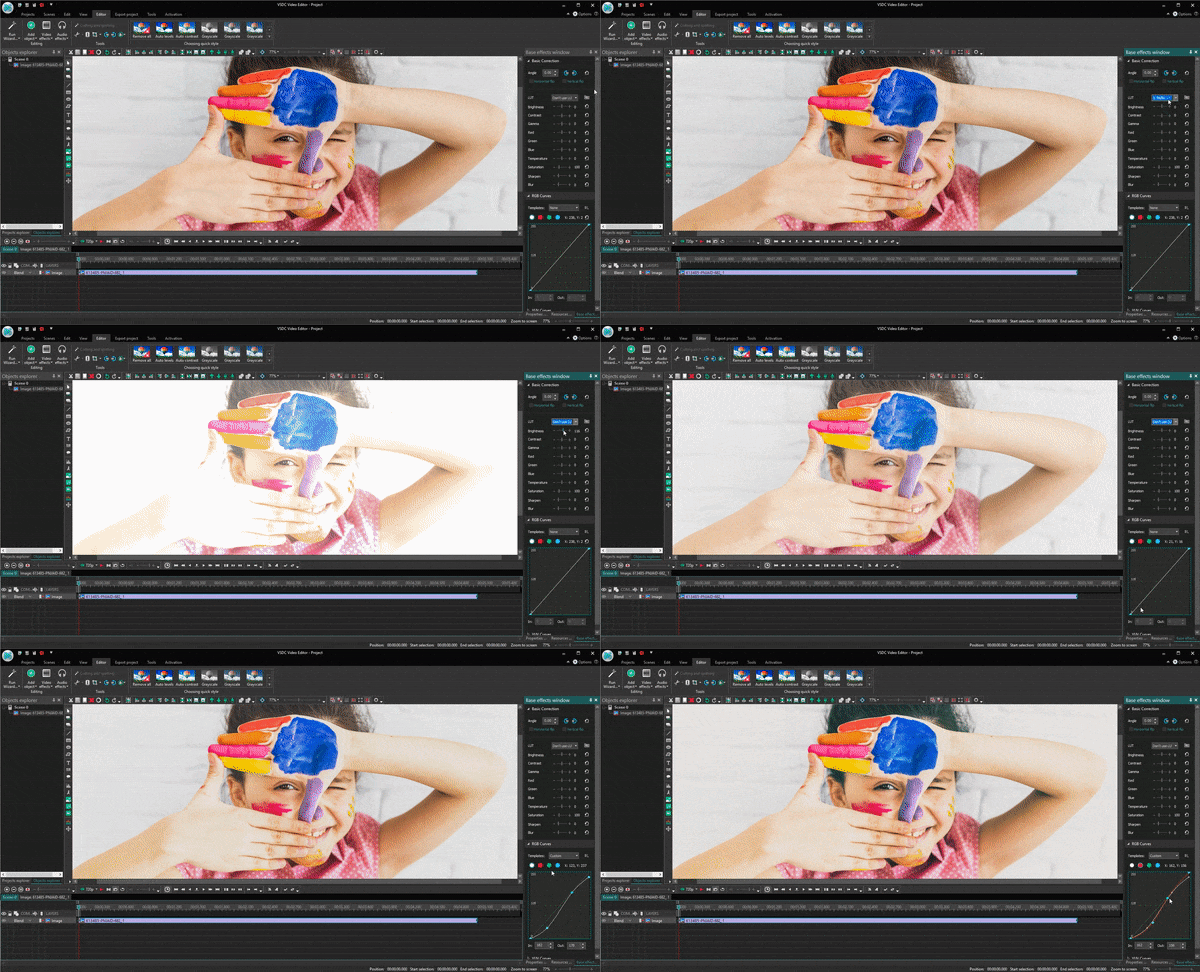
With the previous version launch, we’ve initiated a whole series of interface enhancements, both in terms of design and user-friendliness. The show goes on with the spring release focused on making the process of color correction a lot handier and more effective with a new convenient control panel and a number of advanced tools.

Basic effects window introduced

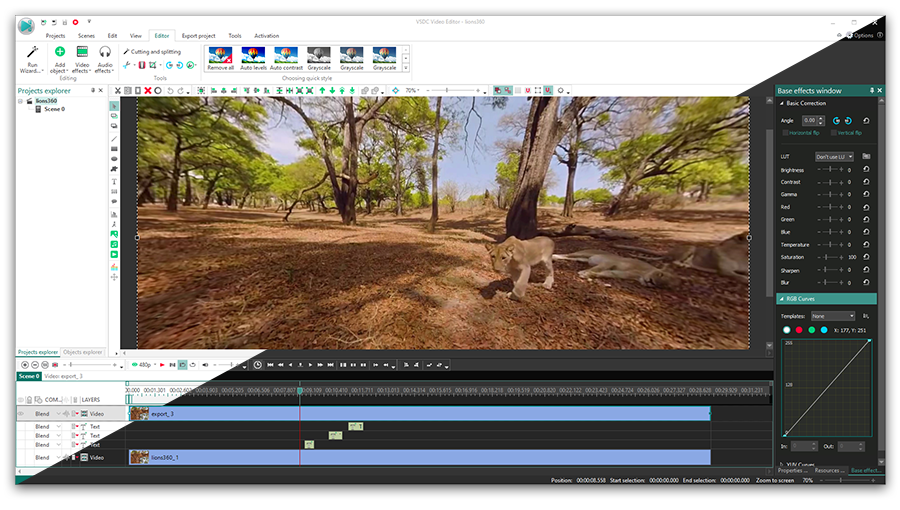
A new panel activated in the View tab brings a completely different way of working with advanced color correction tools. It makes all the color adjustment effects reachable from one processing area allowing users to set required effect levels, select a LUT preset, and work with curves. Not to mention the changes applied to the image are now instantly visible on the working area, and that makes the overall editing process a lot easier and speedier.

New panel with basic effects

RGB Curves added

Experienced video makers are well aware of how intense and time-consuming color correction can be. One of the most helpful must-have assistants, in this case, is a curves tool. It is a versatile instrument making it possible to implement both subtle and significant tonal changes i.e. remap black and white levels, brighten or darken midtones, and match colors between various shots in a sequence. As the RGB abbreviation prompts, you can create adjustments for red, green, and blue channels creating your own stylish look and fixing white balance issues.

Professional color correction - RGB curves

Rotation effects improved

Another touch of the interface user-friendliness policy has been applied to the rotation feature:

  • now you can rotate an object right on the scene using only a mouse;
  • you can also apply rotation along a motion vector while working with the Movement effect;
  • rotation center can be set both according to the absolute and incremental coordinate system.

All these smart words mean that even if you have the trickiest animation idea for a project - say, a boat trip in a rough sea or a comet flight - you will now be able to visualize it in VSDC.

Minor improvements

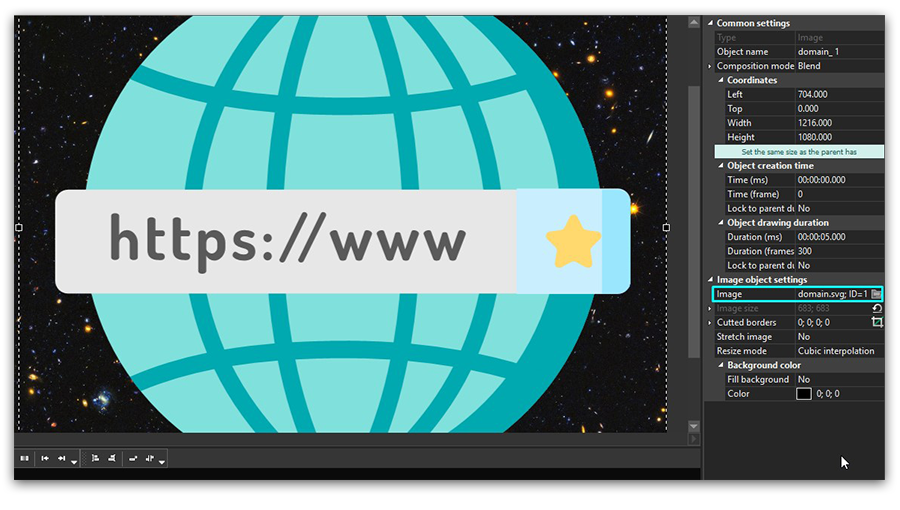
  • New image formats supported: SVG and webP;
  • Making an object semi-transparent is now possible right on the timeline and can be used for quick blending level adjustment.

Supported vector format SVG

For any questions or recommendations, do not hesitate to drop a line to This email address is being protected from spambots. You need JavaScript enabled to view it.

To download the new version of VSDC Free Video Editor, please proceed to www.videosoftdev.com/free-video-editor.
Meet VSDC Free Video Editor 6.3.5: new timeline, VirtualDub effects, and Hue-Saturation curve

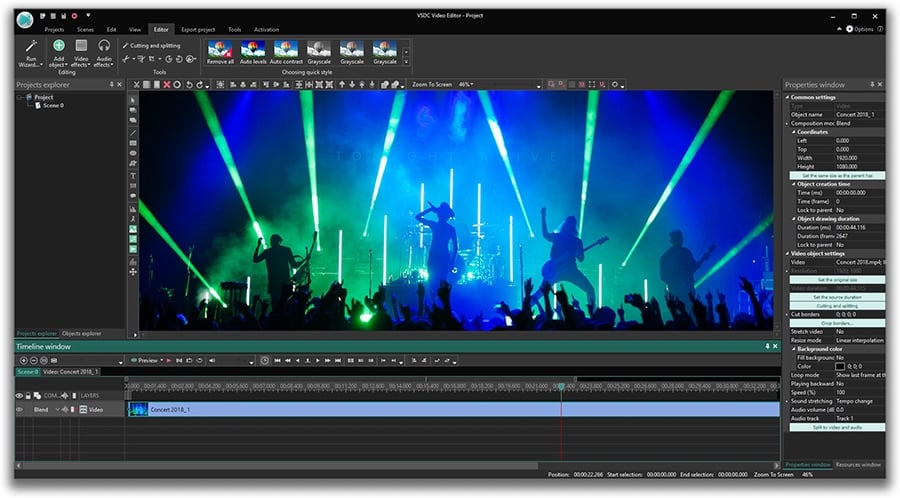
We stick to our promises to make the editor’s interface a lot user-friendlier and the functionality more apt to all trendy video-making demands. Let’s see what lies beneath this beautiful wording this time: a long-expected timeline enhancement, new effects, and filters from the VirtualDub library, special export profiles for iOS and Android users, and Hue/Saturation curve for advanced color correction.

New color correction tools

In addition to the powerful RGB curve added in the spring release, now photographers and video makers also get access to Hue and Saturation curves. The new tool allows for a more precise and convenient way of making your video image colors more saturate or a bit more faded if needed.

New timeline

Processing a video on the timeline gets more conventional: now objects can be placed in one layer instead of a vertical order, which makes your work more visually comprehensible. Consequently, you can cut and split a series of objects at one go as well as sync your video with an audio track in a more convenient way.

New effects and filters

Starting this version, VSDC Video Editor supports VirtualDub plug-ins. It means that just in a couple of clicks you can download any effect from a large open-source library with more than 200 filters to choose from. To name just a few: multiple deinterlacing options, noise reduction, and cartoonizer instruments.

New export profiles for smartphones

No more pain in the neck if you can’t make up your mind what format will be more suitable for reproducing a video on your mobile. New export profiles for iOS and Android come in handy for users of iPhone, Samsung, Xiaomi, Sony and Huawei.

For any questions or recommendations, do not hesitate to drop a line to This email address is being protected from spambots. You need JavaScript enabled to view it.

To download the new version of VSDC Free Video Editor, please proceed to www.videosoftdev.com/free-video-editor.
Christmas Gifts from VSDC Team: Brand New Interface and Expanded Color Grading Toolset

This Christmas release is focused on the interface enhancements – both in terms of design and user-friendliness. Feature-wise, the long-awaited LUT tool has become the key update of the new version, set to expand VSDC color correction capabilities.

Let’s have a look at all these updates in more detail.

New year, new look

We’ve had enough of ‘VSDC interface is somewhat outdated’ opinions. It’s high time we made changes.

Starting this version, the app will welcome you in a stylish black outfit with white buttons – the new default look of the editor. Meanwhile, those on the light side of force are not forlorn either, as there’s an option to switch the color theme to white. But as tired office workers say, one screenshot is worth a thousand words, so here is how VSDC looks in its new style.

New black theme of the interface

Yet more convenience on the timeline

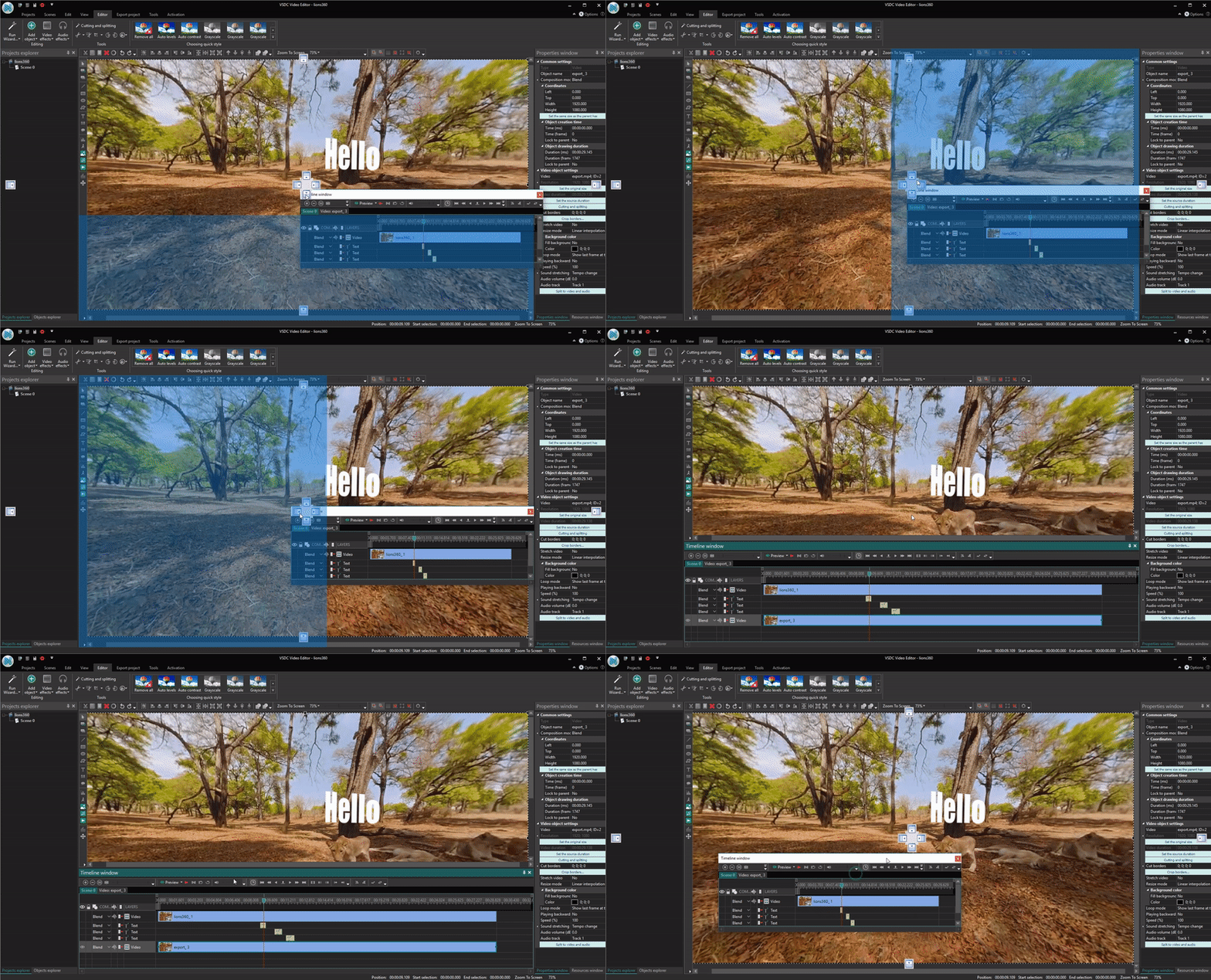
Now you can minimize the timeline and even detach it from the scene. It might come in especially handy when working with two monitors. From now on, busy video makers and designers will be able to preview the scene on one screen while processing the video on the other. Here is a short demo:

Timeline can be minimized and even detached

New opportunities for professional color grading

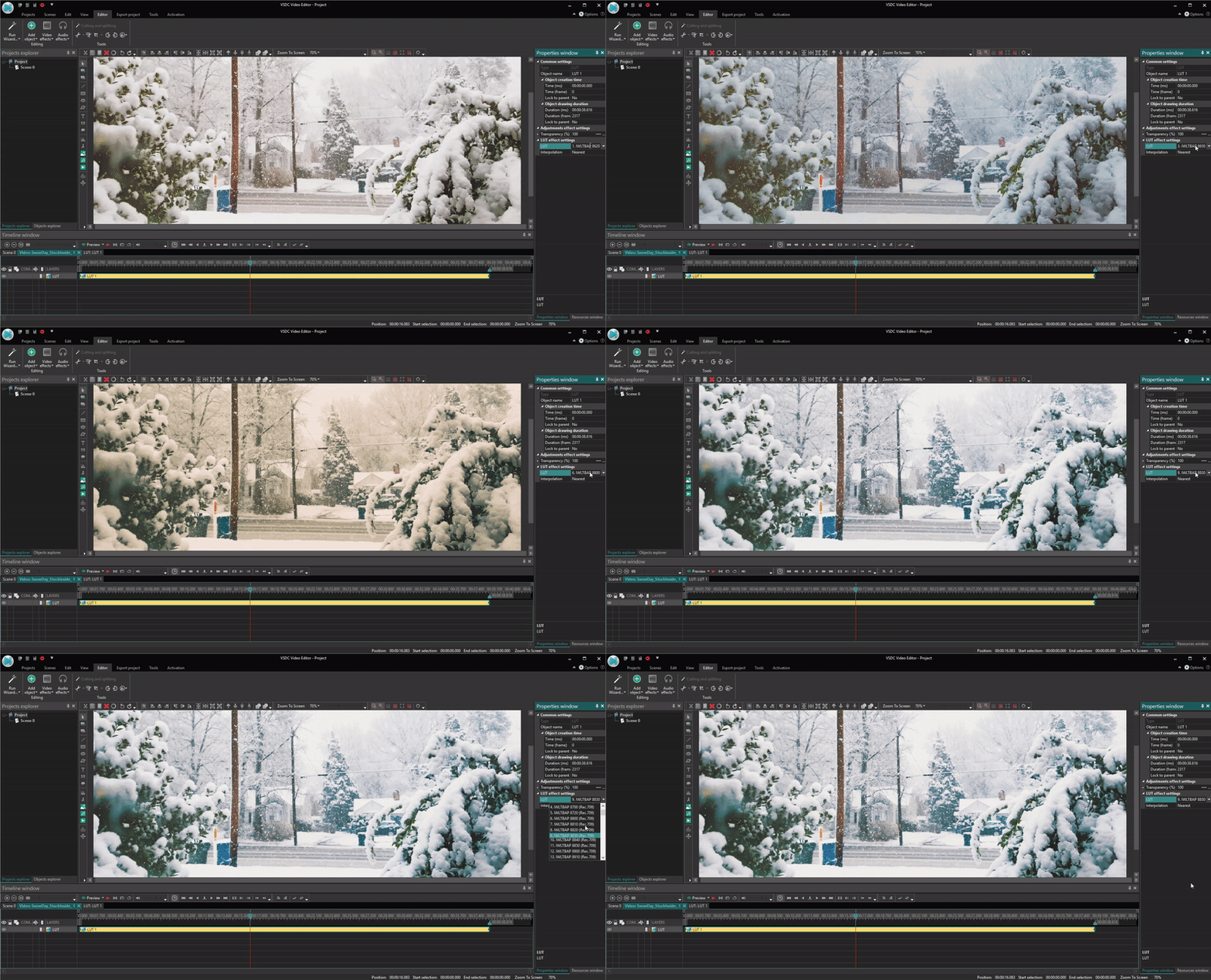
Look Up Tables (widely known as LUTs) are technically just a table of numbers that transform colors of an image. But when it comes to video editing, they become one of those magic tools to make your poorly colored video shot look like a major motion picture.

LUT is available in 'Adjustments'

Last but not the least

  • The video preview window has been reworked and enhanced according to the feedback collected.
  • The ability to import 120 fps footage has been added (Ho, ho, ho GoPro users!)
  • Automatic alignment while dragging objects on the scene has been implemented

For any questions or recommendations, do not hesitate to drop a line to This email address is being protected from spambots. You need JavaScript enabled to view it.

To download the new version of VSDC Free Video Editor, please proceed to www.videosoftdev.com/free-video-editor

News

VSDC 11.3 Update: AI Video Generator, Templates & Telemetry

What's new in VSDC 11.3AI image and video generation directly in VSDCAI-powered image editingNew handheld camera, lens correction, and Audio Spectrum templatesExpanded Garmin and DJI telemetry overlaysKey...

VSDC 11.2: Smart search for lost files, GPS data and video sync, H.266 (VVC), accelerated proxy generation even for 4K/8K, keyframe support for shapes and brand-new designer templates

Published by Amy Shao on June 30, 2026 Meet the new major update to VSDC Free Video Editor: version 11.2! Remember how much time you used to spend hunting for lost files in your projects?...

VSDC 11.1 Adds Direct Insta360 Video Editing, GPS Overlays and Auto-Save

Published by Amy Shao on March 11, 2026 What is the best gift for a creative person? New possibilities, of course. With the VSDC 11.1 update, editing footage from Insta360 cameras becomes...

VSDC 10.2: GPS Gauges for GoPro and Other Action Cameras, Selective Export, Metadata Editing, Extended Codecs and Smarter Workflow

published Amy Shao 11/19/25 Meet the long-awaited VSDC 10.2 update: a new version packed with incredible features and significant enhancements designed to empower all of you, from hobbyists to professionals. GPS...

Major VSDC 10.1 Update: Advanced HDR, GPS Telemetry, New Effects, Great Variety of New Templates and Tools For Different Needs

published Amy Shao 6/10/25 The wait for something new and unusual is finally over! The update is here and it isn’t just another version: it’s VSDC 10.1! VSDC 10.1 Update: Advanced HDR, GPS Telemetry,...

VSDC Christmas Update 9.4: Enhanced Effect Management, 100+ Background Templates and Streamlined Editing

This holiday season embraces new beginnings with the latest update of VSDC Video Editor! We’ve listened to your feedback and decided to focus on enhancing the tools you love most—all while laying the...

How VSDC Free Became My Secret Weapon for Watermark (Free 4K Editing in 2025)

Hi, I'm Mattea Wharton, a travel videographer from Seattle. For three years I battled with video editors that slapped ugly watermarks on my videos until I found VSDC. This free no-subscription editor completely...

VSDC 9.3: 150+ Templates, Text Transformer, Sprite Auto-Detect and GUI Update

Change is all about improvement, and this process wouldn't be possible without your input. After carefully reviewing your feedback, we’ve addressed several key issues and introduced updates designed...

Best Special Effects Software

Intro In 2024 the options range for creating visual effects is incredibly diverse and it becomes more and more challenging to identify the top choices. Here you can find a guide to the top visual FX...

VSDC 9.2: AI Segmentation Models, 300+ Transitions, VSDC Cloud and New Templates Pack

Are you ready to explore new heights with the latest major VSDC update? Finally, Version 9.2 is here! Packed with groundbreaking features, including the new AI-powered Segmentation tool, this update offers...
 

Screen Recorder Box

This program allows you to capture the video of your desktop and save it on your PC in various formats. Coupled with a video editor, the program is a great tool for creating presentations, tutorials and demo videos.

Read more about Screen Recorder...


Video Capture Box

The program captures video from external devices and records it to computer in a free format. You can save video from video tuners, webcams, capture cards and other gadgets.

Read more about Video Capture...

VSDC Video Editor Reviews & Ratings (Trustpilot, Capterra & Media)

VSDC Free Video Editor is rated 4.5/5 by real users on Trustpilot and Capterra. Here are a few reviews and quotes from creators and tech media.

Overall rating: 4.5/5 based on 200+ reviews on Trustpilot and 89 reviews on Capterra.

★★★★⯪

VSDC Free Video Editor is the best free video editor for Windows I’ve used, from color grading to picture-in-picture and cinematic results.

— Ejikeme Eloka Augustine

Source:Trustpilot

★★★★☆

Easy-to-use interface and quick export to social media make VSDC a versatile video editing tool for everyday projects.

— Karen C., E-Learning

Source:Capterra

★★★★☆

A feature-packed non-linear video editor for Windows that can compete with many paid video editing solutions.

— TechRadar

Source:TechRadar review

★★★★★

The free VSDC editor saved my YouTube channel – a powerful video editing software for chroma key, text effects and picture-in-picture.

— Paul Roberts

Source:Trustpilot

★★★★★

Fast and simple for YouTube videos with green screen, zoom, color tools and creative effects in one app.

— Marie R., Media Production

Source:Capterra

★★★★★

One of the best free video editor options for Windows users, ideal for GoPro, YouTube and family videos.

— VidProMom, YouTube creator

Source:Media reviews

★★★★★

I’ve been using VSDC for years; editing is easy and the final videos look great for my personal and professional projects.

— Long-time VSDC user

Source:Trustpilot

★★★★★

Great value and faster than many other free tools; I quickly create videos for YouTube, Instagram and Facebook with features my audience loves.

— Rabika B., Marketing & Advertising

Source:Capterra

★★★★★

VSDC offers many features you don’t usually find in free editors, including picture-in-picture, stabilization and modern codec support with no watermarks.

— Tech media review

Source:Media reviews