


Видеоредактор
Обработка видео любой сложности – от создания поздравительной открытки до презентации компании. Удаляйте, объединяйте видео фрагменты, применяйте визуальные и аудио эффекты, фильтрацию и коррекцию изображения, создавайте слайдшоу и добавляйте звуковые дорожки. Импорт и экспорт видео доступен во всех популярных форматах.
Видео конвертер
Данная программа предназначена для преобразования видео файлов из одного формата в другой. Поддерживаются почти все популярные видео форматы как на чтение, так и на запись. Кроме того, имеется возможность создания видео под конкретные мультимедийные устройства, такие как iPhone, Microsoft Zune или Archos. Программа очень проста в использовании, обладает современным интерфейсом и имеет все основные функции по работе с видео.
Аудио конвертер
Используя аудио конвертер, Вы сможете конвертировать аудио файлы из одного формата в другой. Поддерживаются все ключевые аудио форматы и кодеки. Также программа позволяет работать с плейлистами и мета-тегами файлов, имеется возможность экспортировать аудио из видео файлов и сохранять треки на компьютере в произвольном формате.
Готовые анимированные шаблоны
Каталог шаблонов VSDC — это коллекция профессиональных видеошаблонов для интро, анимированных заставок, титров, логотипов, слайд-шоу, переходов, LUT-пресетов, GPS-наложений и цветокоррекции.
Все шаблоны полностью настраиваются и поддерживают разрешение до 4K (16:9). Всё, что нужно сделать для идеального видео: выбрать шаблон, перетащить его на таймлайн и отредактировать текст, цвета, тайминг и другие параметры в окне настроек.
Облачное пространство VSDC
Храните, загружайте, редактируйте и делитесь файлами напрямую из облака! Доступ к библиотеке материалов и текущим сценам откроется с любого компьютера, где установлен VSDC. А с мобильным приложением для iOS вы сможете проверять и обсуждать работу даже в дороге.
 Видео редактор
 Видео конвертер
 Аудио конвертер
 Каталог шаблонов
 Cloud
Cloud

Универсальность
Сразу несколько инструментов для обработки видео и аудио файлов в одном приложении.

Высокая скорость
Программы используют быстрые оптимизированные многопроцессорные алгоритмы.

Доступность
Наши продукты
доступны для бесплатной скачки на все компьютеры и устройства на базе ОС семейства Windows.
How to create a voice over, using video editing software
Many videos require voice commentaries. Educational clips, how-tos, game walkthroughs, video blogs - all are typically produced with use of voice over software. There are various solutions to record your voice and add it to the footage. In fact, there are even 3-rd party tools for voice recording and processing audio on a professional level. Those are used in professional audio recording studios, for example. Yet, some video editors also have embedded tools for recording voice commentaries. VSDC Video Editor is one of them.
There are two ways to use VSDC as a voice over software. The first one belongs to the free version of VSDC video editor, and the second - a more advanced way - is available in VSDC Pro version. Below we'll take a close look at both ways, and explain how you can make use of the audio recording feature for your videos.
In both cases you'll need a microphone which is either embedded or connected to your computer. The biggest difference between the two, is the sequence of steps required from a user:
- In VSDC free version, you can create an audio commentary using an embedded Voice Recorder. Once you record an audio piece, you'll be able to add it to you project and apply to the required video fragment.
- In VSDC Pro version, you'll use a Voice Over software feature. That means, the voice recording is carried out along with the video preview in one and the same window. It allows for adding audio comments at required parts of the movie easier and more precisely.
Method #1. How to use VSDC as a free voice over software
-
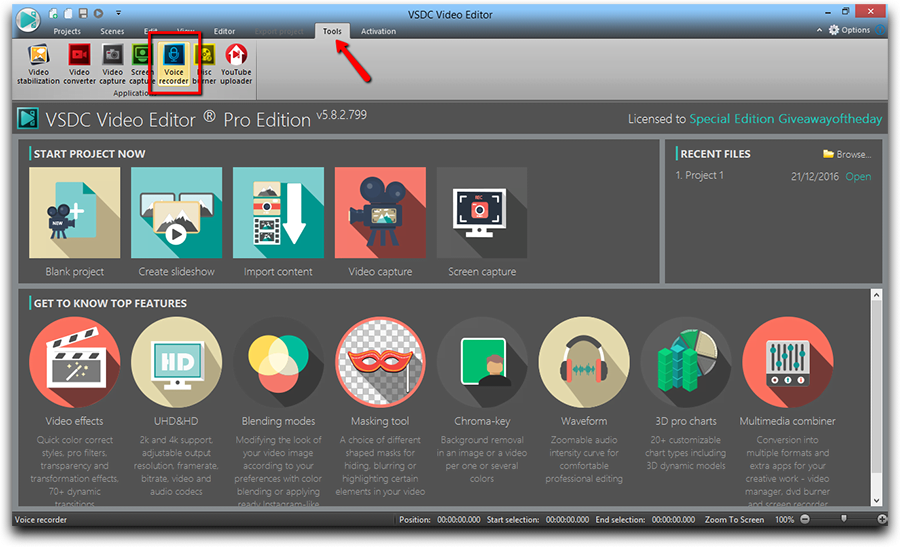
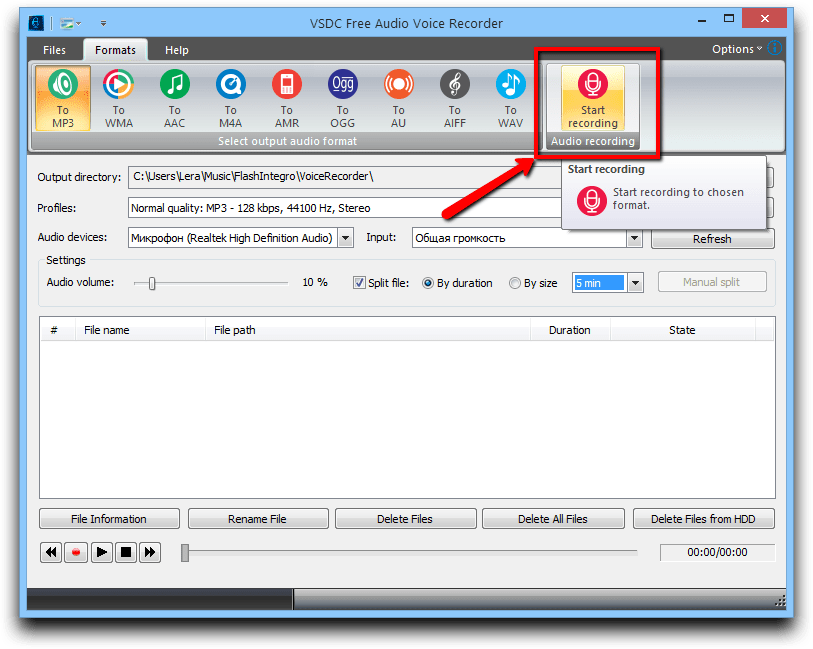
Open the editor, go to the ‘Tool’ tab and select ‘Voice Recorder’
-
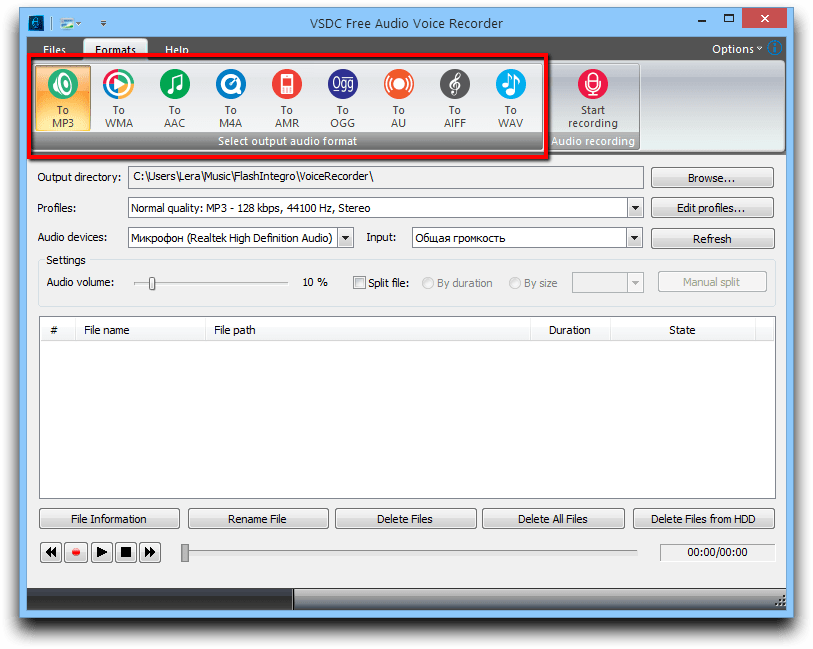
If you need the audio to be recorded in a prticular format, first you should choose it. VSDC voice recorded offers a lot of popular audio formats such as MP3, AAC, WAV and etc.
-
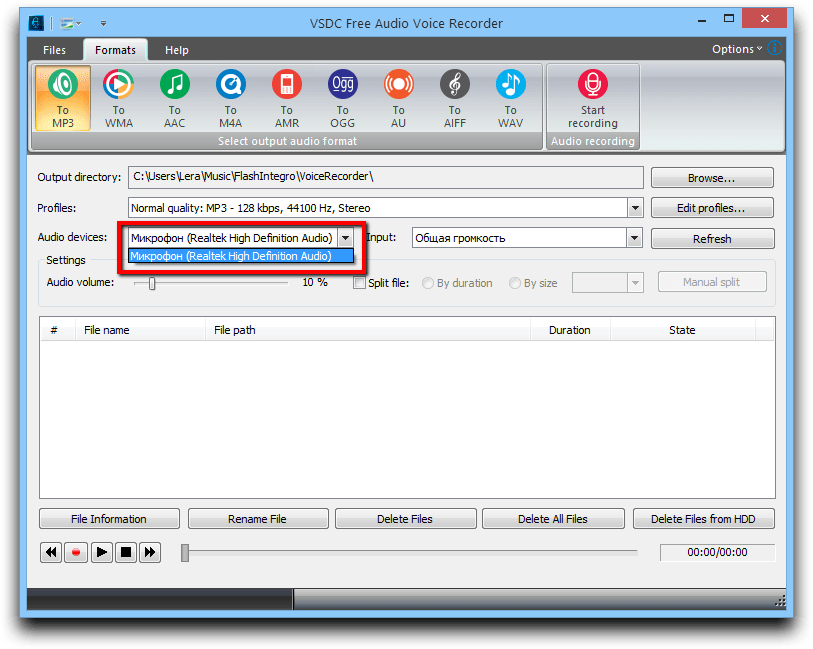
Second, select the audio device you're going to use for recording.
-
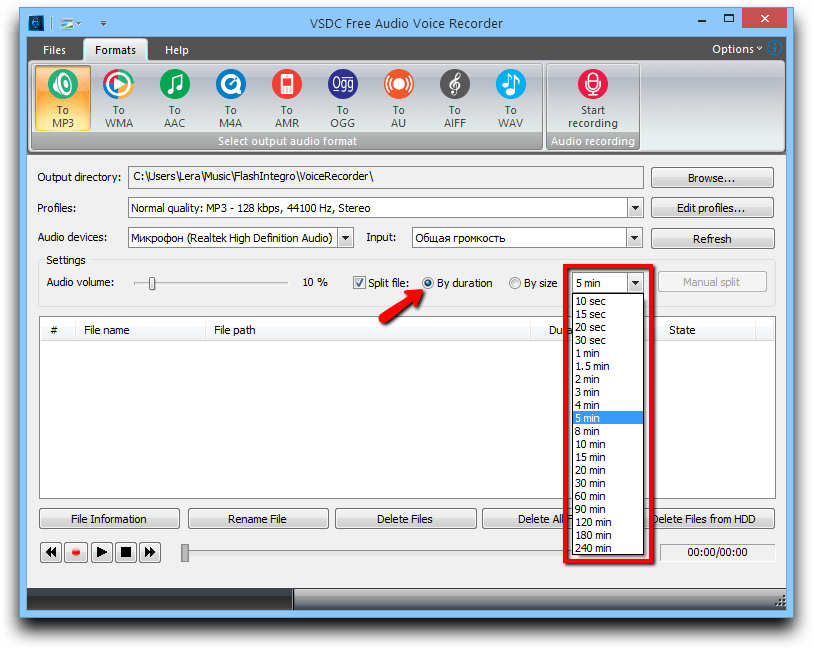
If necessary, you can check the option to split your recordings by their duration or by size.
-
To start recording your voice, click the corresponding button.
-
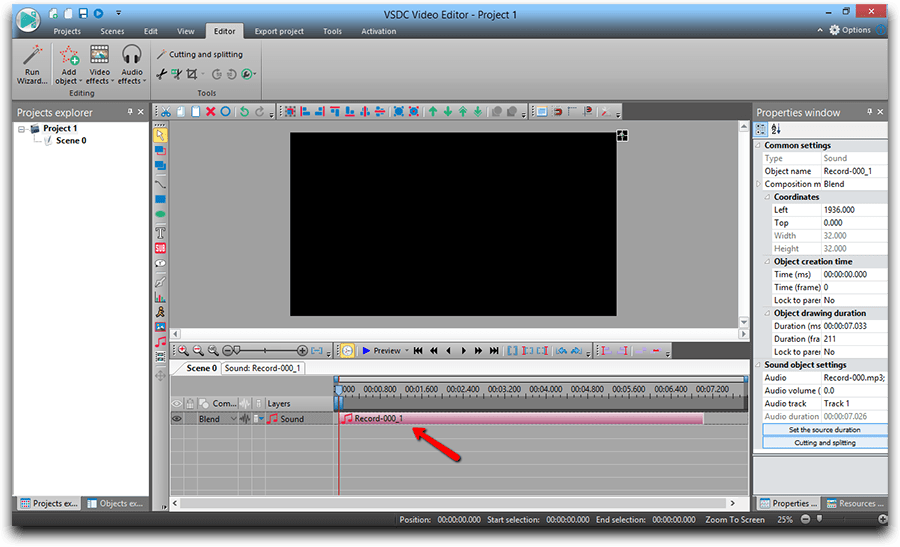
When your voice comments are ready, go to your project and add the audio files to the timeline - precisely where it needs to be added.
Method #2 How to use VSDC Pro as a more advanced voice over software
- Add your video where you want to add your voice.
-
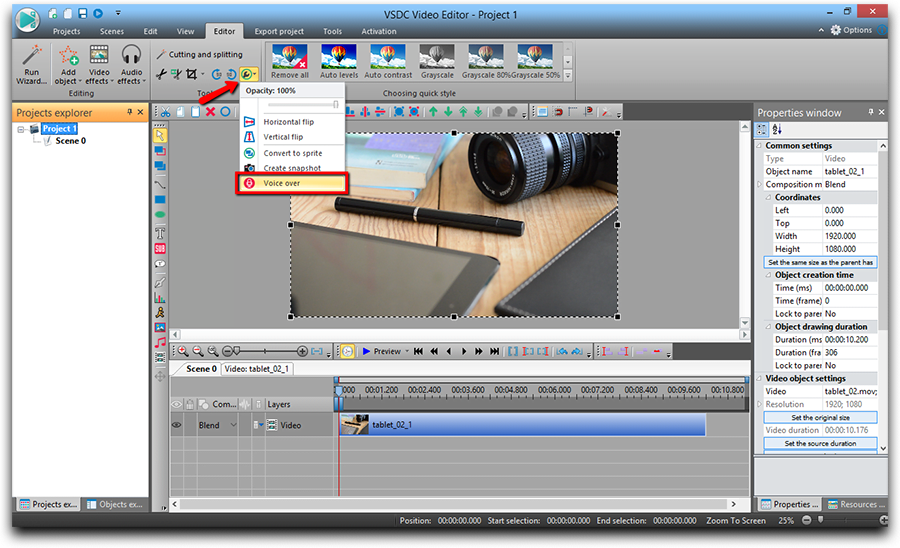
Click the ‘More Tool’ button on the panel above the scene and select ‘Voice Over’.
- Preview the video and decide where you’d like to add your comments.
- Move the cursor to the moment of the video where the recording is supposed to start.
-
Click the ‘Start Recording’ button.
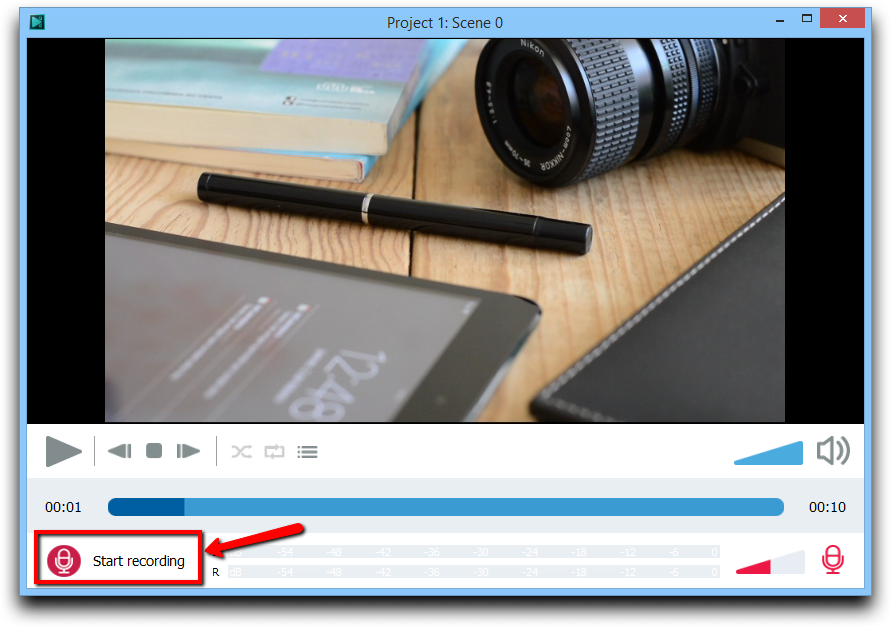
- Record your voice using the microphone.
-
At the end of recording click ‘Stop recording’.
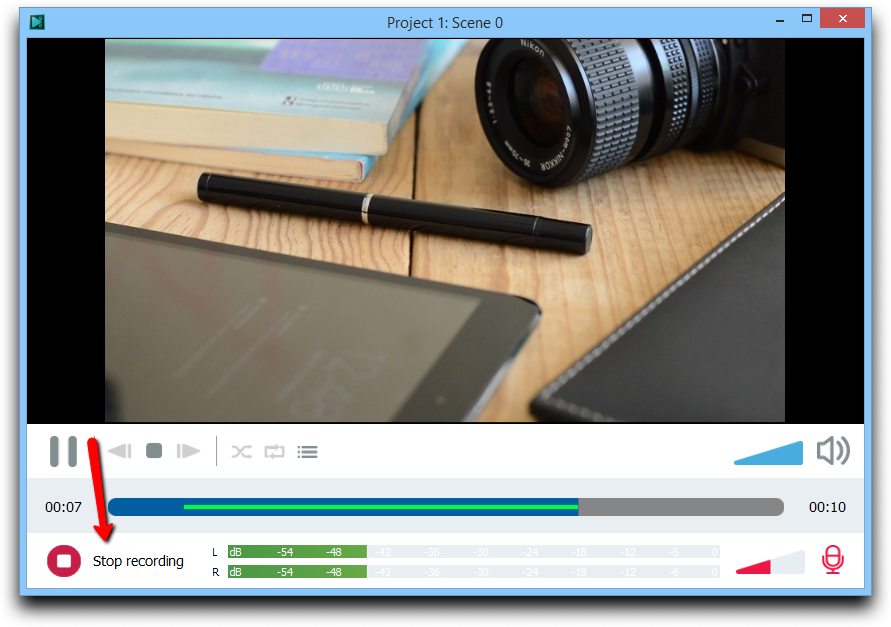
-
Click on the ‘Playlist’ button to see the list of recordings.
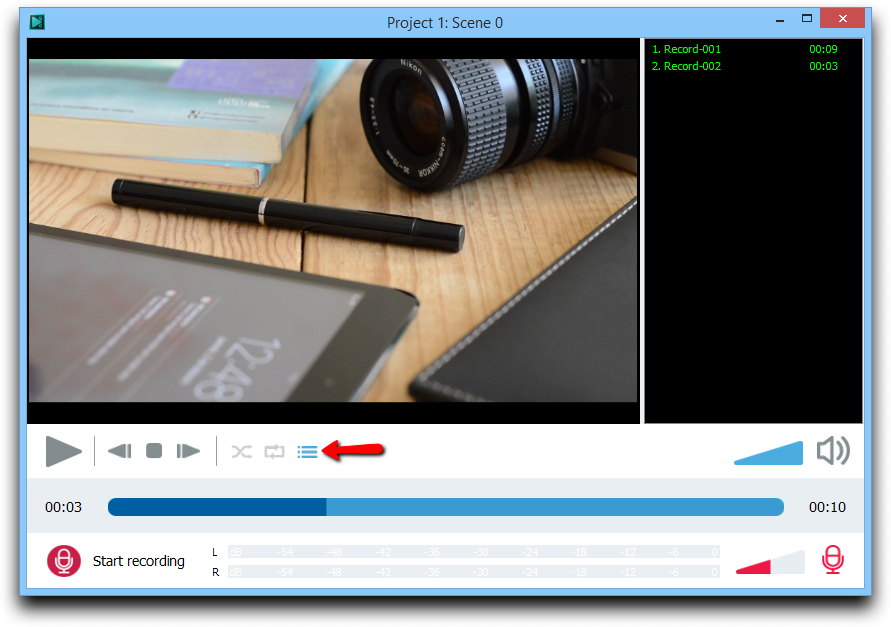
- Close the voice over window.
-
Your recording will appear on the timeline automatically.
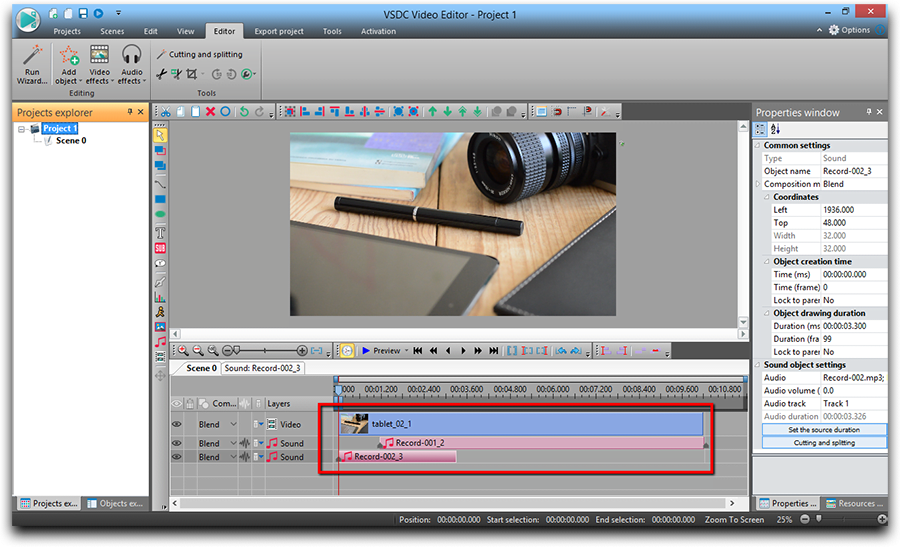
Even though both ways help you get the job done, VSDC Pro version makes a more precise voice over software, saving your time and effort. So, if audio recording is not a one time job, but rather a regular task you 'll have to deal with frequently, you should probably consider it as a more convenient tool.
If you're looking for using voice over software in your video production process, you can also check out our YouTube channel to see how quickly and easily you can utilize VSDC for that purpose.
You can get more information about the program on Free Video Editor' description page.

При помощи этой программы вы сможете записывать видео с рабочего стола и сохранять его на компьютере в различных форматах. В паре с видео редактором, программа идеально подходит для создания презентаций и демо-роликов.

Программа служит для захвата видео с внешних устройств и записи его на компьютер в произвольном видео формате. Вы сможете сохранять видео с видео тюнеров, веб-камер, карт захвата и прочих устройств.
VSDC Video Editor Reviews & Ratings (Trustpilot, Capterra & Media)
VSDC Free Video Editor is rated 4.5/5 by real users on Trustpilot and Capterra. Here are a few reviews and quotes from creators and tech media.
Overall rating: 4.5/5 based on 200+ reviews on Trustpilot and 89 reviews on Capterra.
★★★★⯪
VSDC Free Video Editor is the best free video editor for Windows I’ve used, from color grading to picture-in-picture and cinematic results.
— Ejikeme Eloka Augustine
Source:Trustpilot
★★★★☆
Easy-to-use interface and quick export to social media make VSDC a versatile video editing tool for everyday projects.
— Karen C., E-Learning
Source:Capterra
★★★★☆
A feature-packed non-linear video editor for Windows that can compete with many paid video editing solutions.
— TechRadar
Source:TechRadar review
★★★★★
The free VSDC editor saved my YouTube channel – a powerful video editing software for chroma key, text effects and picture-in-picture.
— Paul Roberts
Source:Trustpilot
★★★★★
Fast and simple for YouTube videos with green screen, zoom, color tools and creative effects in one app.
— Marie R., Media Production
Source:Capterra
★★★★★
One of the best free video editor options for Windows users, ideal for GoPro, YouTube and family videos.
— VidProMom, YouTube creator
Source:Media reviews
★★★★★
I’ve been using VSDC for years; editing is easy and the final videos look great for my personal and professional projects.
— Long-time VSDC user
Source:Trustpilot
★★★★★
Great value and faster than many other free tools; I quickly create videos for YouTube, Instagram and Facebook with features my audience loves.
— Rabika B., Marketing & Advertising
Source:Capterra
★★★★★
VSDC offers many features you don’t usually find in free editors, including picture-in-picture, stabilization and modern codec support with no watermarks.
— Tech media review
Source:Media reviews
 Присоединяйтесь к нам
  Смотрите нас на YouTube
 / @VSDCFreeVideoEditor
© 2011-2026, www.videosoftdev.com, FLASH-INTEGRO LLC. Конфиденциальность | Условия использования | О нас
Все торговые марки, упомянутые здесь, являются исключительной собственностью их соответствующих владельцев.
Копирование любых материалов с сайта разрешено только с письменного согласия Администрации сайта.