Editor Video

L'editor video consente di modificare file e creare video di qualsiasi complessità. Potete applicare effetti video e audio effects ad oggetti modificati, trasformarli, applicare filtri e correzioni d'immagini. Tutti i popolari formati video e audio sono supportati (sia lettura che salvataggio).

Read more about Video Editor...

Convertitore Video

Questo programma serve a convertire video file da un formato ad un altro. Quasi tutti i popolari formati video sono supportati. Inoltre, il programma semplifica drasticamente il compito di convertire video da riprodurre su determinati dispositivi multimedia quali iPhone, Microsoft Zune oppure Archos. Il programma è semplicissimo da usare, dispone di una moderna interfaccia e di tutte le necessarie funzioni per processare i video.

Read more about Video Converter...

Convertitore Audio

Il convertitore audio vi aiuterà a convertire file audio da un formato ad un altro. Tutti i formati audio e codec chiavi sono supportati. Il programma vi consente inoltre di gestire playlist e meta tags, di estrarre audio dai file video e di salvare queste tracce sul vostro computer in qualsiasi formato.

Read more about Audio Converter...

Animated Intro & Title Templates

Explore the VSDC Template Store with ready-made video templates for intros, animated titles, lower thirds, logo reveals, slideshows, glitch transitions, LUTs, and color grading presets. Drop a template into the VSDC Video Editor timeline, edit text, timing, and colors, and finish professional video projects in minutes.

Choose from 300+ exclusive packs of video transitions, LUT packs, text effects, GPS telemetry widgets, animated elements, and animated backgrounds for VSDC. All templates are fully customizable, support up to 4K resolution in 16:9, and help you build intros, wedding slideshows, travel videos, and tutorials much faster.

Store catalog

VSDC Cloud - Online video management

Keep your work safe, organized and always accessible! Back up your video projects, store media files online and access them from any device. Enjoy collaboration, share project updates and exchange files easily.

Online video editing management capabilities

Versatilità

Versatilità

Più strumenti contemporaneamente per elaborare file video e audio in una singola applicazione.

Alta velocità

Alta velocità

I nostri programmi
impiegano rapidi algoritmi di alta qualità per processori singoli a multipli.

Accessibilità

Accessibilità

I nostri prodotti sono disponibili per essere scaricati gratuitamente su tutti i computer e dispositivi che supportano i sistemi operativi Windows.

VSDC

Store

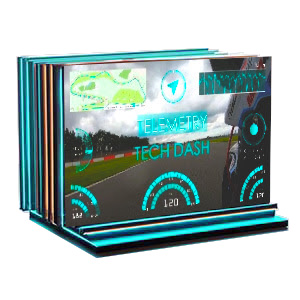
VSDC Tech Dash

25 modelli
$49
Compra

Descrizione

Crea interfacce HUD professionali in stile cinematografico con Tech Dash! Questo pacchetto offre autentici widget di telemetria in font OCR A Extended con Archi di Velocità in tempo reale, indicatori G-Force e molto altro.
Ottieni risultati immediati con suite di strumenti pre-progettate e coordinate per colore, e trasforma le tue recensioni tech, i contenuti di gaming, i video GoPro e i progetti di fantascienza con display di dati cinematografici!

Caratteristiche principali

Grafica Vettoriale SVG
Personalizzazione Completa
Combinazioni di Colori Predefinite
Widget Singoli e Suite Complete
Numero di Elementi: 25
Dimensione File: 87MB

VSDC

Store

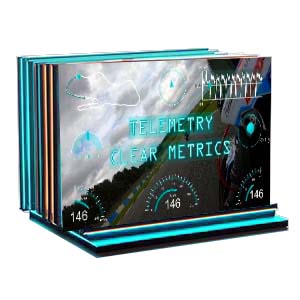
VSDC Clear Metrics

25 templates
$49
Buy

Description

Transform your raw data into a gripping narrative! The "Clear Metrics" pack overlays professional telemetry like Speed Arcs, G-Force meters, Altitude Graphs and other parameters onto your footage. Choose individual widgets or ready-made color suites for instant multi-gauge displays.
Crafted in Myriad Pro for ultimate clarity, these templates are perfect for FPV drones, GoPro, motorsports and action scenes!

Key Features

SVG Vector Graphics
Full Customization
Color Presets
Individual Widgets & Full Suites
Number Of Items: 25
File Size: 96Mb

Frequently Asked Questions

Can I use these widgets with my GoPro HERO 13 Black footage?
Yes, absolutely! The "Clear Metrics" pack works great with any modern GoPro model (HERO 7 and newer) as well as Insta360 X3 cameras. Just import your MP4 file with embedded GPS data into VSDC and the software will extract the telemetry to create the gauges. It's truly a one-click process.
I record motorcycle rides. What exactly can I show to my viewers?
Everything that makes your ride exciting and easy to understand: real-time speed (as a beautiful speedometer or digital display), G-Force meters that show how sharply you took turns, altitude graphs for elevation changes, plus heading and route data. Choose individual widgets or ready-made suites and get a perfect, professional result!
Why does the font matter so much? I'm not a designer.
It's all about viewer experience. When you're moving at high speed, viewers shouldn't struggle to read the numbers. We use the clean, professional Myriad Pro font because it's extremely legible even on small smartphone screens or in fast-paced action. You're not a designer and that's exactly why we've handled this detail for you.

VSDC

Store

VSDC Tech Dash

25 templates
$49
Buy

Description

Create professional movie-style HUD interfaces with Tech Dash! This pack delivers authentic OCR A Extended telemetry widgets featuring real-time Speed Arcs, G-Force meters and more.
Get instant results with pre-designed color-coordinated gauge suites and transform your tech reviews, gaming content, GoPro videos and sci-fi projects with cinematic data displays!

Key Features

SVG Vector Graphics
Full Customization
Color Presets
Individual Widgets & Full Suites
Number Of Items: 25

Frequently Asked Questions

How do I add a map and speedometer to my motorcycle vlog?
It's a one-click process! Just import your GoPro or Insta360 footage into VSDC. VSDC Video Editor will automatically detect the GPS data embedded in your video file and you will be able to add a stylish map of your route, along with a real-time speedometer, altitude graph and more. You don't need to manually track your route or keyframe the speed because it's all done for you, so you can focus on the ride and the storytelling.
I'm an adventure travel vlogger. Can I use this pack to show my hiking elevation or off-road trips?
Absolutely. This is a perfect pack for showcasing your adventures. Here you’ll find great options to display altitude, speed, elevation gain throughout your hike, bike trail or 4x4 journey. You can create a compelling visual story that shows not just where you went, but also, for example, how challenging the terrain was, making your content much more immersive.
My road trip footage feels flat. How can these widgets make my USA travel vlogs more cinematic?
They can help you transform hours of highway footage into a dynamic, data-driven story. Instead of just telling your viewers you're driving, for instance, through Monument Valley, the "Tech Dash" overlays can show them your exact speed, heading (direction) and GPS coordinates on a sleek, futuristic map. This adds a layer of authenticity and a high-tech, "mission control" feel that is highly popular on platforms like YouTube.

VSDC

Store

Classic Bold Titles

15 intro templates
$9
Buy

Description

Want to create memorable logos?
Here you’ll find striking logo animations for branding, YouTube intros, business presentations and commercials. These bold, dynamic designs ensure your logo grabs attention with strong typography and smooth motion.
Make sure everyone notices your name and your company’s brand!

Key Features

100% Fully Customizable
Aspect Ratio: FullHD
Resolution: up to 4K
File Size: 22Mb
Number Of Items: 15


VSDC

Store

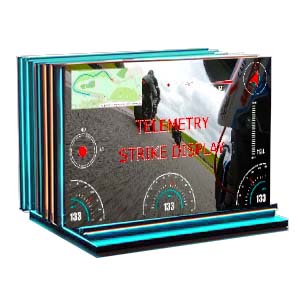
VSDC Strike Display

25 templates
$49
Buy

Description

Make your data impossible to ignore! Strike Display brings bold character to your videos with heavyweight telemetry widgets: Speed Arcs, G-Force meters, Altitude Graphs and more in the distinct Impact font.
Perfect for gaming montages, tech reviews, sports highlights and action content where performance and precision take center stage!

Key Features

SVG Vector Graphics
Full Customization
Color Presets
Individual Widgets & Full Suites
Number Of Items: 25
File Size: 77Mb

Frequently Asked Questions

How can I use Strike Display widgets?
Great question! The "Strike Display" collection is a constructor of stylish, fully customizable gauges. But there's one key detail: these widgets need GPS data to display. For gaming montages or tech reviews you'll need to use GPS data from any source like a smartphone recording or sports watch during your session. Import this data file along with your video and then you can customize all the visual elements to create stylish HUD displays that will definitely capture your viewers' attention!
Can I customize the colors and size to match my channel's branding?
Yes, you have full control. All VSDC Premium Widgets are fully customizable. Inside the VSDC editor you can easily resize, reposition, and change the colors of any element to ensure your telemetry perfectly matches your video's style and your channel's brand identity.
Will these overlays be visible on dark or low-light footage, like from my dashcam?
Definitely. The widgets in the "Strike Display" pack feature high-contrast colors and bold outlines specifically designed for maximum visibility. They will remain clear and readable even over dark or busy backgrounds, such as nighttime driving footage from a dashcam or dimly lit gaming scenes.

Notizie

Indicatori GPS per GoPro e altre action cam, modifica dei metadati, codec estesi e flusso di lavoro più intelligente

pubblicato da Amy Shao 19/11/25 Ecco l'attesissimo aggiornamento VSDC 10.2: una nuova versione ricca di incredibili funzionalità e significativi miglioramenti pensati per dare potere a tutti voi, dagli...

Aggiornamento maggiore di VSDC 10.1: editing HDR avanzato, telemetria GPS, nuovi effetti, un'ampia varietà di template e strumenti per ogni esigenza

published Amy Shao 6/10/25 L'attesa per qualcosa di nuovo e straordinario è finalmente finita! L'aggiornamento è arrivato e non è solo un'altra versione: è VSDC 10.1!! Aggiornamento VSDC 10.1:...

Aggiornamento di Natale VSDC 9.4: Gestione Migliorata degli Effetti, Oltre 100 Modelli di Sfondo e Editing Semplificato

Questa stagione festiva inaugura nuovi inizi con l'ultimo aggiornamento di VSDC Video Editor! Abbiamo ascoltato i vostri suggerimenti e deciso di concentrarci sul miglioramento degli strumenti che amate...

Come VSDC Free è diventato la mia arma segreta per la filigrana (editing 4K gratuito nel 2025)

Ciao, sono Mattea Wharton, una videomaker di viaggi di Seattle. Per tre anni ho combattuto con editor video che appiccicavano brutte filigrane ai miei video, finché non ho trovato VSDC. Questo editor...

Oltre 150 Modelli, Trasformatore di Testo, Rilevamento Automatico degli Sprite e Aggiornamento dell'Interfaccia

Il cambiamento è sinonimo di miglioramento, e questo processo non sarebbe possibile senza il vostro contributo. Dopo aver esaminato attentamente i vostri feedback, abbiamo affrontato diversi problemi...
 

Screen Recorder gratis

Con questo programma è possibile registrare i video dal desktop e salvarli sul computer in diversi formati. Insieme al video editor è ideale per creare presentazioni e demo.

Read more about Screen Recorder...


VSDC Free Video Capture programma

Il programma serve per catturare video da dispositivi esterni e e per registrarli sul computer in qualsiasi formato video. Potete salvare il video da sintonizzatori video, webcam, schede di acquisizione e vari dispositivi.

Read more about Video Capture...

VSDC Video Editor Reviews & Ratings (Trustpilot, Capterra & Media)

VSDC Free Video Editor is rated 4.5/5 by real users on Trustpilot and Capterra. Here are a few reviews and quotes from creators and tech media.

Overall rating: 4.5/5 based on 200+ reviews on Trustpilot and 89 reviews on Capterra.

★★★★⯪

VSDC Free Video Editor is the best free video editor for Windows I’ve used, from color grading to picture-in-picture and cinematic results.

— Ejikeme Eloka Augustine

Source:Trustpilot

★★★★☆

Easy-to-use interface and quick export to social media make VSDC a versatile video editing tool for everyday projects.

— Karen C., E-Learning

Source:Capterra

★★★★☆

A feature-packed non-linear video editor for Windows that can compete with many paid video editing solutions.

— TechRadar

Source:TechRadar review

★★★★★

The free VSDC editor saved my YouTube channel – a powerful video editing software for chroma key, text effects and picture-in-picture.

— Paul Roberts

Source:Trustpilot

★★★★★

Fast and simple for YouTube videos with green screen, zoom, color tools and creative effects in one app.

— Marie R., Media Production

Source:Capterra

★★★★★

One of the best free video editor options for Windows users, ideal for GoPro, YouTube and family videos.

— VidProMom, YouTube creator

Source:Media reviews

★★★★★

I’ve been using VSDC for years; editing is easy and the final videos look great for my personal and professional projects.

— Long-time VSDC user

Source:Trustpilot

★★★★★

Great value and faster than many other free tools; I quickly create videos for YouTube, Instagram and Facebook with features my audience loves.

— Rabika B., Marketing & Advertising

Source:Capterra

★★★★★

VSDC offers many features you don’t usually find in free editors, including picture-in-picture, stabilization and modern codec support with no watermarks.

— Tech media review

Source:Media reviews