 User Help Manual
  Learn FAQ
  Send us feedback


Video Editor
Download and use the free video software to create and edit videos of any complexity from a family greeting card to a company presentation. Apply vsdc free video editor for light edit hdr-video, any raw-video formats from cams - BRAW, ProRes RAW, any high resolution 4k or more due to video proxies technologies in the editor.
Cut, merge video files, apply visual and audio effects, use filtration and image correction, make slideshows and add an appropriate soundtrack. Use multi-color Chroma Key and advanced parameters settings to give your video a professional look.
All popular video and audio formats are supported.
Video Converter
This program is intended for converting video files from one format to another. Nearly all popular video formats are supported (both reading and saving). In addition, the program drastically simplifies the task of converting videos for playback on specific multimedia devices, such as iPhone, Samsung Galaxy or Huawei P30 Pro. The program is extremely easy to use, has a modern interface and all necessary video processing functions.
Audio Converter
The audio converter will help you convert audio files from one format to another. All key audio formats and codecs are supported. The program also allows you to manage playlists and meta tags, extract audio from video files and save these tracks on your computer in any format.
Animated Intro & Title Templates
Explore the VSDC Template Store with ready-made video templates for intros, animated titles, lower thirds, logo reveals, slideshows, glitch transitions, LUTs, and color grading presets. Drop a template into the VSDC Video Editor timeline, edit text, timing, and colors, and finish professional video projects in minutes.
Choose from 300+ exclusive packs of video transitions, LUT packs, text effects, GPS telemetry widgets, animated elements, and animated backgrounds for VSDC. All templates are fully customizable, support up to 4K resolution in 16:9, and help you build intros, wedding slideshows, travel videos, and tutorials much faster.
VSDC Cloud - Online video management
Keep your work safe, organized and always accessible! Back up your video projects, store media files online and access them from any device. Enjoy collaboration, share project updates and exchange files easily.
 Video Editor
 Video Converter
 Audio Tools
 Templates store
 Cloud
Cloud

Multifunctionality
A wide array of multimedia processing tools in one free video software suite.

High speed
Our programs use fast
and high-quality algorithms optimized for single and multi-core CPU’s.

Affordability
VSDC video software is freely available for download to Windows OS-based PCs and laptops.
News:
- Published by Amy Shao on June 30, 2026 Meet the new major update ...
- Published by Amy Shao on March 11, 2026 What is the best gift for...
- published Amy Shao 11/19/25 Meet the long-awaited VSDC 10.2 update: a new ve...
- Hi, I'm Mattea Wharton, a travel videographer from Seattle. For three years I ba...

VSDC
Store
Templates / Telemetry Widgets / Clear Metrics
VSDC Clear Metrics
25 templates
$49
BuyDescription
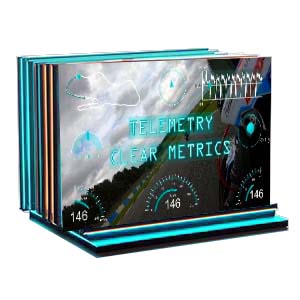
Transform your raw data into a gripping narrative! The "Clear Metrics" pack overlays professional telemetry like Speed Arcs, G-Force meters, Altitude Graphs and other parameters onto your footage. Choose individual widgets or ready-made color suites for instant multi-gauge displays.
Crafted in Myriad Pro for ultimate clarity, these templates are perfect for FPV drones, GoPro, motorsports and action scenes!
Crafted in Myriad Pro for ultimate clarity, these templates are perfect for FPV drones, GoPro, motorsports and action scenes!
Key Features
SVG Vector Graphics
Full Customization
Color Presets
Individual Widgets & Full Suites
Number Of Items: 25
File Size: 96Mb
Frequently Asked Questions
Can I use these widgets with my GoPro HERO 13 Black footage?
Yes, absolutely! The "Clear Metrics" pack works great with any modern GoPro model (HERO 7 and newer) as well as Insta360 X3 cameras. Just import your MP4 file with embedded GPS data into VSDC and the software will extract the telemetry to create the gauges. It's truly a one-click process.
Yes, absolutely! The "Clear Metrics" pack works great with any modern GoPro model (HERO 7 and newer) as well as Insta360 X3 cameras. Just import your MP4 file with embedded GPS data into VSDC and the software will extract the telemetry to create the gauges. It's truly a one-click process.
I record motorcycle rides. What exactly can I show to my viewers?
Everything that makes your ride exciting and easy to understand: real-time speed (as a beautiful speedometer or digital display), G-Force meters that show how sharply you took turns, altitude graphs for elevation changes, plus heading and route data. Choose individual widgets or ready-made suites and get a perfect, professional result!
Everything that makes your ride exciting and easy to understand: real-time speed (as a beautiful speedometer or digital display), G-Force meters that show how sharply you took turns, altitude graphs for elevation changes, plus heading and route data. Choose individual widgets or ready-made suites and get a perfect, professional result!
Why does the font matter so much? I'm not a designer.
It's all about viewer experience. When you're moving at high speed, viewers shouldn't struggle to read the numbers. We use the clean, professional Myriad Pro font because it's extremely legible even on small smartphone screens or in fast-paced action. You're not a designer and that's exactly why we've handled this detail for you.
It's all about viewer experience. When you're moving at high speed, viewers shouldn't struggle to read the numbers. We use the clean, professional Myriad Pro font because it's extremely legible even on small smartphone screens or in fast-paced action. You're not a designer and that's exactly why we've handled this detail for you.

VSDC
Store
Templates / Telemetry Widgets / Tech Dash
VSDC Tech Dash
25 templates
$49
BuyDescription
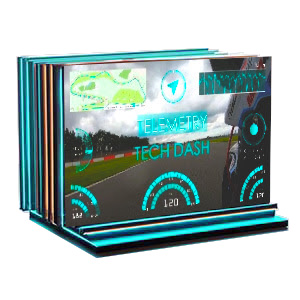
Create professional movie-style HUD interfaces with Tech Dash! This pack delivers authentic OCR A Extended telemetry widgets featuring real-time Speed Arcs, G-Force meters and more.
Get instant results with pre-designed color-coordinated gauge suites and transform your tech reviews, gaming content, GoPro videos and sci-fi projects with cinematic data displays!
Get instant results with pre-designed color-coordinated gauge suites and transform your tech reviews, gaming content, GoPro videos and sci-fi projects with cinematic data displays!
Key Features
SVG Vector Graphics
Full Customization
Color Presets
Individual Widgets & Full Suites
Number Of Items: 25
Frequently Asked Questions
How do I add a map and speedometer to my motorcycle vlog?
It's a one-click process! Just import your GoPro or Insta360 footage into VSDC. VSDC Video Editor will automatically detect the GPS data embedded in your video file and you will be able to add a stylish map of your route, along with a real-time speedometer, altitude graph and more. You don't need to manually track your route or keyframe the speed because it's all done for you, so you can focus on the ride and the storytelling.
It's a one-click process! Just import your GoPro or Insta360 footage into VSDC. VSDC Video Editor will automatically detect the GPS data embedded in your video file and you will be able to add a stylish map of your route, along with a real-time speedometer, altitude graph and more. You don't need to manually track your route or keyframe the speed because it's all done for you, so you can focus on the ride and the storytelling.
I'm an adventure travel vlogger. Can I use this pack to show my hiking elevation or off-road trips?
Absolutely. This is a perfect pack for showcasing your adventures. Here you’ll find great options to display altitude, speed, elevation gain throughout your hike, bike trail or 4x4 journey. You can create a compelling visual story that shows not just where you went, but also, for example, how challenging the terrain was, making your content much more immersive.
Absolutely. This is a perfect pack for showcasing your adventures. Here you’ll find great options to display altitude, speed, elevation gain throughout your hike, bike trail or 4x4 journey. You can create a compelling visual story that shows not just where you went, but also, for example, how challenging the terrain was, making your content much more immersive.
My road trip footage feels flat. How can these widgets make my USA travel vlogs more cinematic?
They can help you transform hours of highway footage into a dynamic, data-driven story. Instead of just telling your viewers you're driving, for instance, through Monument Valley, the "Tech Dash" overlays can show them your exact speed, heading (direction) and GPS coordinates on a sleek, futuristic map. This adds a layer of authenticity and a high-tech, "mission control" feel that is highly popular on platforms like YouTube.
They can help you transform hours of highway footage into a dynamic, data-driven story. Instead of just telling your viewers you're driving, for instance, through Monument Valley, the "Tech Dash" overlays can show them your exact speed, heading (direction) and GPS coordinates on a sleek, futuristic map. This adds a layer of authenticity and a high-tech, "mission control" feel that is highly popular on platforms like YouTube.
VSDC
Store
Templates /
Telemetry Widgets /
Dynamic Hues
Dynamic Hues GPS Telemetry Templates
For GoPro, drone and action videos
27 GPS telemetry templates
$49
Buy Dynamic Hues
Description
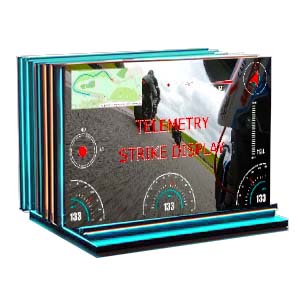
Turn every gauge into a living timeline with Dynamic Hues, a pack of GPS telemetry templates for GoPro, drone footage and action videos. These progressive-fill overlays make speed, altitude and other metrics light up segment by segment as your performance changes on screen.
Use them for motorsport videos, FPV and drone footage, cycling, skiing, racing clips and other extreme sports edits.
Choose any colors you want and customize every widget freely with access to a full color palette!
Use them for motorsport videos, FPV and drone footage, cycling, skiing, racing clips and other extreme sports edits.
Choose any colors you want and customize every widget freely with access to a full color palette!
Key Features
GPS Telemetry Templates for Video
Speedometer, Altitude & Data Widgets
SVG Vector Graphics
Full Color Customization
Individual Widgets & Full Suites
Number Of Items: 27
File Size: 104Mb
This program allows you to capture the video of your desktop and save it on your PC in various formats. Coupled with a video editor, the program is a great tool for creating presentations, tutorials and demo videos.

The program captures video from external devices and records it to computer in a free format. You can save video from video tuners, webcams, capture cards and other gadgets.
VSDC Video Editor Reviews & Ratings (Trustpilot, Capterra & Media)
VSDC Free Video Editor is rated 4.5/5 by real users on Trustpilot and Capterra. Here are a few reviews and quotes from creators and tech media.
Overall rating: 4.5/5 based on 200+ reviews on Trustpilot and 89 reviews on Capterra.
★★★★⯪
VSDC Free Video Editor is the best free video editor for Windows I’ve used, from color grading to picture-in-picture and cinematic results.
— Ejikeme Eloka Augustine
Source:Trustpilot
★★★★☆
Easy-to-use interface and quick export to social media make VSDC a versatile video editing tool for everyday projects.
— Karen C., E-Learning
Source:Capterra
★★★★☆
A feature-packed non-linear video editor for Windows that can compete with many paid video editing solutions.
— TechRadar
Source:TechRadar review
★★★★★
The free VSDC editor saved my YouTube channel – a powerful video editing software for chroma key, text effects and picture-in-picture.
— Paul Roberts
Source:Trustpilot
★★★★★
Fast and simple for YouTube videos with green screen, zoom, color tools and creative effects in one app.
— Marie R., Media Production
Source:Capterra
★★★★★
One of the best free video editor options for Windows users, ideal for GoPro, YouTube and family videos.
— VidProMom, YouTube creator
Source:Media reviews
★★★★★
I’ve been using VSDC for years; editing is easy and the final videos look great for my personal and professional projects.
— Long-time VSDC user
Source:Trustpilot
★★★★★
Great value and faster than many other free tools; I quickly create videos for YouTube, Instagram and Facebook with features my audience loves.
— Rabika B., Marketing & Advertising
Source:Capterra
★★★★★
VSDC offers many features you don’t usually find in free editors, including picture-in-picture, stabilization and modern codec support with no watermarks.
— Tech media review
Source:Media reviews
 Like us on Facebook
 Follow us on Twitter
 / @VSDCFreeVideoEditor