


视频编辑器
使用免费软件制作和编辑从贺卡到公司简介等不同复杂程度的视频。可以剪切和合并视频文件,应用音效和视效,添加滤镜,进行图像校正,创建幻灯片秀、添加背景音乐。使用多彩色色键和高级属性设置可以将视频升级到专业水平。软件支持所有常用的视频和音频格式。
视频转换器
此应用程序针对转换视频文件的格式,支持几乎所有常用的视频格式(读取和保存均可)。此外,程序可以大大简化转码任务,使视频能兼容特殊的多媒体设备,如iPhone、Microsoft Zune或Archos。操作非常简单,软件具有现代化界面以及所有处理视频必须的功能。
CD音频截取器
此音频工具用于从CD截取音频轨迹并存为任何格式。支持几乎所有常用的音频格式。此应用程序也能够从FreeDB服务器中获得音频轨迹的信息,并自动改名及更新文件的标记。
 视频编辑器
视频编辑器 视频转换器
视频转换器 音频转换器
音频转换器 CD音频截取器

多功能
一套免费视频软件包含丰富处理工具的种类。

高速
应用程序采用高速高效算法,适合于单核和多核处理器

实惠
VSDC视频软件可年免费下载到Windows系统操作的PC和笔记本。
News:
- 时刻已到:我们很高兴向您介绍期待已久的VSDC 9.1更新!新版本的增强功能将加速视频编辑,并使编辑过程更加便捷。 New Transition Addit...
- 我们很高兴为您提供最新的 VSDC 8.3 更新!我们的团队一直在积极开发新版本,现在我们可以向您介绍所有变化,这些变化将使 VSDC 的工作更加方便。 V...
- 如今,视频内容的普及势头越来越猛,许多用户都面临着为个人和专业目的制作视频的需求。在从市场上提供的各种视频编辑器中选择一款合适的视频编辑器时,许多用户更倾向于免...
- 在当今的数字世界中, 创造力占据主导地位。 它为个人和品牌提供了无限的可能性来吸引受众并留下持久的印象。 随着社交媒体平台处于沟通和产品消费的最前沿, 制作...
如何删除视频背景使用VSDC(色度键效果)
人们通常需要从视频中移除背景,用一张漂亮的图片或者另一段视频来代替它。从技术上讲,有两种方法可以做到这一点。第一个也是最流行的“背景删除”是色度键。这是一个工具,自动检测一个坚实的颜色背景,并立即删除从视频中。第二个方法是蒙版,当您想要去除的背景不是单一色调光滑的实心绿色墙时,它通常会被应用。
蒙版涉及到大量的手工编辑,因此,需要更多的技能和电脑资源。另一方面,色度键是非常友好和高效的。因此,我们绝对建议您使用它在需要更改视频背景的时候。现在,让我们看看如何使用色度键在VSDC免费视频编辑器。
如何删除背景从视频中使用VSDC
一旦您下载VSDC视频编辑器到您的电脑,启动程序和导入视频与坚实的彩色背景。
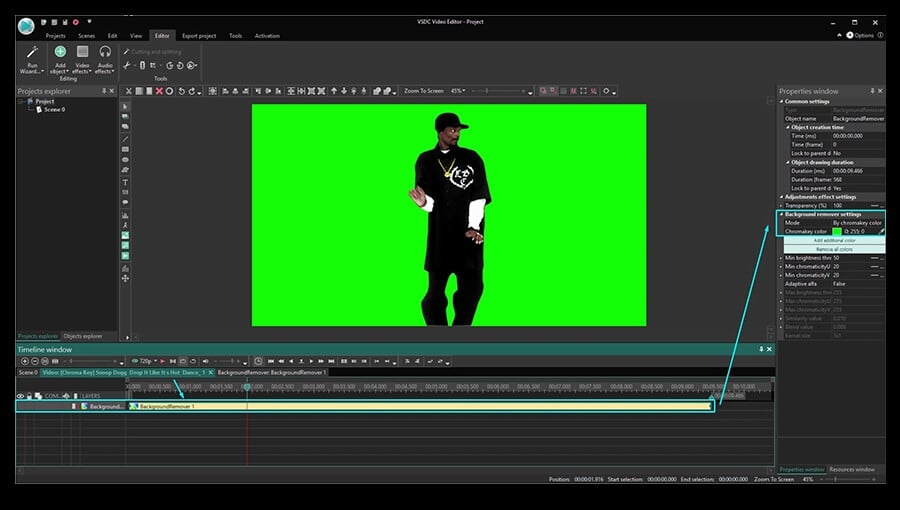
一旦视频被放置在时间线上,你就需要对它应用色度键效果。转到顶部菜单中的“视频效果”,选择“透明”并继续到“背景删除”。注意,您不会立即看到从场景中删除的绿色,但是您会注意到时间线上有一个新的层,称为后台背景删除(1)。右击它可以打开“属性”窗口(如果没有自动打开)。见下图。
在背景删除设置中,您会注意到“色度键颜色”。使用滴管工具直接从现场获取颜色。要做到这一点,只需单击“滴管”图标,然后单击视频背景上的任何位置-该软件将自动检测颜色需要删除。
有的时候,即使您删除背景从视频中,物体周围也会留下一条绿色的边框。这通常发生在背景颜色不均匀,或者光线差,这会产生明显的阴影和高光。
因此,如果有一个大面积,但是它还不是删除的-只要去使用滴管工具再次调整色度键的设置。如果对象周围有一条细线,请继续调整“属性”窗口中的下列参数:
- 亮度最低阈值(通常需要增加此参数)。
- 色度U最低阈值。
- 色度V最低阈值(通常需要增加此参数)。
因为每个视频都是不同的,所以没有一个完美的设置的通用组合。因此,我们建议您手动操作这些参数,检查工作区域的实时结果。
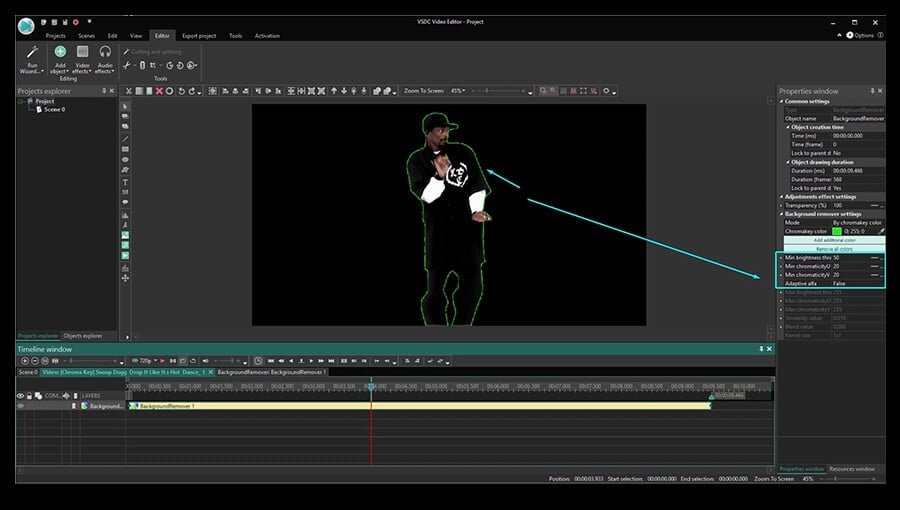
如果您使用VSDC专业的版本,您还可以将自适应阿尔法切换到“真”,并更改最大亮度和最大色度设置,以获得更高的精度。
如何删除背景从视频中,并将其替换为图像
现在我们有了最有趣的部分-改变视频背景。下面是您需要做的事情:
第一步骤: 单击时间线上的“场景0”选项卡上的“后退”。
第二步骤: 单击顶部菜单中的绿色圆形按钮“添加对象”。
第三步骤: 在您的电脑需要选择一个视频或者图像,您想要替换背景。
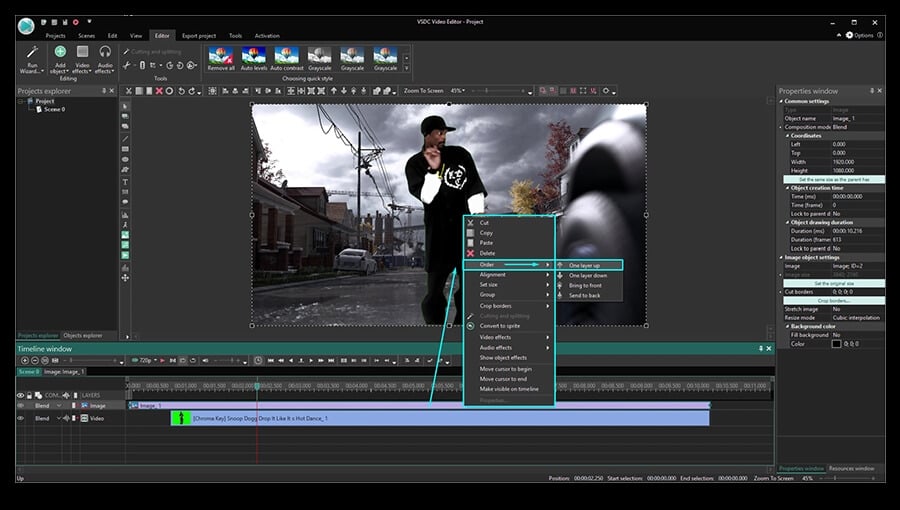
第四步骤: 您这样做的时候破,新的背景将放置在前面的场景-所以右击它并选择订单-一层以下。
第五步骤: 如果需要,通过移动或者调整对象大小来调整结果。
如何删除背景从视频中以最少的问题
色度键的魔力令人印象深刻,尤其是当您第一次使用它的时候。为了使整个过程尽可能顺利,这里有三个提示:
- 避免更改原始视频的大小或者分辨率。如果您这样做,相邻的颜色可能会混合,一旦您删除背景,一些对象将得到删除背景的颜色色调。
- 拍摄时尽量使用均匀涂覆的背景,并安排一个像样的光线。您的视频背景颜色越流畅,软件就越容易检测和删除它。
- 您拍摄的物体应该与背景有最大的对比。换句话说,如果背景是绿色的,避免穿绿色,因为您的衣服可能会像背景一样从视频中被抹去。深色的颜色通常效果最好,而任何含有绿色的颜色最终都会混合在一起。
如果您想了解更多关于在预算上拍摄一个完美的绿色屏幕视频的知识,我们在这个绿色屏幕软件教程中讨论过它。您也可以为您的项目找到一些鼓舞人心的想法。
希望,这是足够详细的,让您现在能够删除背景从视频。如果您有任何问题,可以在Facebook上留言!
别忘了订阅我们的YouTube频道,我们每周都会分享新的视频编辑技巧。
You can get more information about the program on Free Video Editor' description page.
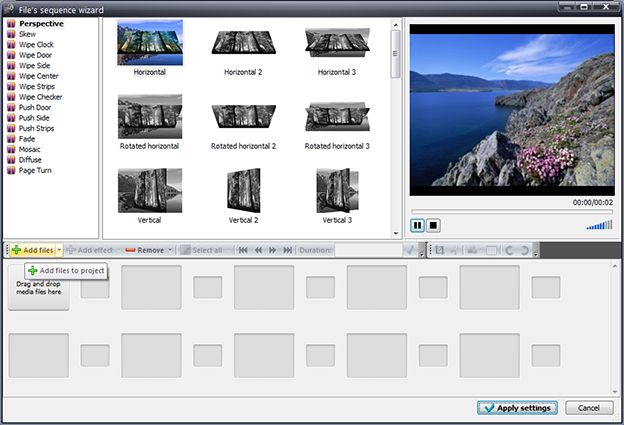


 为Windows下载VSDC免费视频编辑器


"VSDC Free Video Editor is a surprisingly powerful, if unconventional video editor"
- PC Advisor

"This video editor gives you tons of control and editing power"
- CNet

"The editor handles many common formats and boasts a good deal of capabilities when it comes time to alter lighting, splice video, and apply filters and transitions in post production"
- Digital Trends
 Like us on Facebook
 Follow us on Twitter
 Watch us on YouTube
 © 2011-2024, www.videosoftdev.com, FLASH-INTEGRO LLC. Privacy policy | Terms of use | About us
此处被引用的所有商标均为其各自所有者的专有财产。
只有获得网站管理员的书面许可,才能从本网站复制任何材料。