Editor de vídeo

Use o editor de vídeo gratuito para criação e edição de vídeos de qualquer complexidade. Corte vídeos, aplique efeitos visuais e de áudio, use filtros e correção de imagem, faça apresentações de slides, adicione uma trilha sonora. Use Chroma Key e outras funções avançadas. Todos os formatos populares são suportados.

Saiba mais sobre o editor...

Conversor de vídeo

Converta vídeo de um formato para outro. Todos os formatos de vídeo mais populares são suportados - AVI, MOV, QT, MP4, M4V, MPEG, WMV, FLV, MKV, RealVideo (RM e RMVB), 3GP e 3G2. Prepare seus arquivos multimídia para reprodução instantânea em qualquer formato e em qualquer dispositivo.

Saiba mais sobre o conversor...

Conversor de áudio

Converta arquivos de áudio de um formato para outro. Todos os principais formatos e codecs de áudio suportados. Você também pode gerenciar listas de reprodução e meta tags, extrair o áudio de arquivos de vídeo e salvar faixas em seu dispositivo em qualquer formato.

Saiba mais sobre o conversor...

Gravador de CD de áudio

Tire faixas de áudio de CDs e guardá-los em qualquer formato no seu PC. Quase todos os formatos e codecs de áudio são suportados. O programa pode remover detalhes da faixa do servidor FreeDB para renomeação de arquivos automática e atualização de meta tags.

Saiba mais sobre o gravador...

Multifunctionality

Multifuncionalidade

Uma ampla gama de ferramentas de processamento multimídia em um pacote de software de vídeo gratuito.

High speed

Alta velocidade

Algoritmos de nossos programas são rápidos e otimizados para CPU de núcleo único e múltiplos núcleos.

Affordability

Disponibilidade

VSDC está disponível gratuitamente para PCs e laptops com sistema operacional Windows.

The conversion process

You have already opened the file in the converter and chosen the suitable format! All you need to do now to start converting is to press the button "Start conversion"


It is necessary to mention, that the button "Start conversion" will change to "Stop conversion", by means of which you will be able to interrupt the conversion. Progress bar control shows you how much video has already been converted in per cent correlation. Also, under the form you can find the information about the rate of conversion (frame per second), and the time: how much time the video has already been converted and how much time is left.


The installation "Preview" allows enable/disable the display of the video while converting. On low-performance machines, the disabling of this function can accelerate the process of conversion.


When the conversion is completed, the program will inform you about the end.
Changing the directory for saving the result video

By default, the result video will be saved in the folder where the initial video is kept.


If you want to save the file in some other folder or change the name of the file, you just need to push the button "Change name…".

Opening video file in the application

Before you want to start converting or editing the file, it should be opened in Video Converter. To open the file, please follow one of the ways:

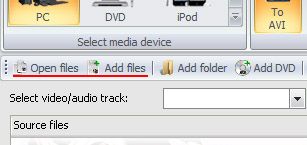
1) Pressing the button "Open files…", you can open one or some files in Video Converter.

2) Pressing the button "Add files" (on the panel it looks like "+"), you will add one or several files to the opened ones.

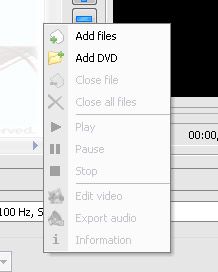
3) While pushing the right mouse button on the list of the opened files, the menu will appear, where you can choose one of the actions:

  • to add video file

  • to add DVD

  • to delete file from the list of converted ones

  • to delete all the files.

By means of this menu, you can begin to play the video, suspend it or stop at all. To get  more interested information, click "Information".

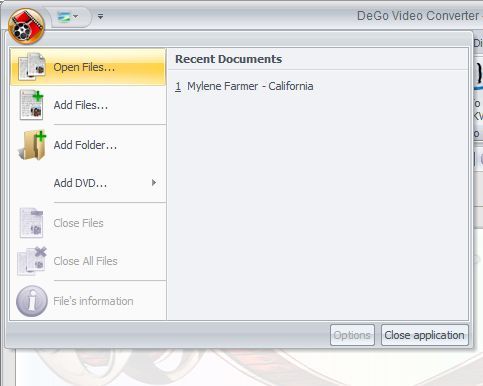
4) Also you can open video files from main menu (that will be appeared after clicking on application icon):


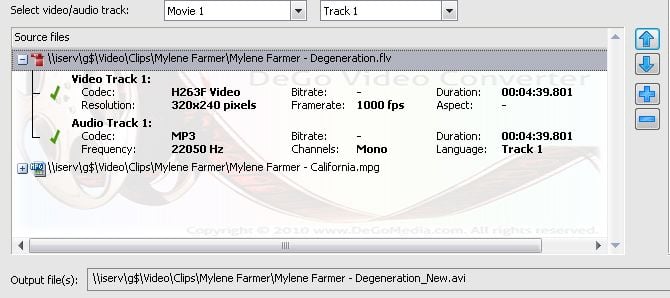
All the opened video files are shown in the list "Source files":


In this list you can choose the file for both: deleting it from Video Converter or playing it.

Choosing a suitable video format

To choose a suitable video format, please, do the following:
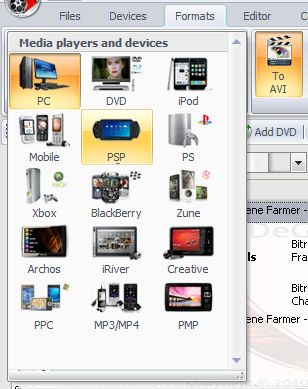
First of all, you need to choose the device you want to play the video on. For this purpose, click the picture of the shown items on "Devices" Tab:


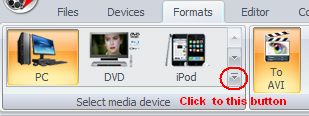
Also you can choose media player in the "Format" Tabs:


Various devices support various formats. The majority of them can play some formats:

Personal computer supports AVI, MPEG, Quick Time, WMV, MKV, Real Media, SWF и FLV.

DVD-player plays DVD, VCD, and SVCD. The latest generation of players can also play AVI or MPEG format.

Portable Sony PlayStation supports only MP4 format.

Apple iPod plays only M4V files.

Archos support AVI format and WMV video.

Portable media-players, subject to their models, can play AVI, MREG, QuickTime, WMV, MTV or AMV.

Mobile phones, as a rule, support 3GP/3G2, MP4 or RealMedia.

Blackberry phones can play AVI, MP4 or 3GP video files.

Creative Zen player support AVI and WMV formats.

iRiver player support AVI and WMV formats.

Play Station can play DVD and MP4 files.

Zune Media player can play WMV and MP4 video files.

Xbox support video files with such format as WMV, AVI, MP4 and DVD

Windows Mobile PPC can play WMV, AVI and MPEG videos.

MP3 / MP4 players support MP4, AMV and MTV video formats.


After you have chosen the device, a list of supported formats will appear.


Secondly, you need to choose the format you want to convert to.
Our program supports practically all the modern formats.

AVI – most of all, this format is used on the PC, but the up-dated players also can support this format. Using it, you are lucky to get the video of any quality.

MPEG – is an extensively used format, which allows you to obtain the good quality of the video with small required resources of PC.

MOV – is a QuickTime format, created by the firm Apple. The format is mostly used in operational systems and media-devices of Apple firm.

WMV – Windows Media Video is specially created by Microsoft. It is used in operational systems like Windows, and also in some players, promoted by Microsoft.

RM – Real Media format was created as a special format for the Internet. Files with such a format can be played by mans of RealPlayer.

SWF – this format is used in the Internet. The format can be also played with the help of Internet explore or Adobe Flash Player.

FLV – this format is created for passing video via Internet in real time.

DVD – is a very popular format. It is used for playing on a DVD-player and distributed on DVD compact discs.

VCD и SVCD – an out-of-date video format, which was practically displaced by DVD. By analogy, it is used for playing on DVD, but distributed only on CD discs.

MP4 – the format for playing on Sony PSP, some mobile phones and Smartphones. It was created by Apple firm and is considered to be one of the varieties of a QuickTime format.

M4V – is played on Apple iPod. The format is created by Apple firm and considered to be one of the varieties of a QuickTime format.

MTV – this format is played in not very expensive media-players.

3GP – is used for mobile phones of GSM connection. The format is made by Apple firm and called to be the kind of QuickTime format.

3GPP – is used for mobile phone of CDMA connection. The format is made Apple firm and called to be the kind of QuickTime format.

MKV - this format is used on the PC, but the up-dated players also can support this format.

AMV – this format is played in not very expensive media-players.

Pagina 2 de 2

News

Indicadores GPS para GoPro e outras câmaras de ação, edição de metadados, codecs alargados e fluxo de trabalho mais inteligente.

publicado por Amy Shao 19/11/25 Conheça a tão aguardada atualização VSDC 10.2: uma nova versão repleta de recursos incríveis e melhorias significativas projetadas para capacitar todos vocês,...

Major VSDC 10.1 Update: Advanced HDR, GPS Telemetry, New Effects, Great Variety of New Templates and Tools For Different Needs

published Amy Shao 6/10/25 A espera por algo novo e incomum finalmente acabou! A atualização chegou e não é apenas mais uma versão: é o VSDC 10.1!! VSDC 10.1 Update: HDR avançado, telemetria GPS,...

Atualização de Natal VSDC 9.4: Gerenciamento de Efeitos Aprimorado, Mais de 100 Templates de Fundo e Edição Simplificada

Nesta temporada de festas, celebramos novos começos com a mais recente atualização do VSDC Video Editor! Ouviu-se suas sugestões e decidimos focar em aprimorar as ferramentas que você mais gosta —...

Como o VSDC Free se tornou a minha arma secreta para marcas de água (edição 4K gratuita em 2025)

Olá, eu sou Mattea Wharton, videomaker de viagens de Seattle. Durante três anos lutei com editores de vídeo que colavam marcas d'água feias nos meus vídeos até encontrar o VSDC. Este editor gratuito...

Mais de 150 modelos, transformador de texto, detecção automática de sprite e atualização da GUI

A mudança é sinônimo de melhoria, e esse processo não seria possível sem a sua contribuição. Após revisar cuidadosamente o seu feedback, resolvemos várias questões importantes e introduzimos...

Melhor Software de Efeitos Especiais

Introdução Em 2024, a gama de opções para criar efeitos visuais é incrivelmente diversa e torna-se cada vez mais desafiador identificar as melhores escolhas. Aqui você pode encontrar um guia para...

VSDC 9.2: modelos de segmentação de IA, mais de 300 transições, VSDC Cloud e nova coleção de modelos

O VSDC 9.2 chegou e oferece recursos inovadores, como a nova ferramenta de segmentação alimentada por IA, que permite a remoção precisa de objetos, correção avançada de cores e uma variedade de...

Como os filmes em preto e branco foram coloridos

Você é fã de filmes clássicos em preto e branco? Já teve curiosidade de saber como eles ficariam se fossem coloridos? Muitos cineastas já se perguntaram o mesmo, o que fez com que vários filmes...

Os melhores editores de vídeo on-line de 2024: vantagens e desvantagens

15 de julho de 2024 publicado por Amy Shao Atualmente, a popularidade do conteúdo de vídeo está ganhando força, e muitos usuários se deparam com a necessidade de criar vídeos para fins pessoais...

Novas maneiras de adicionar transições, suporte para arquivos RAW e BRAW e visualização de áudio gratuita

O momento chegou: estamos felizes em apresentar a você a aguardada atualização do VSDC 9.1! A funcionalidade aprimorada da nova versão acelerará a edição de vídeo e tornará o processo de edição...
 

Caixa de Gravador de tela

Ferramenta de captura de sua Área de Trabalho, que lhe permite salvar essa captura em um arquivo de vídeo e processar no editor.

Saiba mais sobre Gravador de tela...


Caixa de Captura de vídeo

Um programa para capturar vídeo de dispositivos externos. Você pode salvar o vídeo de sintonizadores de vídeo, câmeras web, placas de captura e outros dispositivos.

Saiba mais sobre Captura de vídeo...

VSDC Video Editor Reviews & Ratings (Trustpilot, Capterra & Media)

VSDC Free Video Editor is rated 4.5/5 by real users on Trustpilot and Capterra. Here are a few reviews and quotes from creators and tech media.

Overall rating:4.5/5based on200+ reviews on Trustpilotand89 reviews on Capterra.

★★★★★

VSDC Free Video Editor is the best free video editor for Windows I’ve used, from color grading to picture-in-picture and cinematic results.

— Ejikeme Eloka Augustine

Source:Trustpilot

★★★★☆

Easy-to-use interface and quick export to social media make VSDC a versatile video editing tool for everyday projects.

— Karen C., E-Learning

Source:Capterra

★★★★☆

A feature-packed non-linear video editor for Windows that can compete with many paid video editing solutions.

— TechRadar

Source:TechRadar review

★★★★★

The free VSDC editor saved my YouTube channel – a powerful video editing software for chroma key, text effects and picture-in-picture.

— Paul Roberts

Source:Trustpilot

★★★★★

Fast and simple for YouTube videos with green screen, zoom, color tools and creative effects in one app.

— Marie R., Media Production

Source:Capterra

★★★★★

One of the best free video editor options for Windows users, ideal for GoPro, YouTube and family videos.

— VidProMom, YouTube creator

Source:Media reviews

★★★★★

I’ve been using VSDC for years; editing is easy and the final videos look great for my personal and professional projects.

— Long-time VSDC user

Source:Trustpilot

★★★★★

Great value and faster than many other free tools; I quickly create videos for YouTube, Instagram and Facebook with features my audience loves.

— Rabika B., Marketing & Advertising

Source:Capterra

★★★★★

VSDC offers many features you don’t usually find in free editors, including picture-in-picture, stabilization and modern codec support with no watermarks.

— Tech media review

Source:Media reviews