


Editor video
Use editor de video gratuito con la interfaz en español para crear y editar vídeos de cualquier complejidad desde una tarjeta para la familia hasta una presentación de empresa. Corte, una vídeo, aplique efectos visuales y de audio, corrección de imagen, haga diapositivas y añada una banda sonora. Utilice Croma Key multicolor y ajustes de los parámetros avanzados para dar su vídeo un aspecto profesional. Todos los formatos más populares son soportados.
Convertidor video
Convierta archivos de vídeo de un formato a otro. Todos los formatos de vídeo más populares son soportados - AVI, MOV, QT, MP4, M4V, MPEG, WMV, FLV, MKV, RealVideo (RM y RMVB), 3GP y 3G2. Haga su video disponible para la reproducción en cualquier dispositivo.
Convertidor audio
Convierta archivos de audio de un formato a otro. Todos los formatos y codecs de audio principales soportados. Gestione listas de reproducción y etiquetas meta, extraiga el audio de archivos de vídeo y guarde estas pistas en su dispositivo en cualquier formato.
Animated Intro & Title Templates
Explore the VSDC Template Store with ready-made video templates for intros, animated titles, lower thirds, logo reveals, slideshows, glitch transitions, LUTs, and color grading presets. Drop a template into the VSDC Video Editor timeline, edit text, timing, and colors, and finish professional video projects in minutes.
Choose from 300+ exclusive packs of video transitions, LUT packs, text effects, GPS telemetry widgets, animated elements, and animated backgrounds for VSDC. All templates are fully customizable, support up to 4K resolution in 16:9, and help you build intros, wedding slideshows, travel videos, and tutorials much faster.
VSDC Cloud - Online video management
Keep your work safe, organized and always accessible! Back up your video projects, store media files online and access them from any device. Enjoy collaboration, share project updates and exchange files easily.
 Editor video
 Convertidor video
 Convertidor audio
 Templates store
 Cloud
Cloud

Multifuncionalidad
Amplia gama de herramientas de procesamiento multimedia en un solo paquete de software de vídeo gratuito.

Alta velocidad
Nuestros programas usan algoritmos de alta calidad optimizados para las CPUs de un solo núcleo y núcleos múltiples.

Disponibilidad
VSDC está disponible gratis para la descarga a PC y portátiles con sistema operativo de Windows.
News:
- Publicado por Amy Shao el 30 de junio de 2026 Descubre la nueva g...
- Publicado por Amy Shao el 11 de marzo de 2026 ¿Cuál es el mejor r...
- publicado por Amy Shao 19/11/25 Conoce la tan esperada actualización VSDC 10...
- Hola, soy Mattea Wharton, videógrafa de viajes de Seattle. Durante tres años luc...
VSDC Free Video Editor Comes Up with More Audio Options
July 1, 2015
Flash-Integro announces a new version of VSDC Free Video Editor 3.2. The acclaimed video processing tool now features a number of options to enhance audio editing as well. In particular, the new version introduces waveforms for audio and video objects for precise audio handling, visual editing of audio effects, and flexible volume control.
An easy-to-use, massively visual, feature-rich free video editing tool for home use – that’s the first impression VSDC Free Video Editor makes. Indeed, the software, while being 100% free, offers a lot of functions often found in professional video editing apps only. Non-linear video editing, subpixel precision, flexible object behavior, and tons of visual effects combine to create robust and effortless creation or editing of video at home. The new VSDC Free Video Editor 3.2 aims to deliver more audio editing options too.
Eugene Hapov, the CEO at Flash-Integro comments: “Audio is a natural part of any movie, clip, or home video. In the new release we decided to put the focus on giving our users more audio editing options”.
The central part of the new release is waveforms. The new version displays waveforms for audio and video objects to allow a user to accurately match them and edit as a whole. For instance, the user can now easily strip out silent fragments of a video or apply an effect to the given fragment with utter accuracy. And the audio effects (few dozens are available) can be edited visually now for an even better result. Among other novelties in the new version is more flexible control over sound volume. Now the volume can rise and fall linearly or non-linearly and even in an arbitrary combination of linear and curve parts. The option will come in handy when underscoring dramatic moments of a video or making soft audio transitions.
In spite of its vast functionality, VSDC Free Video Editor demonstrates extreme user friendliness and straightforwardness. Almost all video editing tasks are made visually in the tool by means of various Wizards. At the same time, the app allows for precise fine-tuning for those users who want to be in full control of the video timeline and effects.
Product page: http://www.videosoftdev.com/free-video-editor
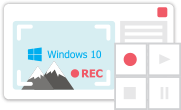
This program allows you to capture the video of your desktop and save it on your PC in various formats. Coupled with a video editor, the program is a great tool for creating presentations, tutorials and demo videos.

El programa de captura de vídeo desde dispositivos externos. Puede guardar vídeo desde sintonizadores de vídeo, cámaras web, tarjetas de captura y otros aparatos.
VSDC Video Editor Reviews & Ratings (Trustpilot, Capterra & Media)
VSDC Free Video Editor is rated 4.5/5 by real users on Trustpilot and Capterra. Here are a few reviews and quotes from creators and tech media.
Overall rating: 4.5/5 based on 200+ reviews on Trustpilot and 89 reviews on Capterra.
★★★★⯪
VSDC Free Video Editor is the best free video editor for Windows I’ve used, from color grading to picture-in-picture and cinematic results.
— Ejikeme Eloka Augustine
Source:Trustpilot
★★★★☆
Easy-to-use interface and quick export to social media make VSDC a versatile video editing tool for everyday projects.
— Karen C., E-Learning
Source:Capterra
★★★★☆
A feature-packed non-linear video editor for Windows that can compete with many paid video editing solutions.
— TechRadar
Source:TechRadar review
★★★★★
The free VSDC editor saved my YouTube channel – a powerful video editing software for chroma key, text effects and picture-in-picture.
— Paul Roberts
Source:Trustpilot
★★★★★
Fast and simple for YouTube videos with green screen, zoom, color tools and creative effects in one app.
— Marie R., Media Production
Source:Capterra
★★★★★
One of the best free video editor options for Windows users, ideal for GoPro, YouTube and family videos.
— VidProMom, YouTube creator
Source:Media reviews
★★★★★
I’ve been using VSDC for years; editing is easy and the final videos look great for my personal and professional projects.
— Long-time VSDC user
Source:Trustpilot
★★★★★
Great value and faster than many other free tools; I quickly create videos for YouTube, Instagram and Facebook with features my audience loves.
— Rabika B., Marketing & Advertising
Source:Capterra
★★★★★
VSDC offers many features you don’t usually find in free editors, including picture-in-picture, stabilization and modern codec support with no watermarks.
— Tech media review
Source:Media reviews
 Like us on Facebook
 Follow us on Twitter
Watch us on YouTube
 / @VSDCFreeVideoEditor
© 2011-2026, www.videosoftdev.com, FLASH-INTEGRO LLC. Privacy policy | Terms of use | About us
Todas las marcas comerciales mencionadas aquí son propiedad exclusiva de sus respectivos dueños.
La copia de cualquier material de este sitio solo se permite con el consentimiento por escrito de la Administración del sitio.