Video Düzenleyici

Aile tebrik kartından şirket sunumuna kadar her türlü karmaşıklıkta videolar oluşturmak ve düzenlemek için ücretsiz video yazılımını kullanın. Video dosyalarını kesin, birleştirin, görsel ve ses efektleri uygulayın, filtreleme ve görüntü düzeltme kullanın, slayt gösterileri yapın ve uygun bir film müziği ekleyin. Videonuza profesyonel bir görünüm kazandırmak için çok renkli Renk anahtarı ve gelişmiş parametre ayarlarını kullanın. Tüm popüler video ve ses formatları desteklenir.

Video Düzenleyici hakkında daha fazla bilgi edinin...

Video Dönüştürücü

Bu program video dosyalarını bir biçimden diğerine dönüştürmek için tasarlanmıştır. Hemen hemen tüm popüler video biçimleri (hem okuma hem de kaydetme) desteklenir. Ayrıca iPhone, Huawei P30 Pro veya Samsung Galaxy gibi belirli multimedya cihazları için videolar oluşturmak da mümkündür. Programın kullanımı son derece kolaydır, modern bir arayüze ve gerekli tüm video işleme fonksiyonlarına sahiptir.

Video Dönüştürücü hakkında daha fazla bilgi edinin...

Ses Dönüştürücü

Bir ses dönüştürücü kullanarak ses dosyalarını bir biçimden diğerine dönüştürebilirsiniz. Tüm önemli ses biçimleri ve codec bileşenleri desteklenir. Program ayrıca çalma listelerini ve meta etiketlerini yönetmenize izin verir, ayrıca video dosyalarından sesi dışa aktarmak ve parçaları herhangi bir biçimde bilgisayarınıza kaydetmeniz de mümkündür.

Ses Dönüştürücü hakkında daha fazla bilgi edinin...

Ses CD’si Yakalayıcı

Bu ses aracı kompakt disklerden ses parçalarını kopyalamaz ve bunları seçtiğiniz herhangi bir biçimde bilgisayarınıza kaydetmek için tasarlanmıştır. Neredeyse tüm popüler ses biçimleri ve codec bileşenleri desteklenir. Program ayrıca dosyaları otomatik olarak yeniden adlandırma ve meta etiketleri güncelleme için parça ayrıntılarını FreeDB sunucusundan ayıklayabilir.

Ses CD’si Yakalayıcı hakkında daha fazla bilgi edinin...

Çok işlevsellik

Çok işlevsellik

Tek bir ücretsiz video yazılım paketinde çok çeşitli multimedya işleme araçları

Yüksek hız

Yüksek hız

Programlar hızlı, optimize edilmiş çok işlemcili algoritmalar kullanır.

Kullanılabilirlik

Kullanılabilirlik

VSDC video yazılımı, Windows işletim sistemi tabanlı tüm bilgisayarlarda ve cihazlarda ücretsiz olarak indirilebilir.

VSDC Free Video Editor 5.7.5 Easy Export to Social Networks and Vaster Blending Modes Range

February 21, 2017

Now VSDC allows for uploading files directly to YouTube as well as has special export profiles for Facebook, Twitter and Vimeo.

While uploading their videos to social networks, users often face difficulties in choosing the correct format and other needed parameters as each website can have various requirements for publishing video content. To make working with Facebook, YouTube and other popular social media much easier, new export profiles have been added to VSDC Free Video Editor.
Instagram effects

Export to YouTube

Proceeding to the Web section of the ‘Export project’ tab and clicking the YouTube icon, fans of this video sharing giant will be able to:

  • choose among Low, Standard and High quality profiles;
  • upload a video to YouTube directly without switching windows, logging in their account right in the program

Preparing video for Facebook

According to our technical support data, the most common problem when exporting a file occurs with finding suitable settings to meet Facebook guidelines. As a result of special testing, one recommended profile has been allocated to this social network.

Any more social network profiles?

Clicking the Social Net button of the Web section, users are also invited to benefit from two profiles for Twitter and 4 profiles for the Vimeo video sharing service.

More opportunities for image compositing operations

With new blending modes added, those, who are more tech-savvy and professional in image and video editing, will be able to carry out more compositing operations, i.e. mixing and overlaying colors and textures of different elements and styles.

  • Grain-merge and grain-extract – one of the most popular compositing modes useful for cartographic design

    Instagram effects

  • Dodge and burn - modify the lightness of the pictures. Dodging makes an image lighter, while burning darkens it (can be compared to burning a negative)


    Instagram effects

    Instagram effects

  • Divide – can be used to brighten images or remove color tints.

    Instagram effects


Product page: www.videosoftdev.com/free-video-editor
VSDC Video Editor Spring Release: Make your Videos Colorful, Stabilized and Faster to Process

April 19, 2017

The spring release of VSDC Free Video Editor is based on the three pillars: operation optimization, adding more adjustment, special and visual video effects and introducing new features, i.e. video stabilization and export for Instagram, much demanded by users.

Speed and optimization

  • The composition operations speed has been increased by almost 20 times and applying the Mask tool is now twice as fast.
  • It has also become possible to upload multiple videos to YouTube, if a project has been split in several files, for example.
  • The video speeding up feature can now make your videos faster up to 100х.

Smoke effects

More visual and special effects

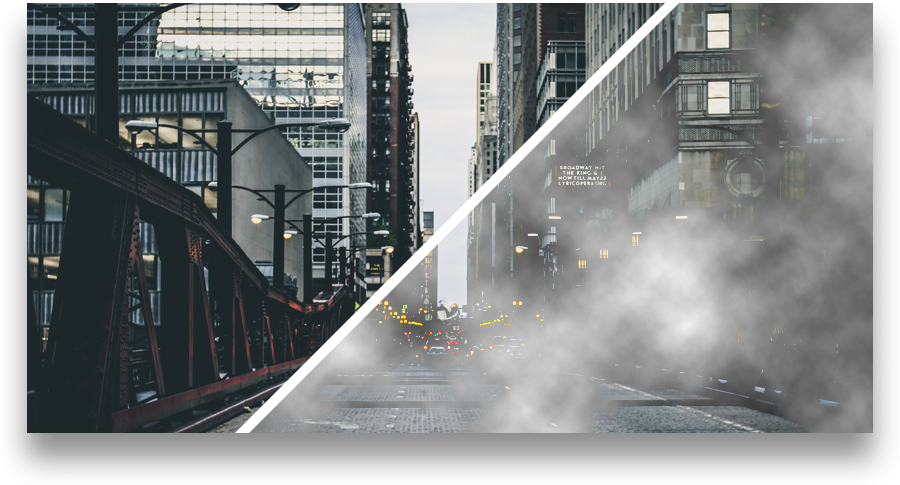
  • Smoke – a special effect that helps create VSDC Video Editor users a smoky look of various intensity levels.
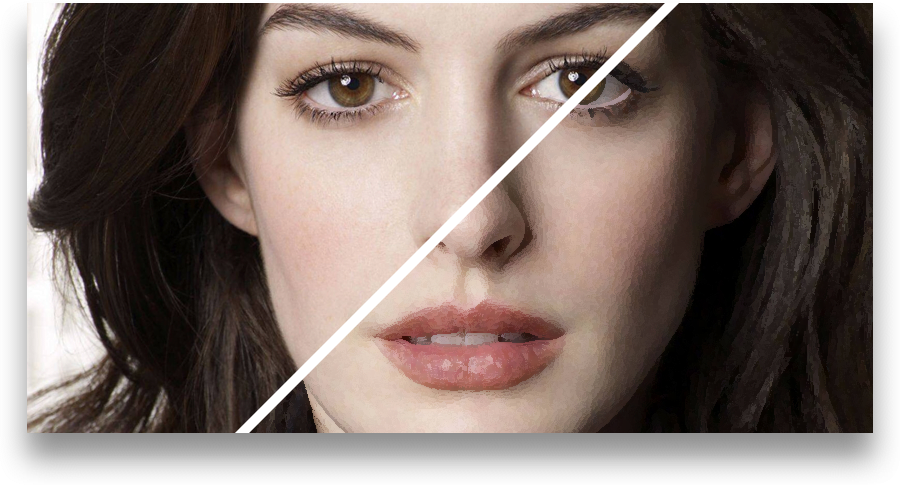
  • Oil Paint – this image filter will help to attach an oil painting masterpiece look similar to that of the popular Prisma app.
  • Color twist – an automatic color correction filter based on toning three basic colors.
  • Sepia and Black-and-white– effects aimed at turning users’ video into classic retro movies.
  • Equalize histogram– a quick way to increase an image contrast for professional photo and video makers.
  • Solarize and Parabolize – these two advanced effects make video image reverse in tone. Dark areas will appear lighter and vice versa.

Oli paint effects

New features at users’ demand

  • Video stabilization.When a video is shot without using any special equipment, or the footage is taken by a drone or a camera attached to a vehicle, there can often be an unwanted movement of the entire frame - jittering.

    Video stabilization effects

    The new video stabilization tool available in VSDC Free Video Editor will turn shaky or jittery footage into a more stable video automatically. According to a cutting edge technology used, the video frames are shifted so as to exclude undesired shaking effects, and any resulting gaps are filled using the information from previous frames.

  • Counter – adding this object to a project will help users insert a timer that can set any time period from days to seconds or even frames.
  • Easy export to Instagram – one more export profile to make users’ short movies more suitable for uploading to the popular network.
 

Product page: www.videosoftdev.com/free-video-editor
Summer Release: VSDC Video Editor Adds Voice Recording and Text Outline Features

July 12, 2021

Maybe for some projects summer is a low season, but not for VSDC: with a new version released users can record their voice and add it to the footage, make texts or titles outlined and benefit from optimized memory.

Voice over/Audio recorder

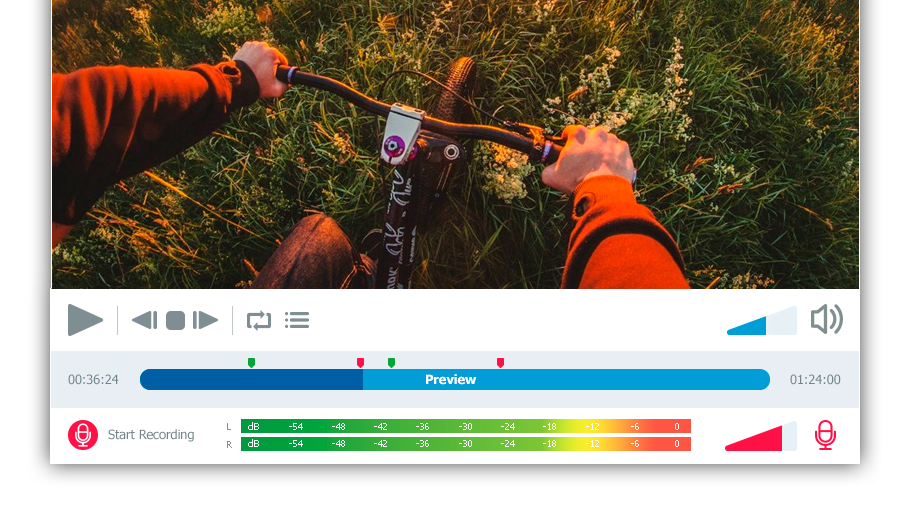
Free Video Editor’s users have always been able to add any soundtrack to the created video projects. The new embedded audio recording tool allows everyone to add voice commentary using the system’s microphone right to a VSDC project. The voice over feature works as a convenient player app where it is possible to record speech or any other sounds.

VSDC Pro users can take advantage of the voice over option synchronized with a video project. For more user friendliness and precision, the recording is carried out along with the video preview in one and the same window that allows for adding audio comments at required parts of the movie.

Meanwhile, the free version users are welcome to turn to the Voice Recorder available as a separate utility among the app’s tools.

This new feature comes in handy for filmmakers, educational institutions and video games fans that often apply audio comments for making tutorials and let’s plays.

Voice over

  • ‘Voice over’ to be found in ‘Editor’ tab >> ‘More tools’ button.
  • Free Voice Recorder to be found in ‘Tools’ tab >> ‘Voice recorder’.

Text processing enhancements

  • To meet multiple users’ demands, text outline features have been designed. Making just a couple of clicks, movie-makers can not only select a necessary text font, size and color, but also apply contouring to their taste and needs. The option, available immediately after adding a text object to the scene, provides a wide array of outline presets whose opacity can be flexibly adjusted.
  • Those using the Arabic, Aramaic, Azeri, Dhivehi/Maldivian, Hebrew, Kurdish (Sorani), Persian/Farsi and Urdu languages can now make use of the right to left writing option available in VSDC Free Video Editor.

Text contour

Memory optimization

From now on it’ll be easier for users with a limited PC memory capacity to manage their VSDC projects. The optimization enhancement carried out increases the app performance stability and prevents it from crashes while working even with large size video files.


To download the new version of VSDC Free Video Editor, please, proceed to http://www.videosoftdev.com/free-video-editor
Top 4 Best Free Video Editors for Windows

June 10, 2025

Once you outgrow Movie Maker, choosing the next video editing tool might be challenging. On the one hand, professional software - such as Sony Vegas - is a bit pricey for an average user. On the other hand, there are dozens of free programs and if you start testing them one by one, finding the right option will take you a while.

Here is a piece of advice: set priorities. What is it exactly you are looking for and why? What features are essential and which ones you're ready to sacrifice? You may not find all the strong sides of Sony Vegas in one freeware, yet a combination of tools can replace a suite worth hundreds of dollars.

In this post we've reviewed the most feature-rich free video editors for Windows and their key advantages.

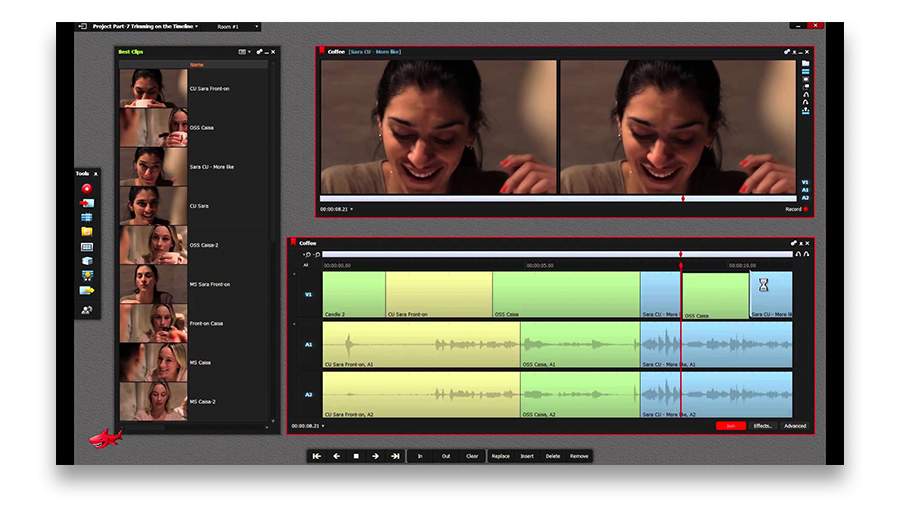
Lightworks: Trimming and Color Correction

Among video editing tools, Lightworks is a legend. According to the developers, it is widely used in Hollywood due to a fast and intuitive trimming feature. Fairly speaking, this is the only intuitive part of Lightworks. In fact, its interface is so far from being logical, it was easy to get lost at almost every step while testing.

Lightworks trimming feature

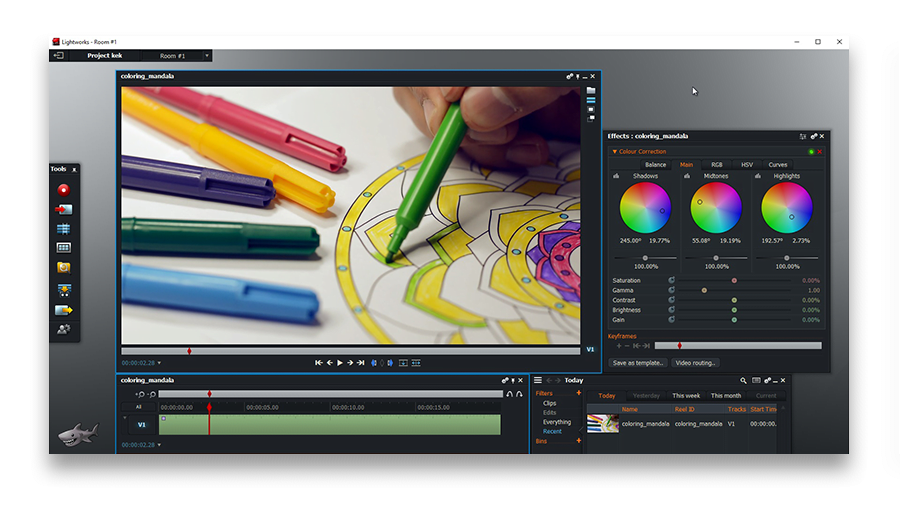
Where Lightworks is unbeatable though, is color correction. Hats off to the developers - that part is at the level of Adobe Premiere or Adobe Lightroom! You have full control of the picture and can literally set up every parameter - the HSV and RGB panels are quickly accessible.

Lightworks color correction

Key limitation of the free version: export is available to YouTube and Vimeo only (1080p), so you won't be able to save the project directly to your PC.

VSDC: Blending Modes and Gradient Tool

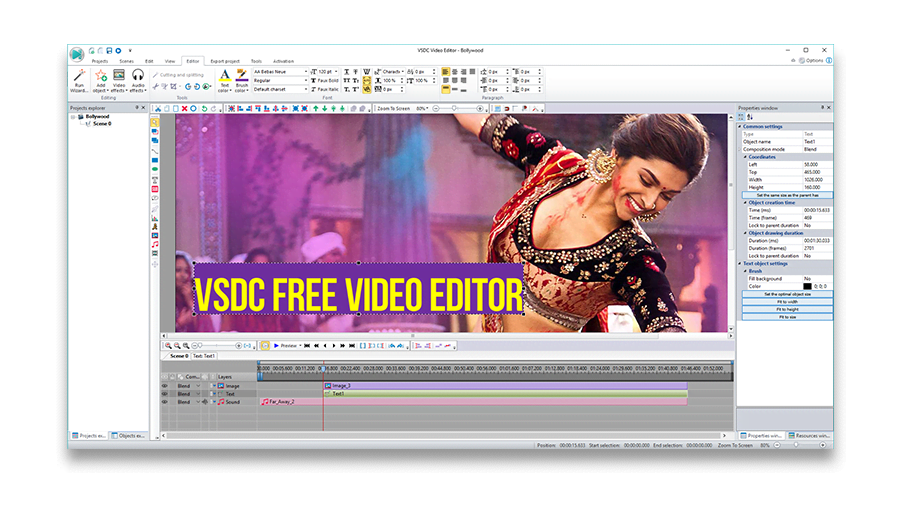
While on the subject of working with color, VSDC is worth checking out. Despite an old-school interface this software has a couple of unique features.

VSDC bollywood video editor

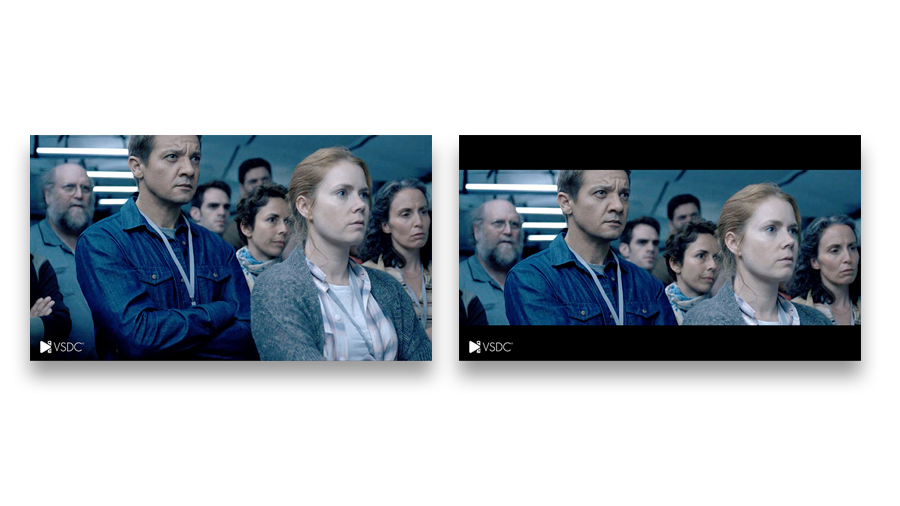
First, there is one unobvious advantage - VSDC performs a lot like a graphic editor. That means you can place graphic objects in the scene and modify them. There are many ways to make use of it, and a quick example is a cinema look: two black bars added on top and on the bottom of a scene. Most video editing programs suggest using masking for that purpose, which is more time and effort consuming.

VSDC cinema look effect (before-after)

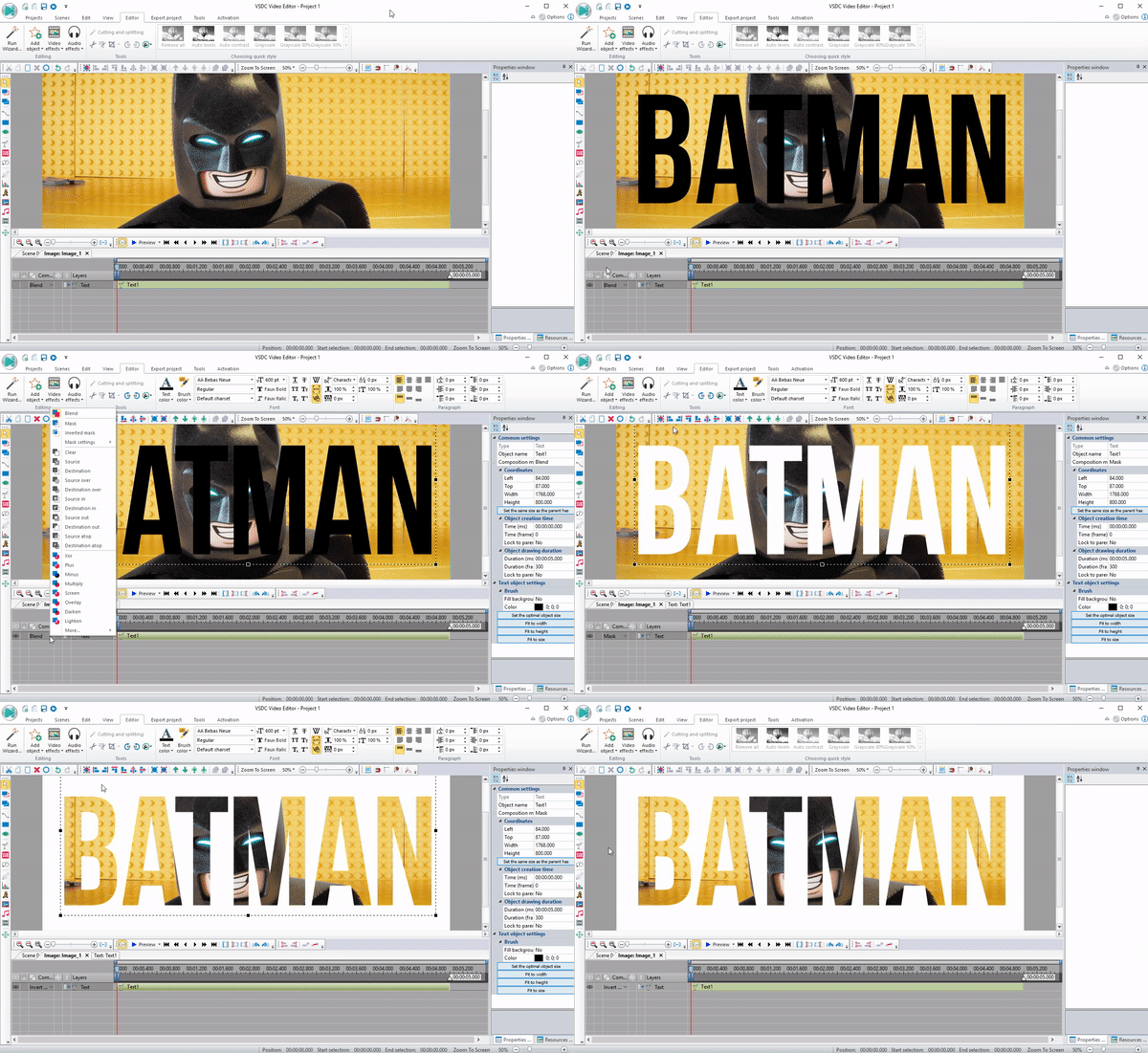
VSDC also stands out with its set of 30+ blending modes applicable for color correction as well as such awesome effects as "Video in text".

VSDC video in text effect

Yet the most distinguishing feature here is "Gradient". In combination with the above described tools it practically provides endless possibilities for a creative mind.

Key limitation of the free version: None.

Videopad: Masking

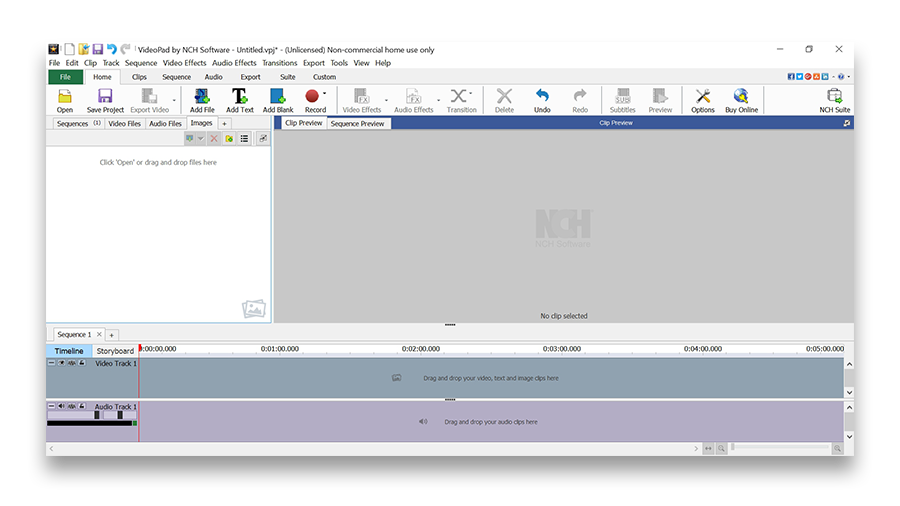
If it was an interface contest, Videopad would have probably won the prize. Its timeline is incredibly intuitive and thought out to the last detail. The overall look produces an impression of Sony Vegas' "younger brother" - as you can't but notice similarities between two programs. Hotkeys are nicely implemented, though one can easily manage using a mouse only.

Videopad interface

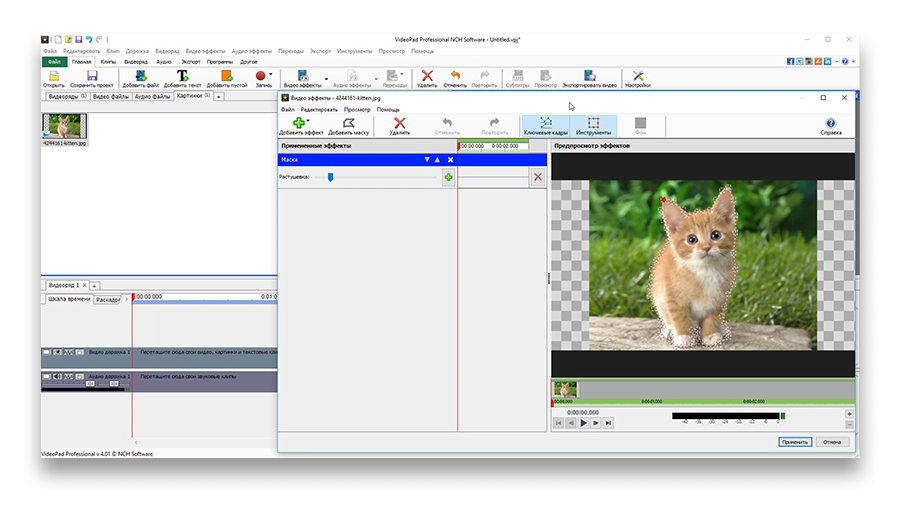
When it comes to features, Videopad is the best at masking. Applying a mask in most video editing tools can be a challenging process. In Videopad it is intuitively done in a couple of clicks, and by adding new red points you can change mask shape according to your needs. What's also remarkable, there is a separate effects window helping you focus on editing the object.

Videopad masking

Key limitation of the free version: only two video tracks available and only personal use allowed.

Shotcut: Chroma Key (Green Screen)

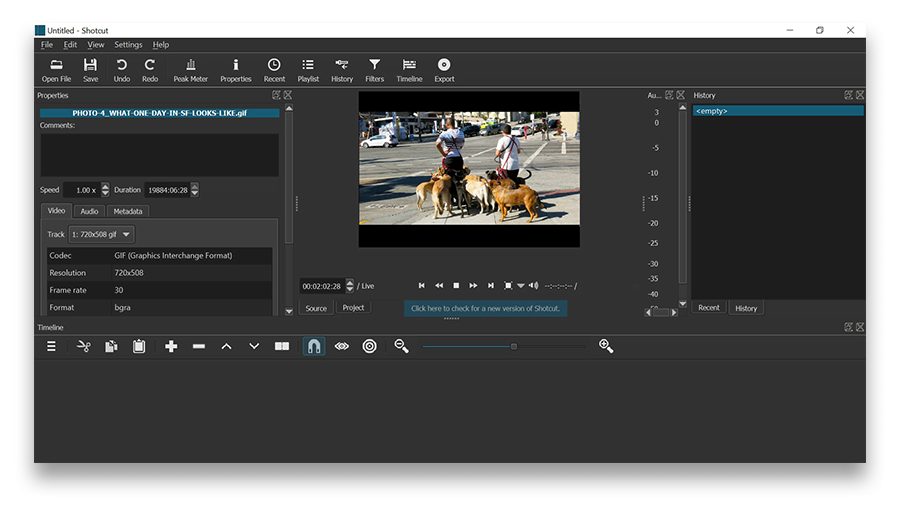
Shotcut interface will look familiar to those having experience with Adobe Premiere. The former might not be as intuitive as the latter, yet Shotcut is considered more stylish and versatile. Shotcut developers also did a great job by implementing a multi-level action history, so there is a way to go back and apply undo/redo commands at any moment.

Shotcut interface

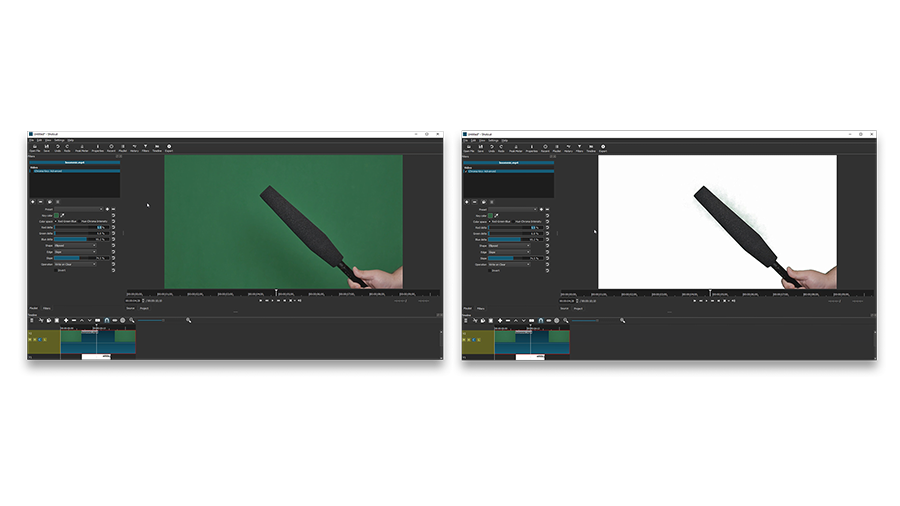
The biggest advantage of Shotcut, however, is a Chroma Key effect. The feature itself is nothing unique, but the performance makes the difference. First, Shotcut is capable of multicolor Chroma Key effect - that means you can remove background of any color, not just green or blue. Second, the number of clicks between adding a video clip to the timeline and the end result is lower than in alternative video editing programs.

Shotcut chroma key (before-after)

Key limitation of the free version: while there is no paid version available, the current one appears to be unstable and crashes on Windows at times.

Conclusion

Is it possible to completely replace professional video editing software with a free tool? Probably, not. At least one component of the "Interface-Stability-Functionality" combination is missing in each program reviewed above. However, if you are ready to make concessions, they will save you a good amount of money without compromising quality.

VSDC Free Video Editor is Now Optimized for 64-bit Windows OS

October 2, 2017

The new release focuses on the editor’s availability to wider groups of aspiring and professional video makers. Those who own 64-bit Windows machines will benefit from a specially designed version, Chinese-speaking users will get an access to the interface translated into Simplified Chinese and educational institutions are now welcome to apply for a branded editor with premium features on board.

64-bit

One of the prominent strengths VSDC has always boasted having is being able to run smoothly even on low-ends PCs, in other words the app is light enough even for small capacity machines. From now on the Free Video Editor can be also much more convenient and faster for owners of the 64-bit Windows systems making users forget about RAM limitations, providing opportunities to be more multi-tasking without any risks of slow-downs and ensuring hassle-free processing of large HD files. This version also allows for coding/decoding speed boost: in case with H265 codec, it will double the export speed and in case with other codecs the increase rate will reach 20%.

Full 64-bit support

Hello, world!

The VSDC interface has been already available in eight languages for a while and now it is time to expand to China. The first step is made - users will be able to find Simplified Chinese in the program settings. Along with that, technical documentation is regularly translated into the app languages– the first part of Help Manual is now available in French and German, and Japanese-speaking users can turn for help to text how-to in their native language.

China language supported

Back to school!

An academic year has just started. There're lots of creative assignments for students ahead and VSDC team would like to do its best to help learners around the world achieve their goals and cope with challenges:

  • a slideshow wizard can make any school/university project an easy and beautiful task;
  • non-linear editing will help to process several video files right on the scene;
  • quick filters, gradient and stabilization tools ensure the enhancement of the video image quality;
  • voice over will enable students to record required comments in sync with video;
  • college sports events can be highlighted with a timer, zoom and slow motion.

These are only a few of vast opportunities VSDC can offer schools, colleges and universities. The license terms of the Free version have always permitted an unlimited use of the editor by educational organizations. Those of them that require a specially branded version with all the features including premium are welcome to send their request to Bu e-Posta adresi istenmeyen posta engelleyicileri tarafından korunuyor. Görüntülemek için JavaScript etkinleştirilmelidir.

To download the new version of VSDC Free Video Editor, please, proceed to www.videosoftdev.com/free-video-editor
News

GoPro ve Diğer Aksiyon Kameraları için GPS Ölçüm Cihazları, Meta Veri Düzenleme, Genişletilmiş Kodekler ve Daha Akıllı İş Akışı

yayınlayan Amy Shao 19/11/25 Uzun zamandır beklenen VSDC 10.2 güncellemesiyle tanışın: hobicilerden profesyonellere kadar herkesi güçlendirmek için tasarlanmış inanılmaz özellikler ve önemli...

Büyük VSDC 10.1 Güncellemesi: Gelişmiş HDR, GPS Telemetrisi, Yeni Efektler, Farklı İhtiyaçlar İçin Çok Çeşitli Yeni Şablonlar ve Araçlar

published Amy Shao 6/10/25 Yeni ve sıradışı bir şey için bekleyiş nihayet sona erdi! Güncelleme burada ve bu sadece başka bir sürüm değil: Bu VSDC 10.1! VSDC 10.1 Güncellemesi: Gelişmiş...

VSDC Noel Güncellemesi 9.4: Geliştirilmiş Efekt Yönetimi, 100'den Fazla Arka Plan Şablonu ve Kolaylaştırılmış Düzenleme

Bu tatil sezonu, VSDC Video Editörü'nün en son güncellemesiyle yeni başlangıçları kucaklıyor! Geri bildirimlerinizi dinledik ve en sevdiğiniz araçları geliştirmeye odaklanmaya karar verdik—tüm...

VSDC Free, Filigran İçin Gizli Silahım Nasıl Oldu (2025'te Ücretsiz 4K Düzenleme)

Merhaba, ben Mattea Wharton, Seattle'dan bir seyahat videografçısıyım. Üç yıl boyunca videolarıma çirkin su kimlikleri (filigran) basan video editörlerle mücadele ettim, ta ki VSDC'yi bulana...

150+ Şablon, Metin Dönüştürücüsü, Sprite Otomatik Algılama ve GUI Güncellemesi

Değişim, gelişim demektir ve bu süreç sizlerin geri bildirimleri olmadan mümkün olamazdı. Geri bildirimlerinizi titizlikle değerlendirdik ve düzenleme deneyiminizi iyileştirmek için birkaç...

En İyi Özel Efekt Yazılımı

Giriş 2024 yılında görsel efekt oluşturma seçenekleri son derece çeşitli ve en iyi seçenekleri belirlemek giderek zorlaşıyor. Projelerinize orijinallik katmanıza yardımcı olacak en iyi...

VSDC 9.2: AI segmentasyon modelleri, 300'den fazla geçiş, VSDC Cloud ve yeni şablon koleksiyonu

VSDC 9.2 burada ve hassas nesne kaldırma, gelişmiş renk düzeltme ve videolarınızı geliştirmek için çeşitli efektler sağlayan yeni AI destekli segmentasyon aracı gibi çığır açan özellikler...

Siyah Beyaz Filmler Nasıl Renklendirildi?

Klasik siyah beyaz filmlerin hayranı mısınız? Renkli olsalardı nasıl görüneceklerini hiç merak ettiniz mi? Birçok film yapımcısı da aynı şeyi düşünmüş ve çok sayıda klasik filmin...

En İyi Çevrimiçi Video Düzenleyiciler 2024: Avantajlar ve Dezavantajlar

15 Temmuz 2024 Amy Shao tarafından yayınlandı Şu anda video içeriğinin popülaritesi artıyor ve birçok kullanıcı kişisel ve profesyonel amaçlar için video klipler oluşturma ihtiyacıyla...

New Transition Addition Methods, RAW/BRAW Files Support and Free Waveform

Moment gelmiştir: VSDC 9.1'ün merakla beklenen güncellemesini sunmaktan mutluluk duyuyoruz! Yeni sürümün geliştirilmiş işlevselliği, video montajını hızlandıracak ve düzenleme sürecini...
 

Screen Recorder Box

Bu program ile masaüstünüzün video videosunu çekebilir ve bilgisayarınıza çeşitli biçimlerde kaydedebilirsiniz. Bir video düzenleyiciyle eşleştirilmiş program, sunumlar ve demolar oluşturmak için idealdir.

Ekran Kaydedici hakkında daha bilgi edinin...


Video Capture Box

Program, dış aygıtlardan video yakalar ve ücretsiz bir biçimde bilgisayara kaydeder. Video tarayıcılardan, web kameralardan, yakalama kartlarından ve diğer araçlardan da video kaydedebilirsiniz.

Video Yakalama hakkında daha fazla bilgi edinin…


İnceleyen


"VSDC Ücretsiz Video Düzenleyici her ne kadar alışılmadık bir video düzenleyici olsa da şaşırtıcı derecede güçlü"

- PC Advisor


"Bu video düzenleyici size tonlarca kontrol ve düzenleme gücü veriyor"

- CNet


"Bu video düzenleyici tüm popüler video formatlarını destekler ve çok çeşitli özelliklere sahiptir. Aydınlatma seviyesini değiştirebilir, videoları birleştirebilir, filtreler ve geçişler uygulayabilirsiniz"

- Digital Trends