Video Editor

Download and use the free video software to create and edit videos of any complexity from a family greeting card to a company presentation. Apply vsdc free video editor for light edit hdr-video, any raw-video formats from cams - BRAW, ProRes RAW, any high resolution 4k or more due to video proxies technologies in the editor.
Cut, merge video files, apply visual and audio effects, use filtration and image correction, make slideshows and add an appropriate soundtrack. Use multi-color Chroma Key and advanced parameters settings to give your video a professional look.
All popular video and audio formats are supported.

Read more about Video Editor...

Video Converter

This program is intended for converting video files from one format to another. Nearly all popular video formats are supported (both reading and saving). In addition, the program drastically simplifies the task of converting videos for playback on specific multimedia devices, such as iPhone, Samsung Galaxy or Huawei P30 Pro. The program is extremely easy to use, has a modern interface and all necessary video processing functions.

Read more about Video Converter...

Audio Converter

The audio converter will help you convert audio files from one format to another. All key audio formats and codecs are supported. The program also allows you to manage playlists and meta tags, extract audio from video files and save these tracks on your computer in any format.

Read more about Audio Converter...

Audio CD Grabber

This audio tool is intended for grabbing audio tracks from compact discs and saving them to the user’s computer in any format. Nearly all popular audio formats and codecs are supported. The program can also extract track details from the FreeDB server for automatic file renaming and updating meta tags.

Read more about Audio CD Grabber...

Multifunctionality

Multifunctionality

A wide array of multimedia processing tools in one free video software suite.

High speed

High speed

Our programs use fast
and high-quality algorithms optimized for single and multi-core CPU’s.

Affordability

Affordability

VSDC video software is freely available for download to Windows OS-based PCs and laptops.

VSDC Free Video Editor 5.7.5 Easy Export to Social Networks and Vaster Blending Modes Range

February 21, 2017

Now VSDC allows for uploading files directly to YouTube as well as has special export profiles for Facebook, Twitter and Vimeo.

While uploading their videos to social networks, users often face difficulties in choosing the correct format and other needed parameters as each website can have various requirements for publishing video content. To make working with Facebook, YouTube and other popular social media much easier, new export profiles have been added to VSDC Free Video Editor.
Instagram effects

Export to YouTube

Proceeding to the Web section of the ‘Export project’ tab and clicking the YouTube icon, fans of this video sharing giant will be able to:

  • choose among Low, Standard and High quality profiles;
  • upload a video to YouTube directly without switching windows, logging in their account right in the program

Preparing video for Facebook

According to our technical support data, the most common problem when exporting a file occurs with finding suitable settings to meet Facebook guidelines. As a result of special testing, one recommended profile has been allocated to this social network.

Any more social network profiles?

Clicking the Social Net button of the Web section, users are also invited to benefit from two profiles for Twitter and 4 profiles for the Vimeo video sharing service.

More opportunities for image compositing operations

With new blending modes added, those, who are more tech-savvy and professional in image and video editing, will be able to carry out more compositing operations, i.e. mixing and overlaying colors and textures of different elements and styles.

  • Grain-merge and grain-extract – one of the most popular compositing modes useful for cartographic design

    Instagram effects

  • Dodge and burn - modify the lightness of the pictures. Dodging makes an image lighter, while burning darkens it (can be compared to burning a negative)


    Instagram effects

    Instagram effects

  • Divide – can be used to brighten images or remove color tints.

    Instagram effects


Product page: www.videosoftdev.com/free-video-editor
VSDC Video Editor Spring Release: Make your Videos Colorful, Stabilized and Faster to Process

April 19, 2017

The spring release of VSDC Free Video Editor is based on the three pillars: operation optimization, adding more adjustment, special and visual video effects and introducing new features, i.e. video stabilization and export for Instagram, much demanded by users.

Speed and optimization

  • The composition operations speed has been increased by almost 20 times and applying the Mask tool is now twice as fast.
  • It has also become possible to upload multiple videos to YouTube, if a project has been split in several files, for example.
  • The video speeding up feature can now make your videos faster up to 100х.

Smoke effects

More visual and special effects

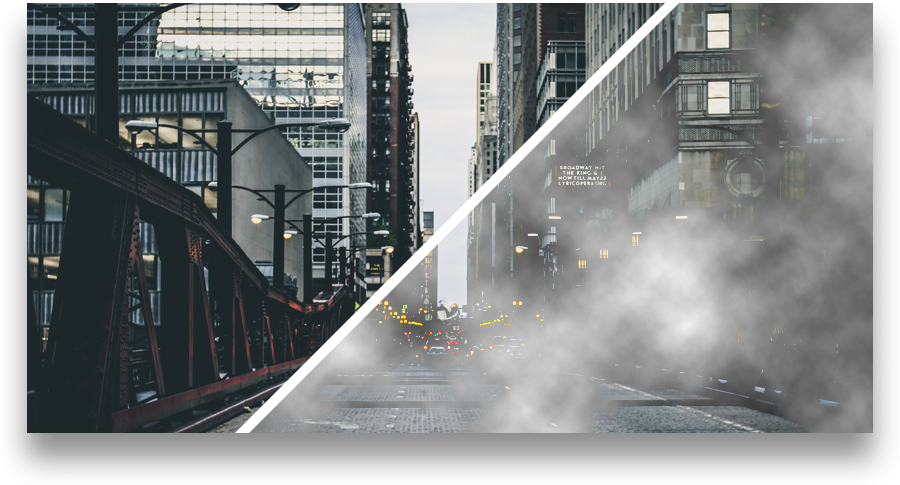
  • Smoke – a special effect that helps create VSDC Video Editor users a smoky look of various intensity levels.
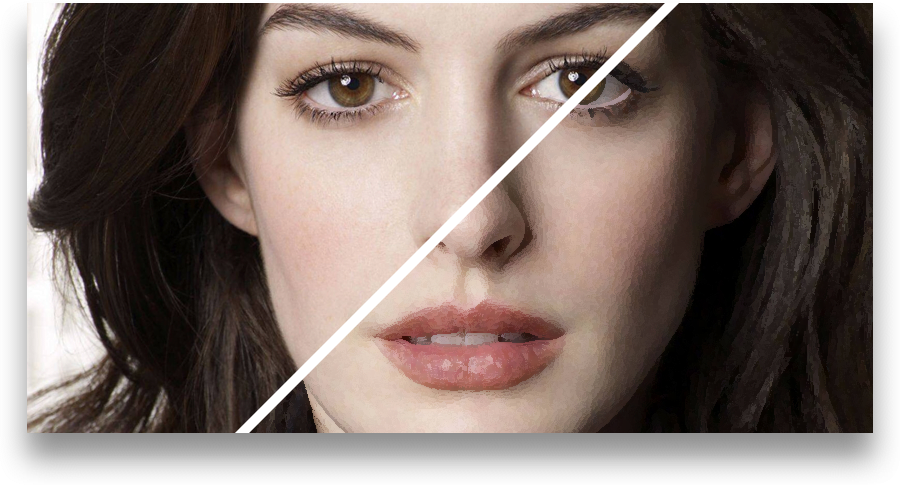
  • Oil Paint – this image filter will help to attach an oil painting masterpiece look similar to that of the popular Prisma app.
  • Color twist – an automatic color correction filter based on toning three basic colors.
  • Sepia and Black-and-white– effects aimed at turning users’ video into classic retro movies.
  • Equalize histogram– a quick way to increase an image contrast for professional photo and video makers.
  • Solarize and Parabolize – these two advanced effects make video image reverse in tone. Dark areas will appear lighter and vice versa.

Oli paint effects

New features at users’ demand

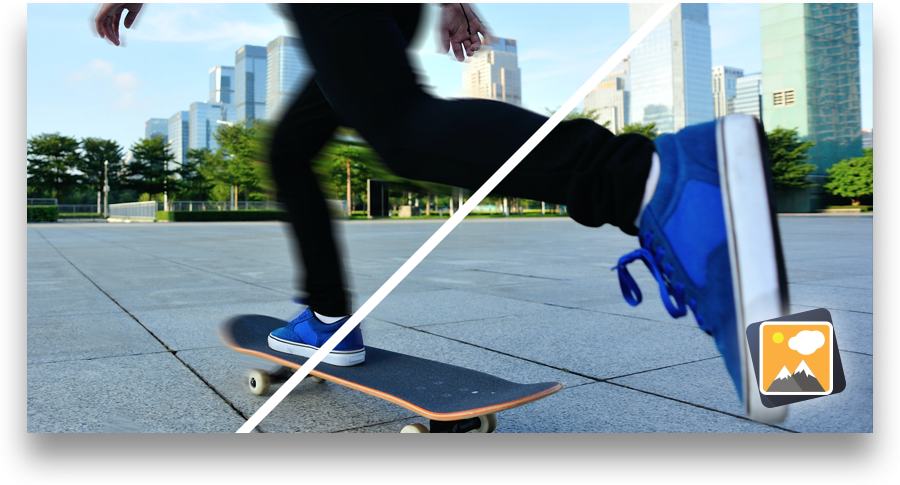
  • Video stabilization.When a video is shot without using any special equipment, or the footage is taken by a drone or a camera attached to a vehicle, there can often be an unwanted movement of the entire frame - jittering.

    Video stabilization effects

    The new video stabilization tool available in VSDC Free Video Editor will turn shaky or jittery footage into a more stable video automatically. According to a cutting edge technology used, the video frames are shifted so as to exclude undesired shaking effects, and any resulting gaps are filled using the information from previous frames.

  • Counter – adding this object to a project will help users insert a timer that can set any time period from days to seconds or even frames.
  • Easy export to Instagram – one more export profile to make users’ short movies more suitable for uploading to the popular network.
 

Product page: www.videosoftdev.com/free-video-editor
Summer Release: VSDC Video Editor Adds Voice Recording and Text Outline Features

July 12, 2021

Maybe for some projects summer is a low season, but not for VSDC: with a new version released users can record their voice and add it to the footage, make texts or titles outlined and benefit from optimized memory.

Voice over/Audio recorder

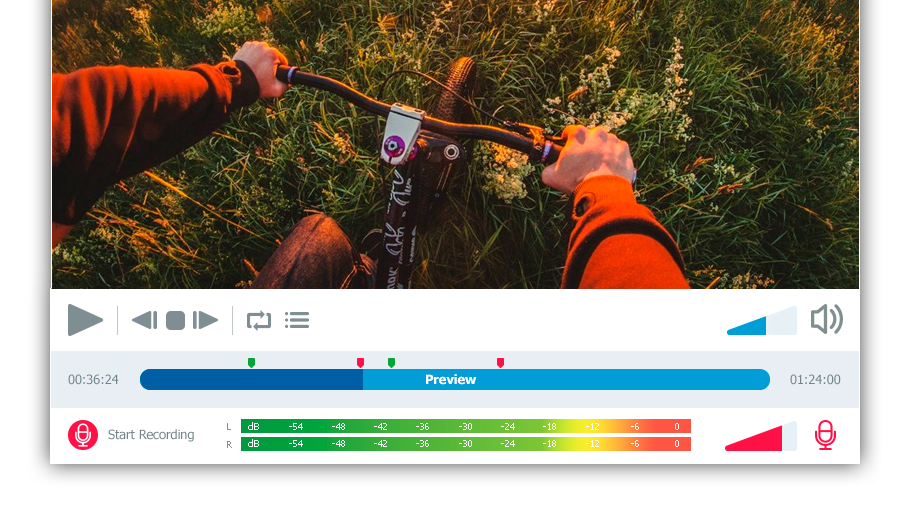
Free Video Editor’s users have always been able to add any soundtrack to the created video projects. The new embedded audio recording tool allows everyone to add voice commentary using the system’s microphone right to a VSDC project. The voice over feature works as a convenient player app where it is possible to record speech or any other sounds.

VSDC Pro users can take advantage of the voice over option synchronized with a video project. For more user friendliness and precision, the recording is carried out along with the video preview in one and the same window that allows for adding audio comments at required parts of the movie.

Meanwhile, the free version users are welcome to turn to the Voice Recorder available as a separate utility among the app’s tools.

This new feature comes in handy for filmmakers, educational institutions and video games fans that often apply audio comments for making tutorials and let’s plays.

Voice over

  • ‘Voice over’ to be found in ‘Editor’ tab >> ‘More tools’ button.
  • Free Voice Recorder to be found in ‘Tools’ tab >> ‘Voice recorder’.

Text processing enhancements

  • To meet multiple users’ demands, text outline features have been designed. Making just a couple of clicks, movie-makers can not only select a necessary text font, size and color, but also apply contouring to their taste and needs. The option, available immediately after adding a text object to the scene, provides a wide array of outline presets whose opacity can be flexibly adjusted.
  • Those using the Arabic, Aramaic, Azeri, Dhivehi/Maldivian, Hebrew, Kurdish (Sorani), Persian/Farsi and Urdu languages can now make use of the right to left writing option available in VSDC Free Video Editor.

Text contour

Memory optimization

From now on it’ll be easier for users with a limited PC memory capacity to manage their VSDC projects. The optimization enhancement carried out increases the app performance stability and prevents it from crashes while working even with large size video files.


To download the new version of VSDC Free Video Editor, please, proceed to http://www.videosoftdev.com/free-video-editor
Top 4 Best Free Video Editors for Windows

June 10, 2025

Once you outgrow Movie Maker, choosing the next video editing tool might be challenging. On the one hand, professional software - such as Sony Vegas - is a bit pricey for an average user. On the other hand, there are dozens of free programs and if you start testing them one by one, finding the right option will take you a while.

Here is a piece of advice: set priorities. What is it exactly you are looking for and why? What features are essential and which ones you're ready to sacrifice? You may not find all the strong sides of Sony Vegas in one freeware, yet a combination of tools can replace a suite worth hundreds of dollars.

In this post we've reviewed the most feature-rich free video editors for Windows and their key advantages.

Lightworks: Trimming and Color Correction

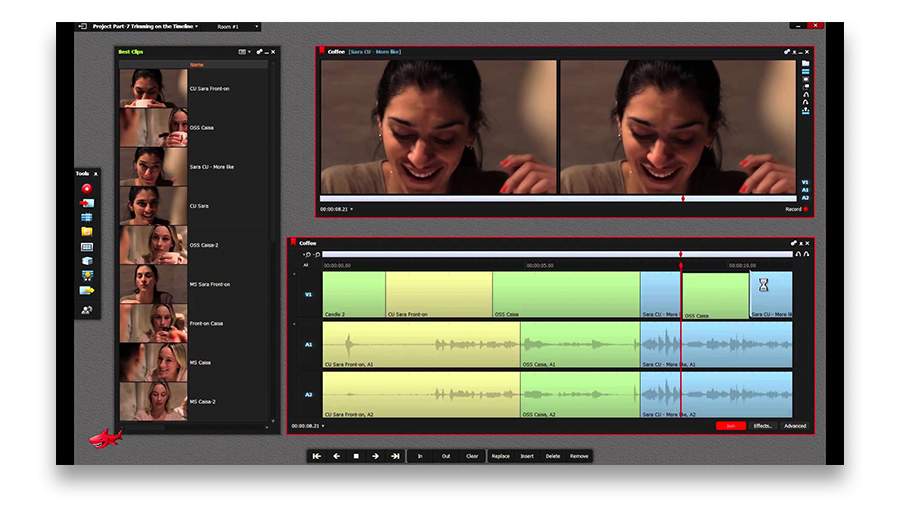
Among video editing tools, Lightworks is a legend. According to the developers, it is widely used in Hollywood due to a fast and intuitive trimming feature. Fairly speaking, this is the only intuitive part of Lightworks. In fact, its interface is so far from being logical, it was easy to get lost at almost every step while testing.

Lightworks trimming feature

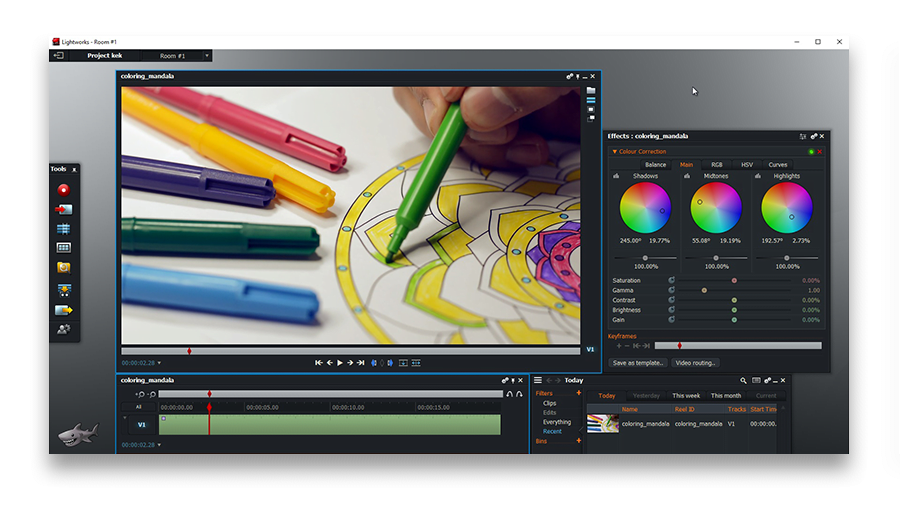
Where Lightworks is unbeatable though, is color correction. Hats off to the developers - that part is at the level of Adobe Premiere or Adobe Lightroom! You have full control of the picture and can literally set up every parameter - the HSV and RGB panels are quickly accessible.

Lightworks color correction

Key limitation of the free version: export is available to YouTube and Vimeo only (1080p), so you won't be able to save the project directly to your PC.

VSDC: Blending Modes and Gradient Tool

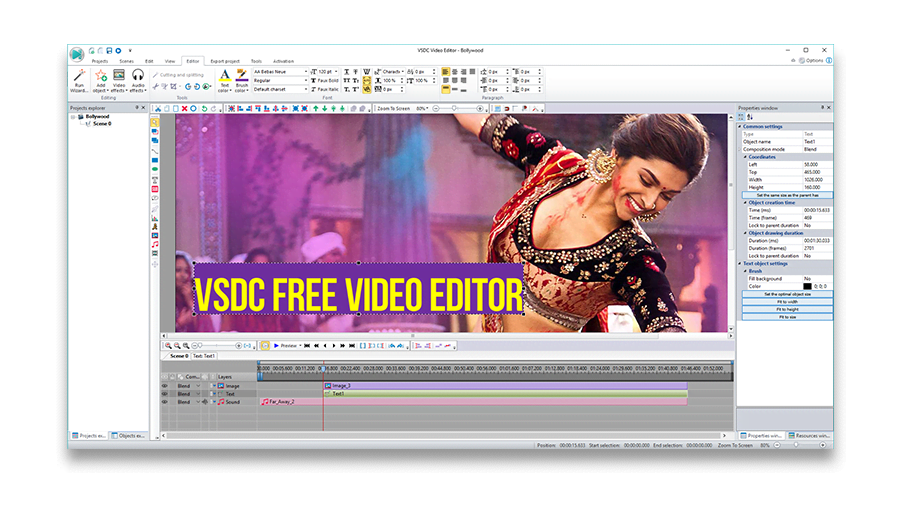
While on the subject of working with color, VSDC is worth checking out. Despite an old-school interface this software has a couple of unique features.

VSDC bollywood video editor

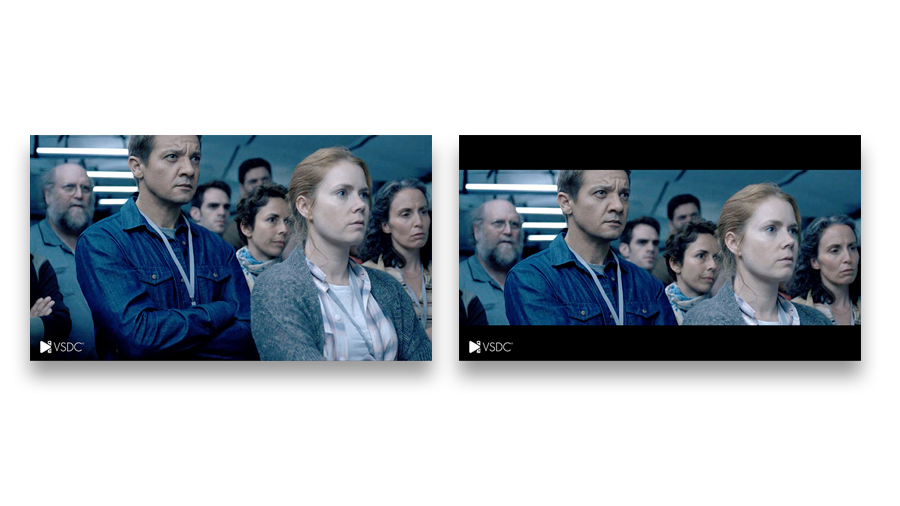
First, there is one unobvious advantage - VSDC performs a lot like a graphic editor. That means you can place graphic objects in the scene and modify them. There are many ways to make use of it, and a quick example is a cinema look: two black bars added on top and on the bottom of a scene. Most video editing programs suggest using masking for that purpose, which is more time and effort consuming.

VSDC cinema look effect (before-after)

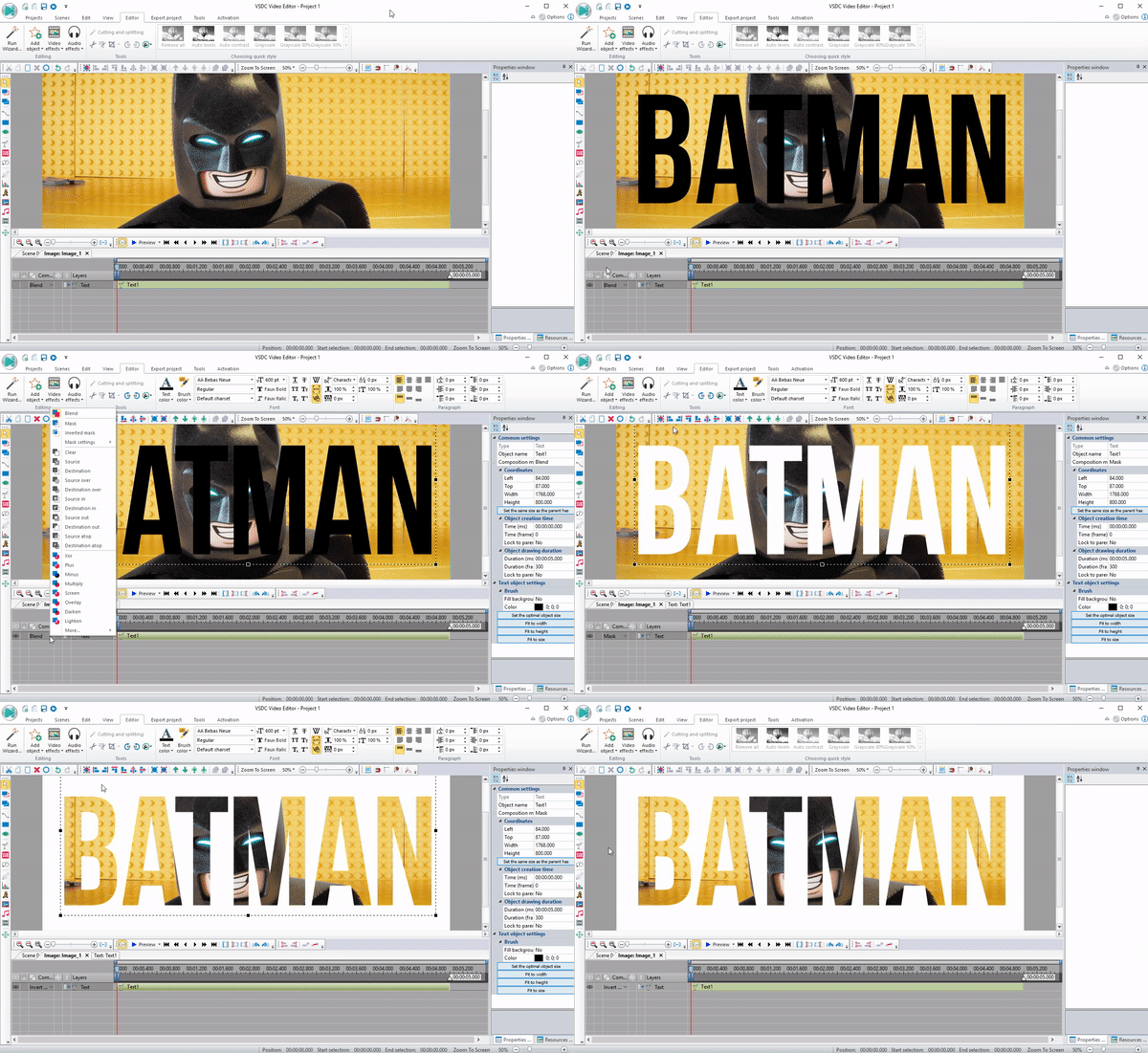
VSDC also stands out with its set of 30+ blending modes applicable for color correction as well as such awesome effects as "Video in text".

VSDC video in text effect

Yet the most distinguishing feature here is "Gradient". In combination with the above described tools it practically provides endless possibilities for a creative mind.

Key limitation of the free version: None.

Videopad: Masking

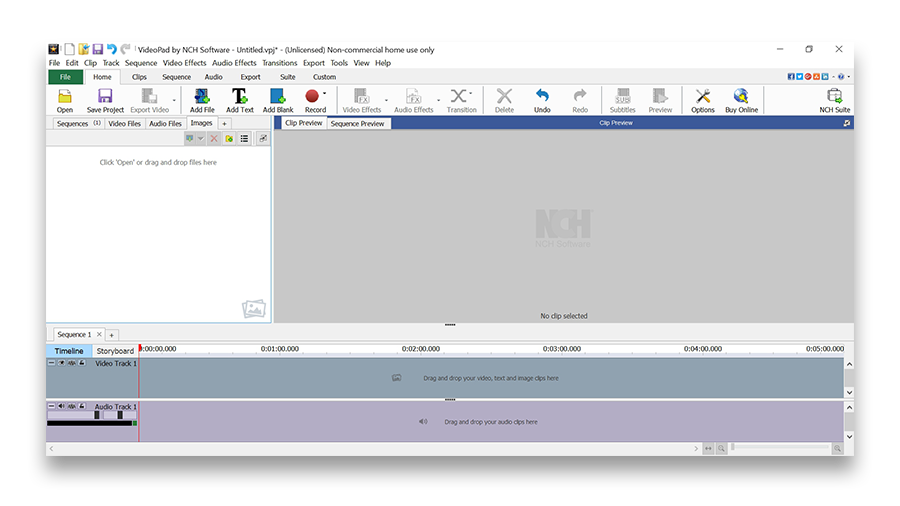
If it was an interface contest, Videopad would have probably won the prize. Its timeline is incredibly intuitive and thought out to the last detail. The overall look produces an impression of Sony Vegas' "younger brother" - as you can't but notice similarities between two programs. Hotkeys are nicely implemented, though one can easily manage using a mouse only.

Videopad interface

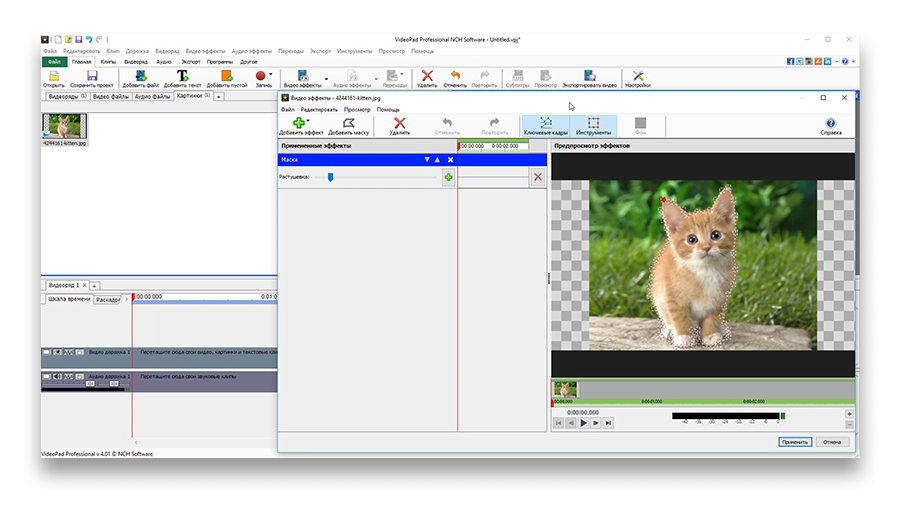
When it comes to features, Videopad is the best at masking. Applying a mask in most video editing tools can be a challenging process. In Videopad it is intuitively done in a couple of clicks, and by adding new red points you can change mask shape according to your needs. What's also remarkable, there is a separate effects window helping you focus on editing the object.

Videopad masking

Key limitation of the free version: only two video tracks available and only personal use allowed.

Shotcut: Chroma Key (Green Screen)

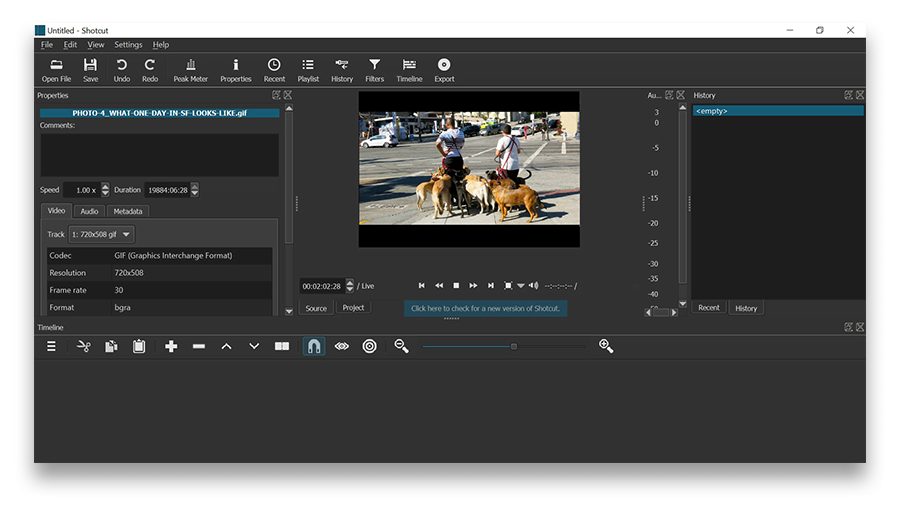
Shotcut interface will look familiar to those having experience with Adobe Premiere. The former might not be as intuitive as the latter, yet Shotcut is considered more stylish and versatile. Shotcut developers also did a great job by implementing a multi-level action history, so there is a way to go back and apply undo/redo commands at any moment.

Shotcut interface

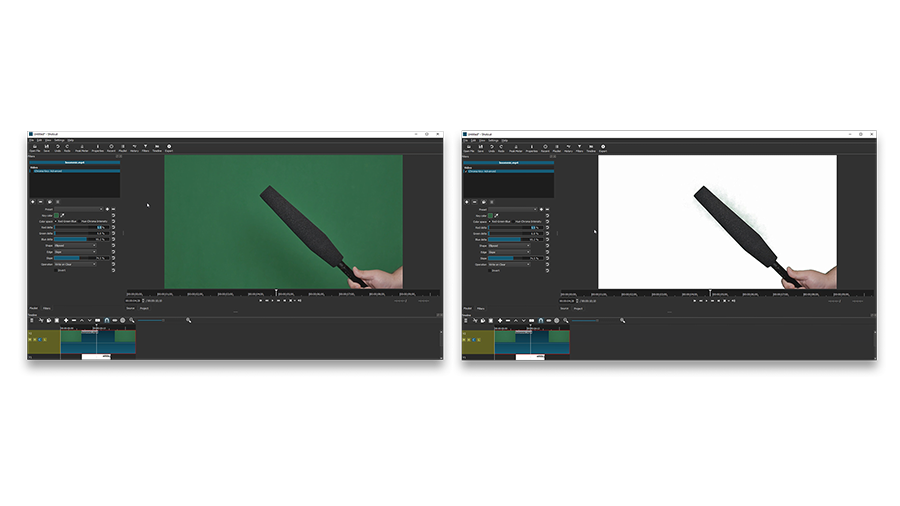
The biggest advantage of Shotcut, however, is a Chroma Key effect. The feature itself is nothing unique, but the performance makes the difference. First, Shotcut is capable of multicolor Chroma Key effect - that means you can remove background of any color, not just green or blue. Second, the number of clicks between adding a video clip to the timeline and the end result is lower than in alternative video editing programs.

Shotcut chroma key (before-after)

Key limitation of the free version: while there is no paid version available, the current one appears to be unstable and crashes on Windows at times.

Conclusion

Is it possible to completely replace professional video editing software with a free tool? Probably, not. At least one component of the "Interface-Stability-Functionality" combination is missing in each program reviewed above. However, if you are ready to make concessions, they will save you a good amount of money without compromising quality.

VSDC Free Video Editor is Now Optimized for 64-bit Windows OS

October 2, 2017

The new release focuses on the editor’s availability to wider groups of aspiring and professional video makers. Those who own 64-bit Windows machines will benefit from a specially designed version, Chinese-speaking users will get an access to the interface translated into Simplified Chinese and educational institutions are now welcome to apply for a branded editor with premium features on board.

64-bit

One of the prominent strengths VSDC has always boasted having is being able to run smoothly even on low-ends PCs, in other words the app is light enough even for small capacity machines. From now on the Free Video Editor can be also much more convenient and faster for owners of the 64-bit Windows systems making users forget about RAM limitations, providing opportunities to be more multi-tasking without any risks of slow-downs and ensuring hassle-free processing of large HD files. This version also allows for coding/decoding speed boost: in case with H265 codec, it will double the export speed and in case with other codecs the increase rate will reach 20%.

Full 64-bit support

Hello, world!

The VSDC interface has been already available in eight languages for a while and now it is time to expand to China. The first step is made - users will be able to find Simplified Chinese in the program settings. Along with that, technical documentation is regularly translated into the app languages– the first part of Help Manual is now available in French and German, and Japanese-speaking users can turn for help to text how-to in their native language.

China language supported

Back to school!

An academic year has just started. There're lots of creative assignments for students ahead and VSDC team would like to do its best to help learners around the world achieve their goals and cope with challenges:

  • a slideshow wizard can make any school/university project an easy and beautiful task;
  • non-linear editing will help to process several video files right on the scene;
  • quick filters, gradient and stabilization tools ensure the enhancement of the video image quality;
  • voice over will enable students to record required comments in sync with video;
  • college sports events can be highlighted with a timer, zoom and slow motion.

These are only a few of vast opportunities VSDC can offer schools, colleges and universities. The license terms of the Free version have always permitted an unlimited use of the editor by educational organizations. Those of them that require a specially branded version with all the features including premium are welcome to send their request to This email address is being protected from spambots. You need JavaScript enabled to view it.

To download the new version of VSDC Free Video Editor, please, proceed to www.videosoftdev.com/free-video-editor
News

VSDC 10.2: GPS Gauges for GoPro and Other Action Cameras, Selective Export, Metadata Editing, Extended Codecs and Smarter Workflow

published Amy Shao 11/19/25 Meet the long-awaited VSDC 10.2 update: a new version packed with incredible features and significant enhancements designed to empower all of you, from hobbyists to professionals. GPS...

Major VSDC 10.1 Update: Advanced HDR, GPS Telemetry, New Effects, Great Variety of New Templates and Tools For Different Needs

published Amy Shao 6/10/25 The wait for something new and unusual is finally over! The update is here and it isn’t just another version: it’s VSDC 10.1! VSDC 10.1 Update: Advanced HDR, GPS Telemetry,...

VSDC Christmas Update 9.4: Enhanced Effect Management, 100+ Background Templates and Streamlined Editing

This holiday season embraces new beginnings with the latest update of VSDC Video Editor! We’ve listened to your feedback and decided to focus on enhancing the tools you love most—all while laying the...

How VSDC Free Became My Secret Weapon for Watermark (Free 4K Editing in 2025)

Hi, I'm Mattea Wharton, a travel videographer from Seattle. For three years I battled with video editors that slapped ugly watermarks on my videos until I found VSDC. This free no-subscription editor completely...

VSDC 9.3: 150+ Templates, Text Transformer, Sprite Auto-Detect and GUI Update

Change is all about improvement, and this process wouldn't be possible without your input. After carefully reviewing your feedback, we’ve addressed several key issues and introduced updates designed...

Best Special Effects Software

Intro In 2024 the options range for creating visual effects is incredibly diverse and it becomes more and more challenging to identify the top choices. Here you can find a guide to the top visual FX...

VSDC 9.2: AI Segmentation Models, 300+ Transitions, VSDC Cloud and New Templates Pack

Are you ready to explore new heights with the latest major VSDC update? Finally, Version 9.2 is here! Packed with groundbreaking features, including the new AI-powered Segmentation tool, this update offers...

How Black and White Movies Were Colorized

Are you a fan of classic black and white films? Ever been curious about how they would appear if they were in color? Many filmmakers have pondered the same, leading to numerous classic movies being colorized....

The Best Online Video Editors in 2025: Benefits and Drawbacks

May 15, 2025 published by Amy Shao In today’s digital landscape, the popularity of video content is gaining momentum, with users increasingly turning to video creation both for personal advantage and...

New Transition Addition Methods, RAW/BRAW Files Support and Free Waveform

Welcome to the next level of video editing with VSDC's latest release, Version 9.1! Packed with an array of fresh features and enhancements, this update is designed to make your video editing experience...
 

Screen Recorder Box

This program allows you to capture the video of your desktop and save it on your PC in various formats. Coupled with a video editor, the program is a great tool for creating presentations, tutorials and demo videos.

Read more about Screen Recorder...


Video Capture Box

The program captures video from external devices and records it to computer in a free format. You can save video from video tuners, webcams, capture cards and other gadgets.

Read more about Video Capture...

VSDC Video Editor Reviews & Ratings (Trustpilot, Capterra & Media)

VSDC Free Video Editor is rated 4.5/5 by real users on Trustpilot and Capterra. Here are a few reviews and quotes from creators and tech media.

Overall rating:4.5/5based on200+ reviews on Trustpilotand89 reviews on Capterra.

★★★★★

VSDC Free Video Editor is the best free video editor for Windows I’ve used, from color grading to picture-in-picture and cinematic results.

— Ejikeme Eloka Augustine

Source:Trustpilot

★★★★☆

Easy-to-use interface and quick export to social media make VSDC a versatile video editing tool for everyday projects.

— Karen C., E-Learning

Source:Capterra

★★★★☆

A feature-packed non-linear video editor for Windows that can compete with many paid video editing solutions.

— TechRadar

Source:TechRadar review

★★★★★

The free VSDC editor saved my YouTube channel – a powerful video editing software for chroma key, text effects and picture-in-picture.

— Paul Roberts

Source:Trustpilot

★★★★★

Fast and simple for YouTube videos with green screen, zoom, color tools and creative effects in one app.

— Marie R., Media Production

Source:Capterra

★★★★★

One of the best free video editor options for Windows users, ideal for GoPro, YouTube and family videos.

— VidProMom, YouTube creator

Source:Media reviews

★★★★★

I’ve been using VSDC for years; editing is easy and the final videos look great for my personal and professional projects.

— Long-time VSDC user

Source:Trustpilot

★★★★★

Great value and faster than many other free tools; I quickly create videos for YouTube, Instagram and Facebook with features my audience loves.

— Rabika B., Marketing & Advertising

Source:Capterra

★★★★★

VSDC offers many features you don’t usually find in free editors, including picture-in-picture, stabilization and modern codec support with no watermarks.

— Tech media review

Source:Media reviews